 Trafficledger
Google Analytics 4 reports in Google Sheets, kept up to date
Build a GA4 report once, save it, and refresh it by hand or on a schedule. Comparisons, AND/OR filters and every row, in a sidebar that doesn't freeze. Already using Google's add-on? Your reports import in one click.
Email us to get Trafficledger14-day free trial, no card needed. Then $55/month. Works with Google Analytics 4 properties.
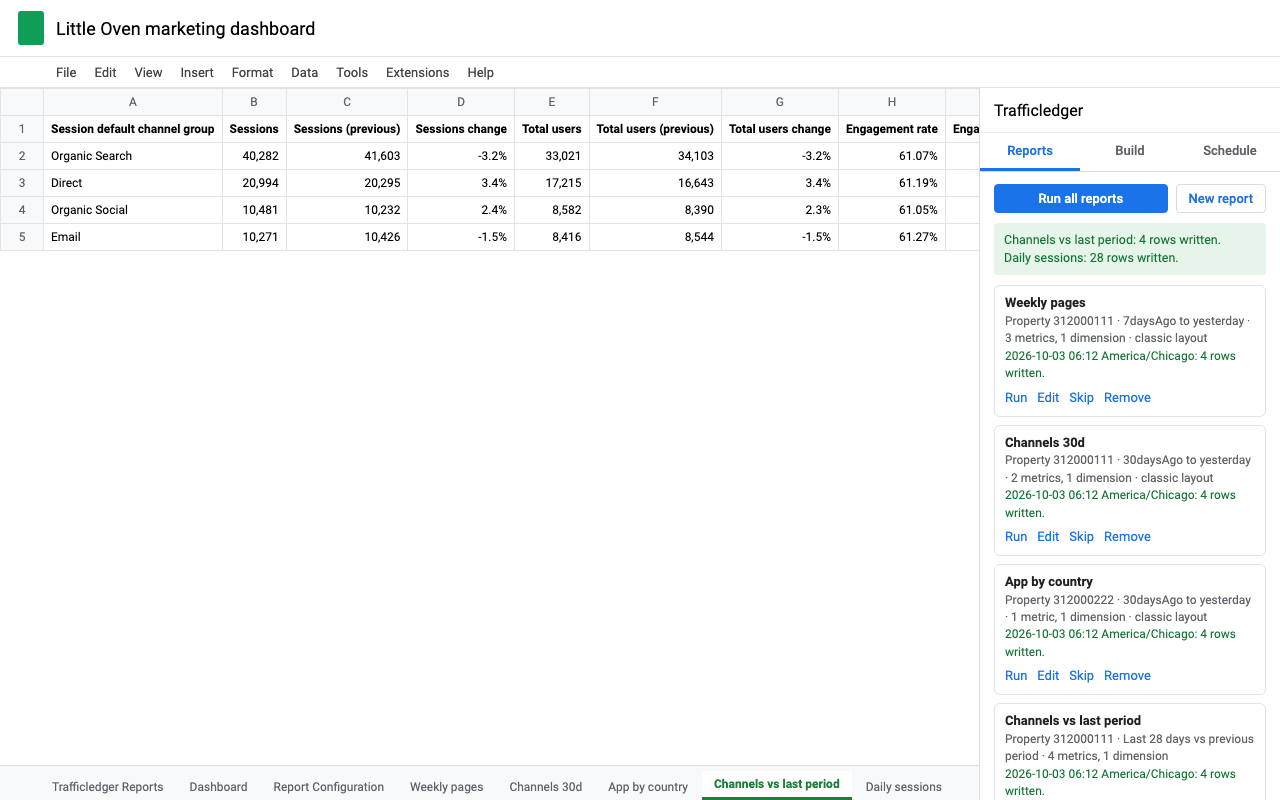
What it does
Any dimensions and metrics
Up to 9 dimensions and 10 metrics per report, custom ones included. Trafficledger asks Google as you pick and greys out fields that can't be combined.
Saved reports
Every report is a column in one configuration sheet. Edit, skip, run one or run all. You can also edit the sheet by hand.
Comparisons side by side
Previous period or the same dates last year. Each metric gets current, previous and change % next to each other.
Any date range
Last 7, 28 or 90 days, last month, last quarter, year to date, last N days, weeks or months, exact dates, or a formula.
Filters with AND and OR
Contains, begins with, regex, not, greater than. Click them together, or type country==Germany,country==France;sessions>10.
Every row
No row limit unless you set one: Trafficledger pages through Google's results past 100,000 rows and says how many it found.
Scheduled refresh
Hourly, daily, weekly or monthly at your hour. If a property's GA4 allowance runs low, it waits and finishes the next hour instead of failing.
Realtime
Active users in the last 30 minutes by country, device or screen, refreshed every minute while the sidebar is open.
Plain explanations
Sampling, privacy thresholds, "(other)" rows and quota limits are spelled out on the tab and in the sidebar, with what to change.
Switching from Google's GA4 Reports Builder
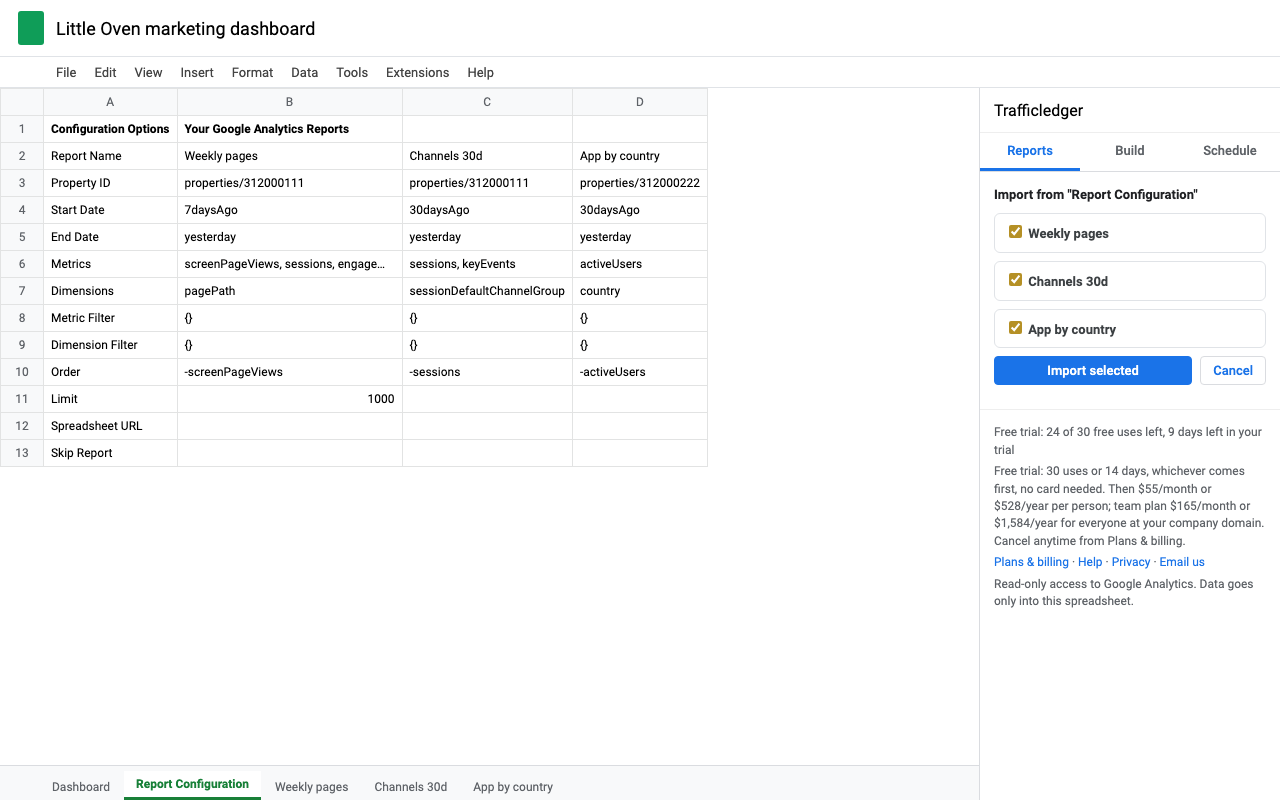
Open Trafficledger in the spreadsheet that has your Report Configuration sheet. It shows a banner with the number of reports it found; click Import. Each report keeps its tab name and writes to the same cells as before (results from row 16, totals in row 12), so the formulas and charts that read from those tabs keep working. Google's sheet is left as it was.
Reports from the old Universal Analytics add-on import too. Field names are converted where GA4 has a real equivalent (ga:users to totalUsers, ga:pageviews to screenPageViews), and Trafficledger lists the fields that have none so you can pick replacements.
Pricing
Per person. Every feature, every row, any number of reports and properties.
Per person. Same as monthly, billed once a year.
Team plan for everyone with an email at your company's domain. Or $1,584/year.
Free trial: 30 uses or 14 days, whichever comes first, with every feature. A use is one run you start (a report or Run all) or one day of scheduled refreshes. Building, checking and importing reports is free. No card needed.
Renewal and cancelling: subscriptions renew automatically each month or year until you cancel. Cancel any time in one step from Plans & billing in the add-on ("Manage billing"); you keep access until the end of the period you paid for. We never charge without a subscription you started, and every charge gets an email receipt. UK customers can cancel within 14 days of buying for a full refund. Prices are in US dollars; checkout is Stripe.
Questions
- Does Trafficledger change anything in my Google Analytics account?
- No. It asks for read-only Analytics access. It can list your properties and read reports; it can't edit settings, users or data.
- Where does my data go?
- From Google straight into your spreadsheet, inside Google's Apps Script. It is never stored on our servers. Our licensing server only sees your Google account email. Trafficledger only works in the spreadsheet you have open and never asks to see your Google Drive.
- Why does Google say my report is sampled or thresholded?
- Google Analytics samples some large reports and withholds rows with very small numbers when demographics or Google signals are involved. Trafficledger writes Google's note on the tab. A shorter date range reduces sampling; removing age, gender or interest dimensions usually removes thresholding.
- What happens when a property hits Google's quota?
- Google gives each standard GA4 property 40,000 reporting tokens an hour and 200,000 a day, shared by every tool that reports on it. Trafficledger shows how many are left after each run. If a scheduled run finds the hourly allowance nearly used up, it waits and finishes the next hour.
- Can different reports use different properties?
- Yes, each report has its own property, so one spreadsheet can report on many sites or apps.
- Who do I talk to?
- A person, at hello@greatwork.company, within one business day.