Voice notes in Google Docs, Slides and Forms
Talk instead of typing. Remarkwell records feedback in a sidebar, saves the clip to your own Google Drive, and puts a play link right where you were working. Students and coworkers click it and hear you, with nothing to install.
Email us to get Remarkwell See pricing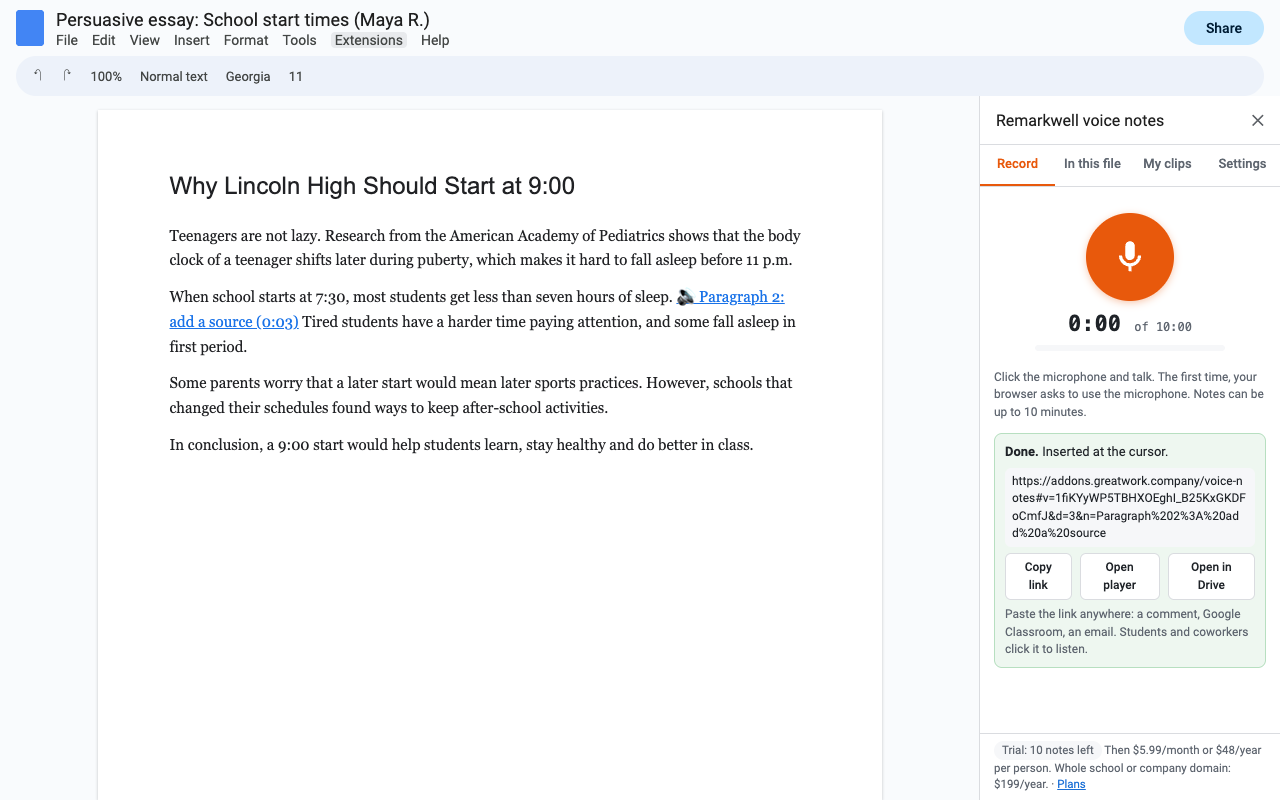
What it does
Click the microphone, talk, listen back, add a label. Up to 10 minutes per note, with pause and resume.
Every clip is a normal audio file in "Voice notes (Remarkwell)" in your own Google Drive, one folder per document. Nothing sits on our servers.
The link opens a small player with Google Drive's own audio player. Listeners use their own Google access, and nobody needs an account with us.
"Voice notes in this file" lists every note and plays it right in the sidebar, so a student with their own copy never leaves the essay.
A linked label at the cursor in Docs, a play button on the slide in Slides, and a listen link in a question, the form description or the confirmation message in Forms.
Save the feedback you give every class ("cite your sources", "great topic sentence") and insert it again in any file. Re-inserting never uses a trial note.
Your school or company, anyone with the link, only the people the document is shared with, or only you. Update a note's sharing later in one click.
About 0.4 MB a minute (AAC or Opus), or WAV if you need the most compatible format. Plays on Chromebooks, phones and Macs.
How it works
- Install Remarkwell, open a Doc, deck or form, and choose Extensions, Remarkwell, Record a voice note.
- Put the cursor where the note belongs, click the microphone and talk.
- Click Save and insert. The clip goes into your Drive with the sharing you picked, and a link like 🔊 Paragraph 2 feedback (0:42) appears at the cursor.
- Your reader clicks the link and the note plays. Or they open "Voice notes in this file" and play it without leaving the document.
Pricing
One Google account. Unlimited notes, up to 10 minutes each.
One Google account. Same as monthly, billed once a year.
Everyone at one school or company domain (for example everyone @yourschool.org). Bought by one person, covers every teacher.
Free trial: 15 voice notes or 14 days, whichever comes first. No card needed. The trial counts new recordings only. Listening is always free for the people you share with, and re-inserting a saved clip never counts.
After the trial the add-on asks you to pick a plan before the next recording. It never charges you on its own: you only pay if you choose a plan in Stripe Checkout.
Renewal: monthly plans renew every month and annual plans every year, at the price shown at checkout, until you cancel. Cancel in one step from Plans and billing, then Manage billing. You keep access until the end of the period you paid for, and your notes stay in your Drive and keep playing.
UK and EU customers: you have 14 days from a first purchase to cancel for a full refund. Email hello@greatwork.company and we refund it, no questions.
Privacy
| What | Where it goes |
|---|---|
| Your recordings | Only your Google Drive. They travel from your browser to Google, never to Great Work. |
| Drive access | Google's drive.file permission: the add-on can see only the files and folders it created for you, not the rest of your Drive. |
| Documents | Only the Doc, deck or form you open the add-on in, to add or list note links. |
| Great Work's server | Your Google account email and how many notes you've recorded, to run the trial and your plan. Nothing else. |
| This player page | Reads the note's id from the part of the link after #, which browsers never send to a server. It shows Google Drive's player; we don't log who listens. |
Full policy: addons.greatwork.company/voice-notes/privacy. Terms: addons.greatwork.company/terms.
Questions
Email hello@greatwork.company. A person answers within one business day.