 Viewkeep
See how your channel grows, day by day, in Google Sheets.
Viewkeep puts channel and video stats from YouTube into your spreadsheet and takes a snapshot every day, so you build the subscriber and view history that public numbers don't show. Works with YouTube.
Email us to get Viewkeep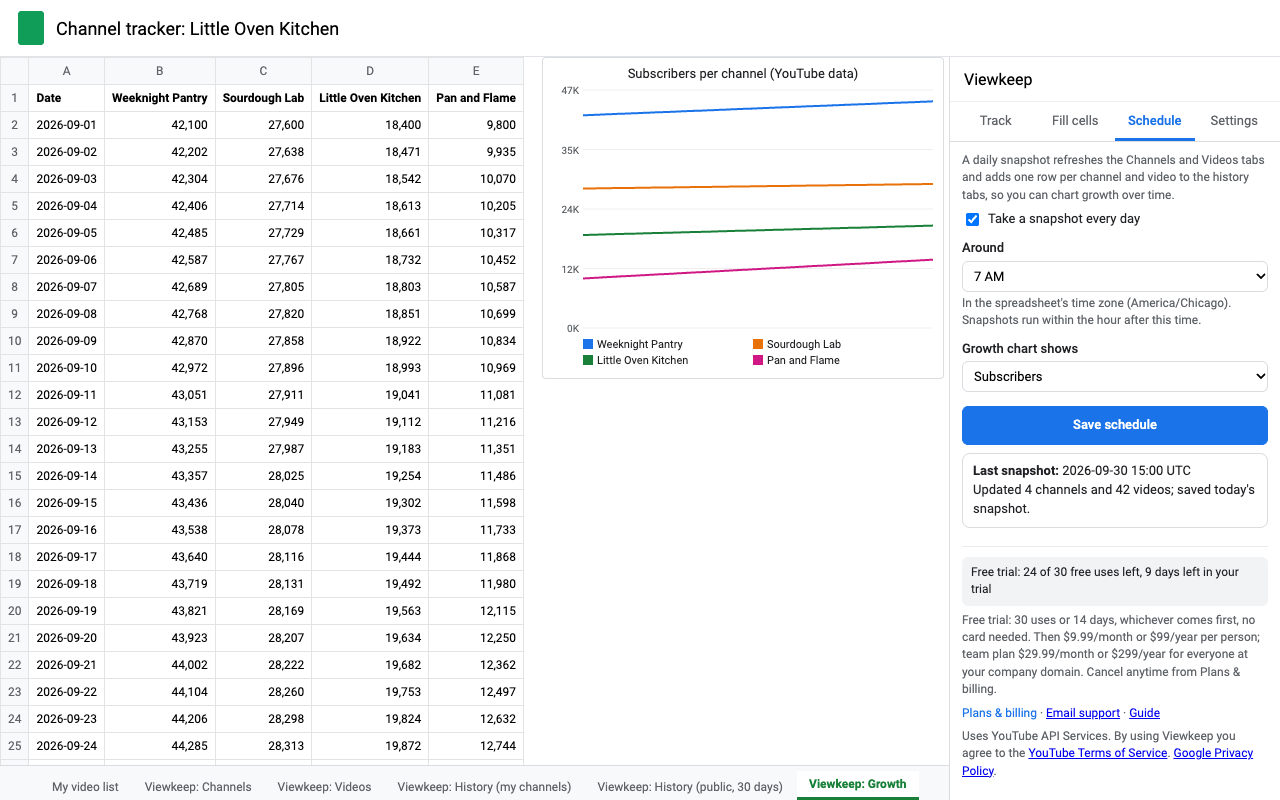
What it does
Daily snapshots
Pick an hour. Every day Viewkeep refreshes your tabs and adds one row per channel and video to a history tab: subscribers, views, videos, likes, comments.
Growth chart
A Growth tab charts subscribers or views per channel over time, redrawn after every snapshot.
Your channel, kept
One click finds the channel you own. Its history stays in your sheet for as long as you use Viewkeep.
Competitors too
Paste any public channel, video, Short or playlist by link, @handle or ID. Choose totals only or their latest 10 to 5,000 videos.
Fill a column you already have
Select your column of video links or @handles and get the stats you pick right next to it, row for row, refreshed daily if you like.
Exact numbers, explained
Every number is exactly what YouTube reports, with the time it was fetched. Hidden counts stay blank, never a fake zero.
Light on quota
50 videos per request and no expensive search calls. A daily allowance shows in the sidebar, or bring your own API key for very large lists.
Your data stays yours
Read-only access. Stats go from YouTube into your spreadsheet and never through our servers. One button deletes everything Viewkeep stored.
How history works
YouTube's API rules decide how long history may be kept, and Viewkeep follows them for you:
- Channels you own (found through "Add my YouTube channel"): history is kept for as long as you use Viewkeep. Every snapshot confirms you still own the channel, and at least every 30 days Viewkeep checks that saved videos still exist and removes rows for deleted ones.
- Channels you don't own: the latest 30 days of history are kept; older rows are removed automatically. The current numbers are always refreshed.
- History rows hold IDs and numbers. Names are looked up live from the current tabs, so a renamed video shows its new title everywhere.
Pricing
- Free trial: 30 uses or 14 days, whichever comes first. A use is one refresh (yours, or one day's scheduled snapshot) or one "Fill stats" run. Adding channels is free. When the trial ends, nothing is charged; Viewkeep asks you to pick a plan.
- Daily allowance: each person can make 2,000 YouTube requests a day on a paid plan (300 on the trial). A snapshot of 20 channels with their latest 50 videos uses about 40. With your own API key there's no allowance.
- Renewal: plans renew automatically every month or year at the price shown until you cancel. Cancel any time in one step from Extensions > Viewkeep > Plans & billing > Manage billing. You keep access until the end of the period you paid for. Every charge comes with an emailed receipt.
- UK customers: you can cancel within 14 days of buying and get a full refund.
- Prices are in US dollars and exclude any sales tax or VAT. Payment is by card through Stripe.
Questions
- Why does a channel's view total differ from the sum of its videos?
- YouTube updates channel totals on its own schedule, and they include videos that are private or deleted. Viewkeep shows both numbers exactly as YouTube reports them, with the fetch time, rather than changing either.
- Why is a subscriber count rounded?
- YouTube rounds public subscriber counts. If an owner hides the count, the cell stays blank.
- Do I need an API key?
- No. Viewkeep uses your Google sign-in. A key is only an option for people who track thousands of videos and want their own quota.
- What happens when I stop paying?
- Daily snapshots pause and the Schedule tab says why. Everything already in your spreadsheet stays there. While the daily schedule is on, rows for channels you don't own still age out after 30 days, as YouTube's rules require.
- Which permissions does it ask for?
- Read-only YouTube access, access to the open spreadsheet, permission to run the daily snapshot on a schedule, and your email for billing. Details in the privacy policy.
- Who answers support?
- A person, within one business day: hello@greatwork.company.