LaTeX equations in Word and PowerPoint, editable for good
Texwell LaTeX Equations is an add-in for Word and PowerPoint on the web, Windows and Mac. Type LaTeX with a live preview, insert real Word equations, number them, reference them, and click any equation later to change it.
Get started
- Install Texwell LaTeX Equations from Microsoft AppSource (in Word or PowerPoint: Home, Add-ins, search "Texwell").
- Go to Insert and click LaTeX Equation. The Texwell pane opens on the right.
- Type LaTeX, for example
x = \frac{-b \pm \sqrt{b^2-4ac}}{2a}, and press Insert (or Ctrl+Enter, Cmd+Enter on a Mac). - Sign in with your Microsoft account to start the trial: 25 equations or 14 days, no card needed.
What it does
Native Word equations
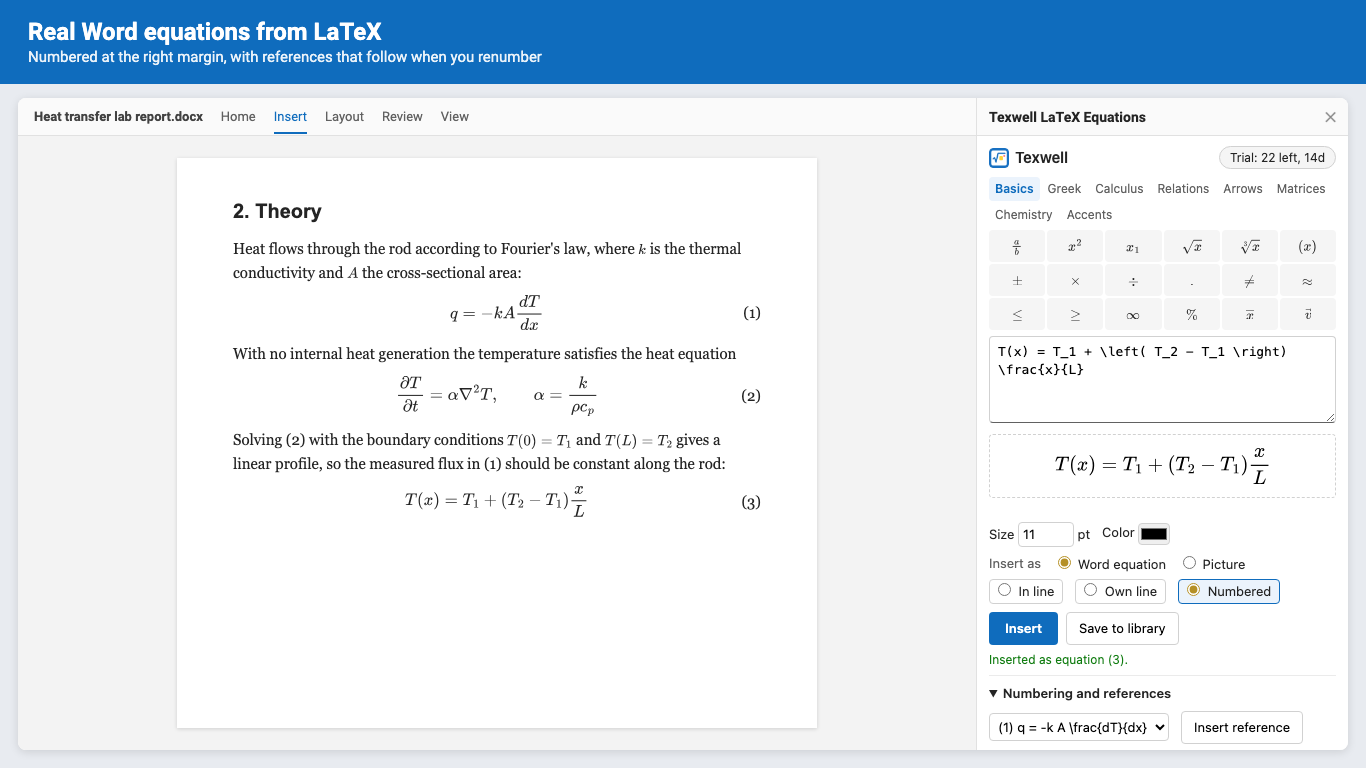
Inserted as real Word equations: on the text line, sharp in print and PDF, and still editable with Word's own equation tools. Or insert a picture if you prefer.
Numbering and references
In line, on its own line, or numbered at the right margin. Insert a reference to any numbered equation; Renumber keeps numbers and references in step.
Click to edit
Click an equation Texwell inserted and its LaTeX comes back into the pane. Update it in place; it keeps its number, size and position.
Chemistry
\ce{2H2 + O2 -> 2H2O}, charges, states, equilibrium arrows and isotopes, the way chemists write them.
PowerPoint
Sharp vector equations on your slides, stacked under each other. Resize them; editing keeps your size.
Convert pasted LaTeX
Turns every $...$, $$...$$, \(...\) and \[...\] pasted from ChatGPT, Copilot or Overleaf into Word equations. Prices like $5 stay text.
Pricing
Everything, in Word and PowerPoint, on every computer you sign in on.
Same thing, month to month. Cancel any time in Manage billing.
A Microsoft 365 work or school account can buy seats for colleagues in its organization, or buy a license key with several seats.
Trial: 25 equations or 14 days, whichever comes first. No card needed. 1 equation inserted = 1 trial use; previews, edits, references and renumbering don't count. After the trial, inserting new equations needs a plan; equations already in your documents stay as they are. Prices in US dollars; billing by Great Work LLC through Stripe. First purchases can be refunded within 14 days.
Questions
Which versions of Office does it work with?
Word and PowerPoint on the web (Edge, Chrome, Firefox, Safari), Word and PowerPoint 2016 or later on Windows and Mac, and Microsoft 365. Not on iPad, iPhone or Android.
Do I need a Microsoft 365 subscription?
No. Texwell works with Office 2016, 2019, 2021 and 2024 too, including versions that can't take LaTeX input on their own.
Can I sign in without a Microsoft account?
Yes: buy a license key at addons.greatwork.company/buy/latex-equations and paste it into the pane. A key works on 3 computers per seat.
Where is my LaTeX stored?
In the document itself: with each Word equation (document settings), in a picture's alt text, or in a PowerPoint shape's tags. Your library and recent list stay in your browser on your computer. Nothing is uploaded.
I copied an equation into another document and can't edit it in Texwell.
Word equations carry their LaTeX in the document they were made in. In the new document, edit it with Word's equation tools, or insert it as a Picture (pictures carry their LaTeX everywhere).
How do I cancel or manage billing?
In the Texwell pane, open the account section and click Manage billing. Bought a license key? Use addons.greatwork.company/billing.
Support
Email hello@greatwork.company. A person replies within one business day. Full help: Texwell help.