A readability checker that works inside Google Docs
Crispwell gives your Doc a reading grade against the target you set, highlights the sentences and words that make it hard, and fixes the safe ones in one click. Then it checks your SEO before you publish. No AI, and your writing never leaves Google.
Email us to get Crispwell See pricing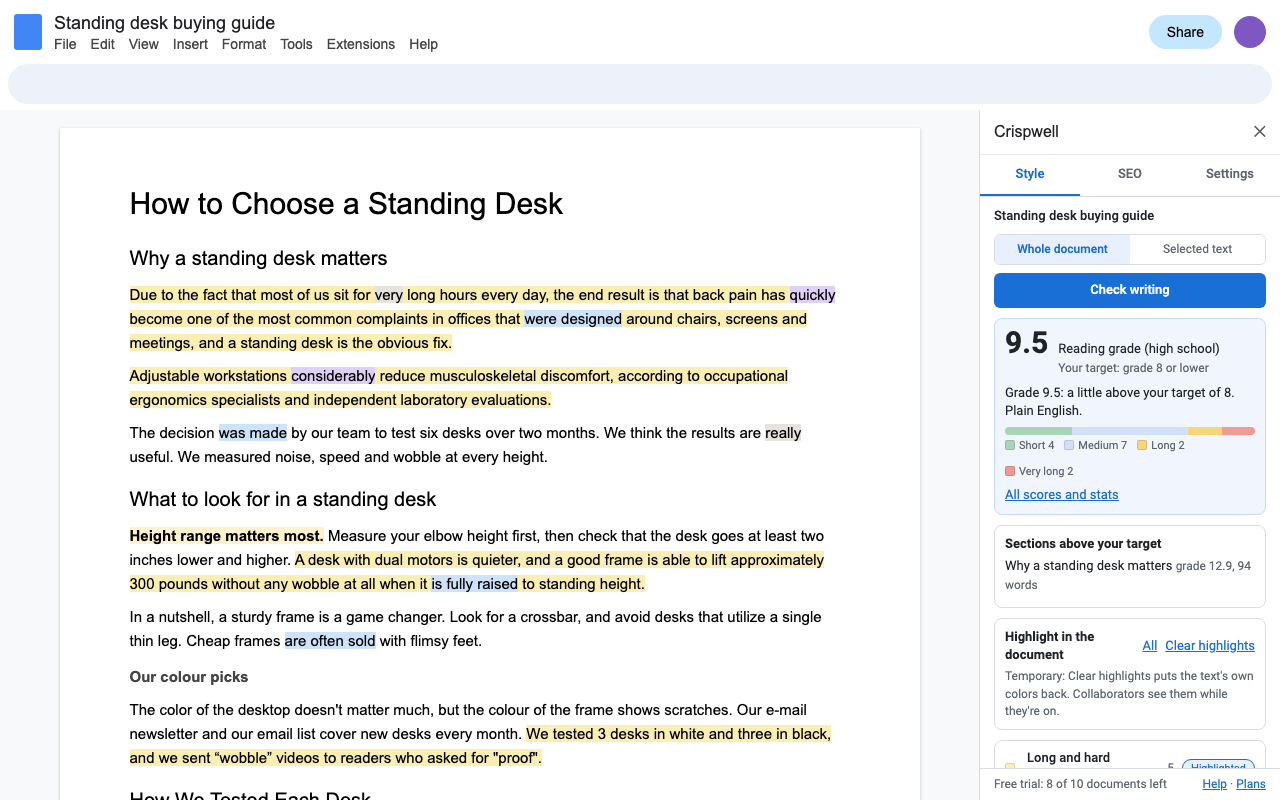
Readability you can aim at
One reading grade, the average of five standard formulas (Flesch-Kincaid grade, Gunning fog, SMOG, Coleman-Liau and the Automated Readability Index), plus Flesch reading ease. Pick an audience and Crispwell sets the target: grade 8 for the general public and the web, 10 for business, 13 for academic writing, 5 for young readers, or your own. Check the whole document, one selection, or see which sections read above target.
What it highlights
Long and hard sentences
Over your length limit, or far above your target grade because of long words.
Passive voice
"The report was written by Sam." Put the doer first, unless the doer doesn't matter.
Adverbs and filler
Quickly, very, really, just, kind of, I think: words that hedge or add nothing. Add your own.
Wordy phrases and redundancies
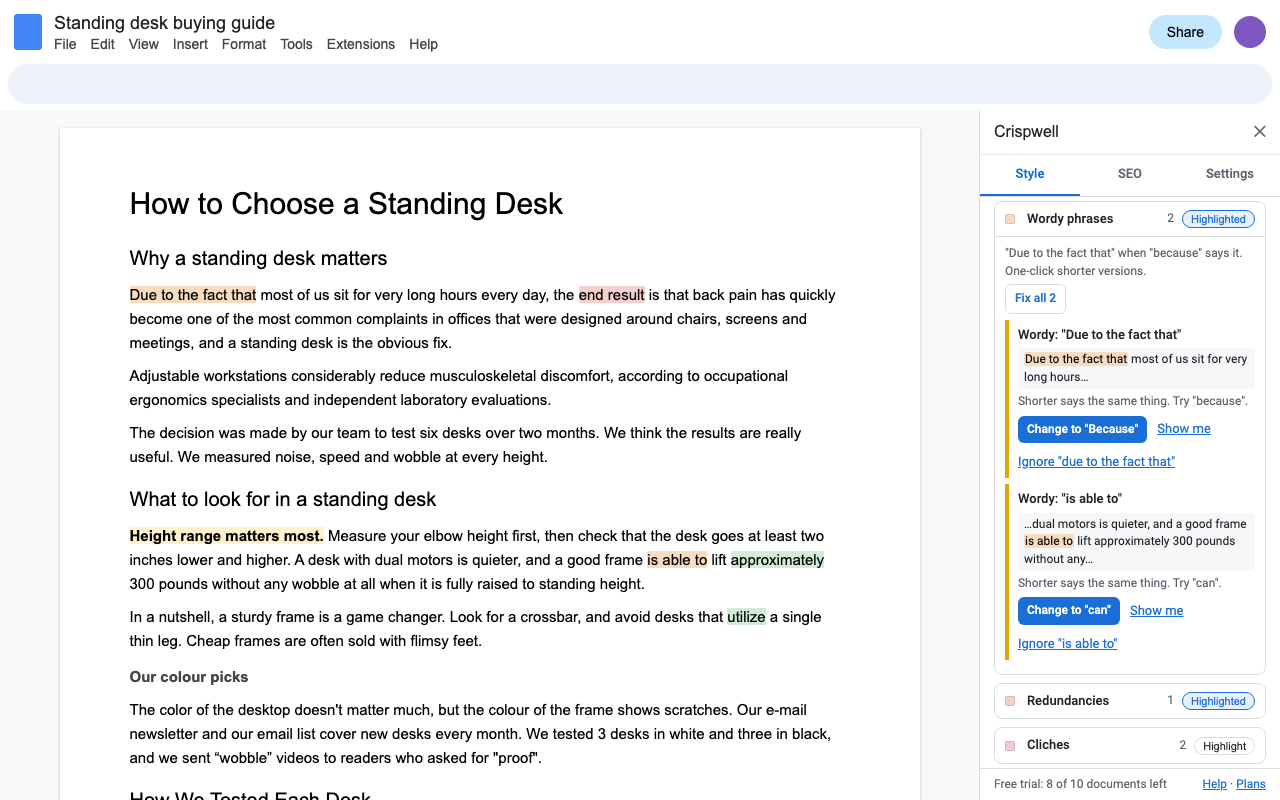
"Due to the fact that" becomes "because", "end result" becomes "result", in one click.
Cliches and complex words
"In a nutshell", "game changer"; utilize, approximately, facilitate, with the plain word to use instead.
Repeats
Doubled words, the same word twice in a few words, three sentences in a row that start the same way, overused phrases, sticky sentences.
Consistency
Color and colour, e-mail and email, Internet and internet, 3 and three, curly and straight quotes, double spaces, heading case.
Paragraphs and headings
Long paragraphs, skipped heading levels, empty headings, long stretches without a subheading.
Each kind has its own color. Highlights are temporary: Clear highlights puts back exactly the background colors your text had, including your own highlighting.
One-click fixes, only where they're safe
Wordy phrases, redundancies, doubled words, plain-word swaps that fit every sentence, and consistency (spelling, hyphens, capitalization, quotes, spaces) change in one click, one at a time or all at once. The new words keep the formatting of the words they replace, and Edit > Undo reverses them. Long sentences, passive voice and cliches are never rewritten for you: only you know what you meant.
SEO checks for drafts you're going to publish
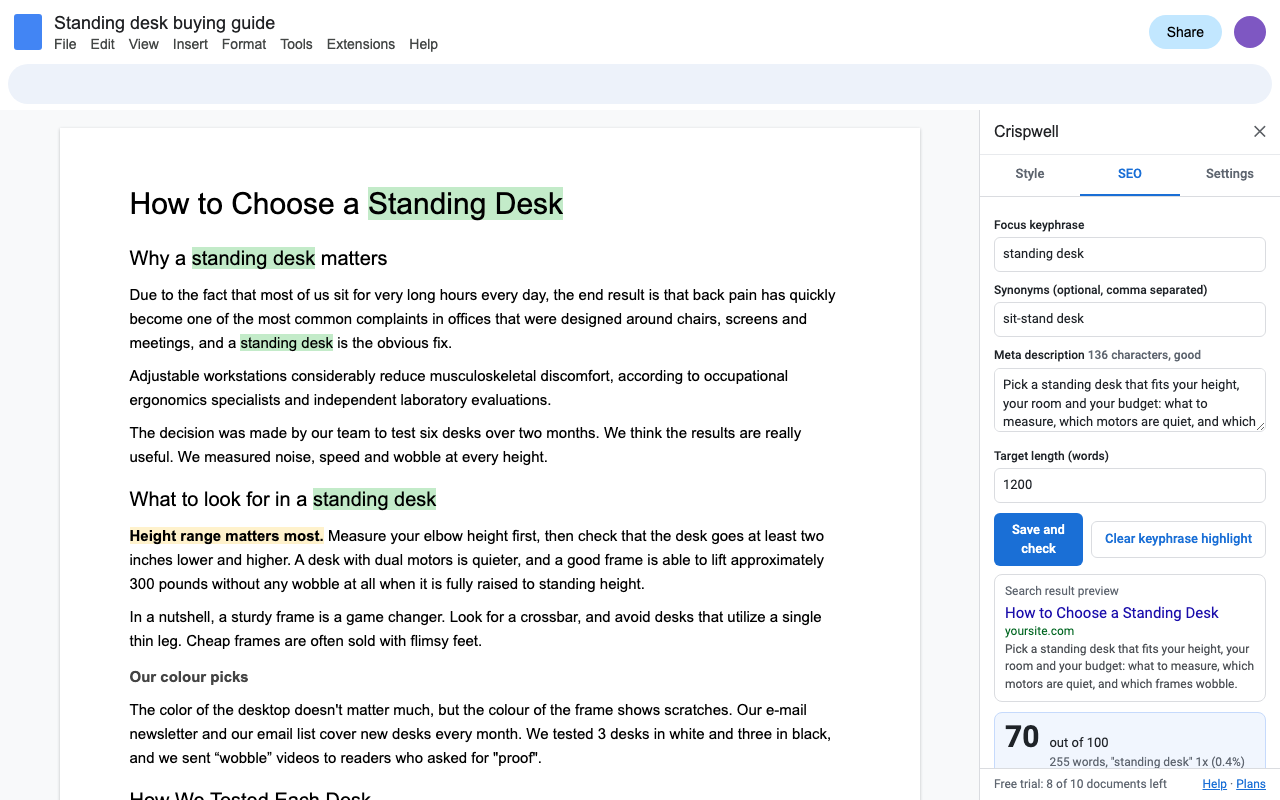
Type your focus keyphrase (and synonyms) and a meta description. Crispwell checks the keyphrase in the title, the first paragraph and subheadings, its density, title and meta description length with a search result preview, the heading outline with words per section, length against your target, links and images, and highlights every use of the keyphrase in the Doc.
Looking for a ProWritingAid or Hemingway alternative inside Google Docs?
Crispwell is a current Google Docs add-on built on Google's own Apps Script, priced the same as ProWritingAid Premium ($30 a month, $120 a year or $399 once). What you get:
- A reading grade against your own target, for the document, each section and any selection.
- Highlights in the document itself, by color, that clear without touching your own highlighting.
- SEO keyphrase, title and meta description checks in the same sidebar.
- Access to the one Doc you open it in, nothing else in your Drive.
- A person answering support email within one business day.
ProWritingAid prices from prowritingaid.com/pricing as of October 2026. Crispwell doesn't check spelling or grammar: Google Docs already does, so Crispwell covers style, readability, consistency and SEO.
Pricing
One Google account. Cancel any time.
One Google account. Works out to $10 a month.
One Google account, for life.
Free trial: 10 documents or 7 days, whichever comes first. No card needed. Checking the same document again within 24 hours, highlights and fixes are included.
Renewal: subscriptions renew automatically at the same price each month or year until you cancel. Cancel any time from Extensions > Crispwell > Plans and billing (Manage billing); you keep access until the end of the period you paid for. Changes you made stay in your documents.
UK and EU customers: you can cancel within 14 days of your first purchase for a full refund, no reason needed. Email hello@greatwork.company.
Privacy and permissions
- Crispwell only opens the Doc you use it in (Google's "current document only" permission). It can't see anything else in your Drive.
- The check runs inside Google Apps Script under your own account. No text is sent to Great Work, and nothing goes to any AI service.
- We receive your Google account email (for your license) and, during the trial, a count of documents checked.
- Settings and your SEO keyphrase are saved in the document's own add-on storage, so collaborators get the same targets.
Full policy: addons.greatwork.company/privacy. Terms: addons.greatwork.company/terms.
Questions
Does Google Docs have a readability score?
No. Docs counts words and checks spelling and grammar, but doesn't report a reading grade or Flesch reading ease. Crispwell adds both, for the whole document, a section or a selection.
Will it change my writing without asking?
No. Highlights only change background colors, and Clear highlights restores them. Text changes only when you click a fix, and Edit > Undo reverses it.
Does it check grammar and spelling?
No. Google Docs already does that. Crispwell covers what Docs doesn't: readability, style, consistency and SEO.
Does it use AI?
No. Every check is a rule you can read in Help, and the same text always gets the same result.