Alphabetize, sort and tidy text in Google Docs
Tidywell sorts lines, lists and tables, changes case, and cleans up pasted text. You see every change before it happens, and you can undo it afterwards.
Email us to get Tidywell See pricing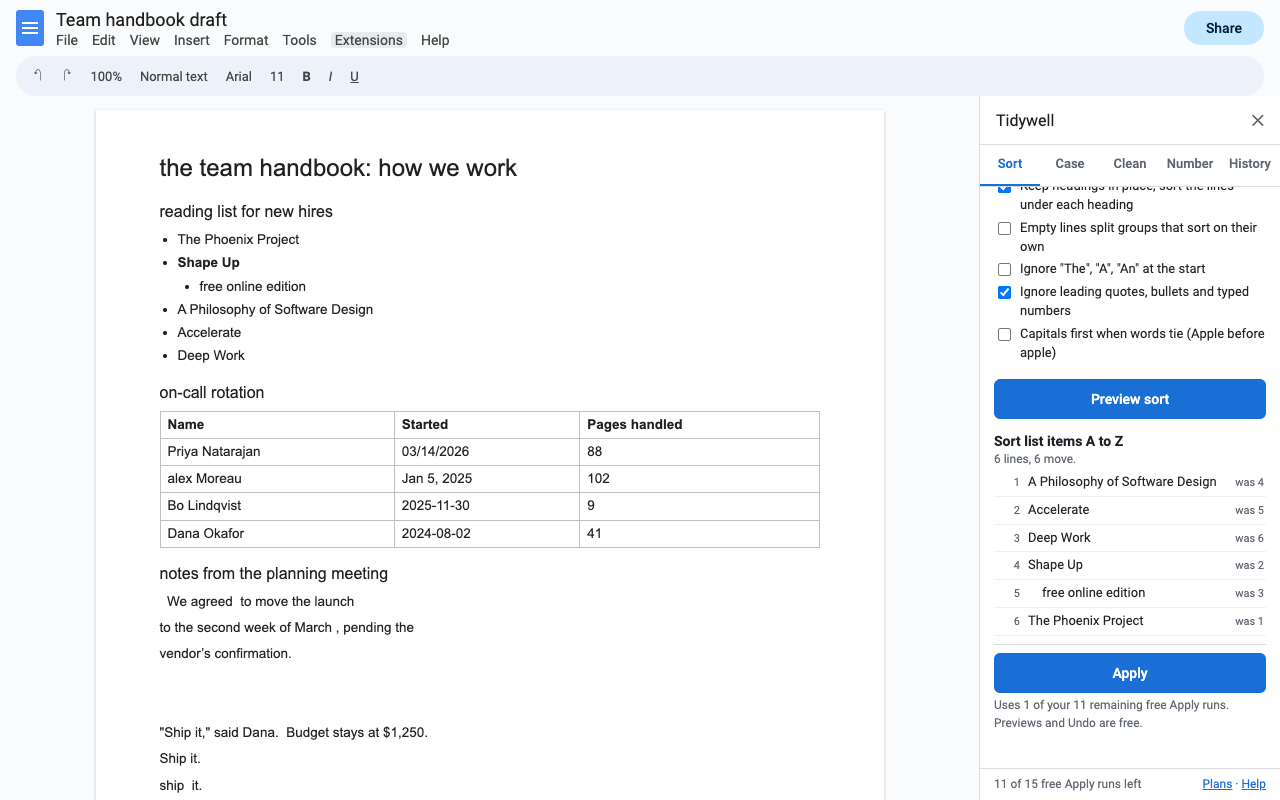
What it does
A to Z, Z to A, by number, by date, by length, reverse or shuffle. "Item 2" comes before "Item 10". Sub-items move with their parent, headings stay put.
Click inside a table, pick a column, and the rows sort under a fixed header row. Each row keeps its formatting.
Sentence case, Title Case with proper small words, Capitalize Each Word, UPPERCASE, lowercase. NASA and iPhone stay as they are.
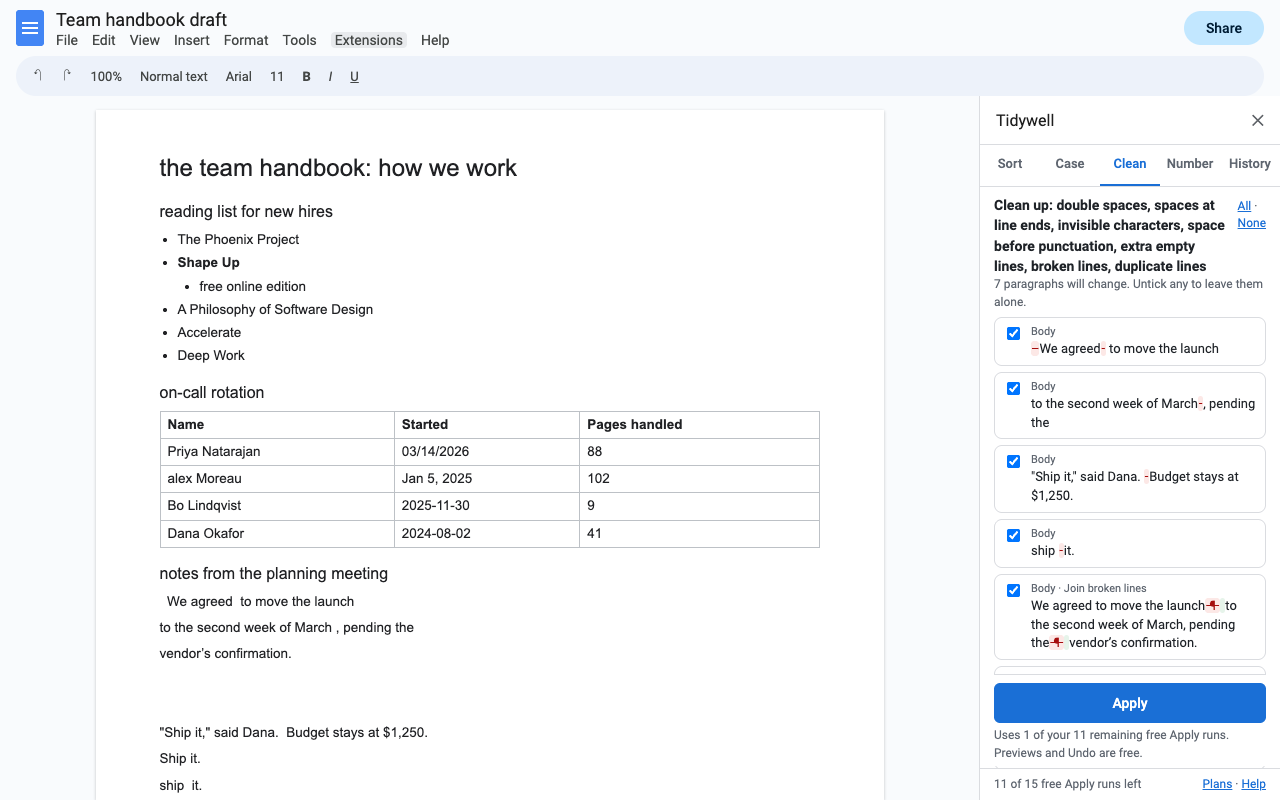
Double spaces, stray spaces, Shift+Enter breaks, invisible characters, straight or curly quotes, extra empty lines, duplicate lines.
Text from a PDF or email often breaks in the middle of every sentence. Tidywell joins those lines and rejoins hyphenated words.
Every change is listed first, red for removed, green for added. Untick any. Undo any time from History, even after closing the Doc.
How to alphabetize a list in Google Docs
- Install Tidywell, open your Doc, and click inside the list (or select the lines you want sorted).
- Choose Extensions > Tidywell > Sort lines, lists or tables.
- Pick A to Z (or Z to A, numbers, dates, length). Tick Ignore "The", "A", "An" for titles and names.
- Press Preview sort to see the new order, then Apply. Bold, links and images move with their line; sub-items stay with their parent.
How to sort a table in Google Docs by a column
- Click anywhere inside the table and open Extensions > Tidywell > Sort lines, lists or tables.
- Press Preview sort, then choose the column and the order: A to Z, numbers high to low, or dates oldest first.
- Leave First row is a header ticked so it stays on top, and press Apply.
How to change case in Google Docs
Select text (even part of a word) or pick Whole document, open Extensions > Tidywell > Change case, choose Sentence case, Title Case, Capitalize Each Word, UPPERCASE, lowercase or tOGGLE cASE, and preview. Headings only fixes every heading at once. Title Case keeps "of", "and" and "the" lowercase unless they start or end the title.
How to remove line breaks from text pasted from a PDF
Select the pasted text, open Extensions > Tidywell > Clean up text, tick Join lines broken mid-sentence, and preview. A line is joined onto the one before when that one doesn't end a sentence and the next starts in lowercase, so real paragraph breaks stay. Add Double spaces and Empty lines to finish the job.
Pricing
One Google account. Cancel any time.
One Google account. About $3.67 a month.
Lifetime license for one Google account. No renewals.
Free trial: 15 Apply runs or 14 days, whichever comes first. No card needed. One Apply counts once however many lines it changes. Previews and Undo are always free, during and after the trial.
Renewal: monthly and yearly plans renew automatically until you cancel in Extensions > Tidywell > Plans and billing (Manage billing). You keep access until the end of the period you paid for. The lifetime license is a single payment.
UK and EU customers: you can cancel within 14 days of your first purchase for a full refund, no reason needed. Email hello@greatwork.company.
There is no free-forever plan, and nothing is charged inside the add-on without you choosing a plan first. The price is shown in the sidebar before you apply anything.
Privacy and permissions
- Only the Doc you open it in. Tidywell uses Google's "current document only" permission. It can't see the rest of your Drive.
- Your text stays in Google. Sorting and cleaning run inside Google Apps Script under your account. No document text is sent to Great Work or anyone else.
- What it stores: Undo snapshots of what a change touched, with the Doc (latest 10 changes; collaborators who use Tidywell on the same Doc see the same History). Your last settings, in your Google account's private add-on storage.
- What reaches Great Work: your Google account email and how many times you pressed Apply during the trial. Payments go through Stripe.
Full policy: addons.greatwork.company/privacy. Terms: addons.greatwork.company/terms.
Questions
Sorted Paragraphs stopped working. Does Tidywell do the same job?
Yes, and more: it sorts selected paragraphs, lists with sub-items and table rows, shows the new order before anything moves, and keeps an Undo.
Does it keep my formatting?
Yes. Sorting moves whole paragraphs, list items and rows with their bold, links, colors and images. Case changes keep each character's formatting.
Can it find and replace?
No, that's our sister add-on Replacewell, with the same preview and Undo.
Google keeps asking me to authorize it.
That happens when several Google accounts are signed in to the same browser. Open the Doc in a window where only one account is signed in, or a private window.