 Copyrule
Your style guide, enforced in every Google Doc
Copyrule checks Google Docs against your organization's house style: the terms you prefer and ban, how product names are written, how numbers, dates and money look, punctuation, headings, abbreviations and legal wording. Share the rules with your team as one file. Fix findings one at a time or all at once with a preview, and copy a compliance summary for the review. No AI, and your documents never leave Google.
Email us to get Copyrule See pricing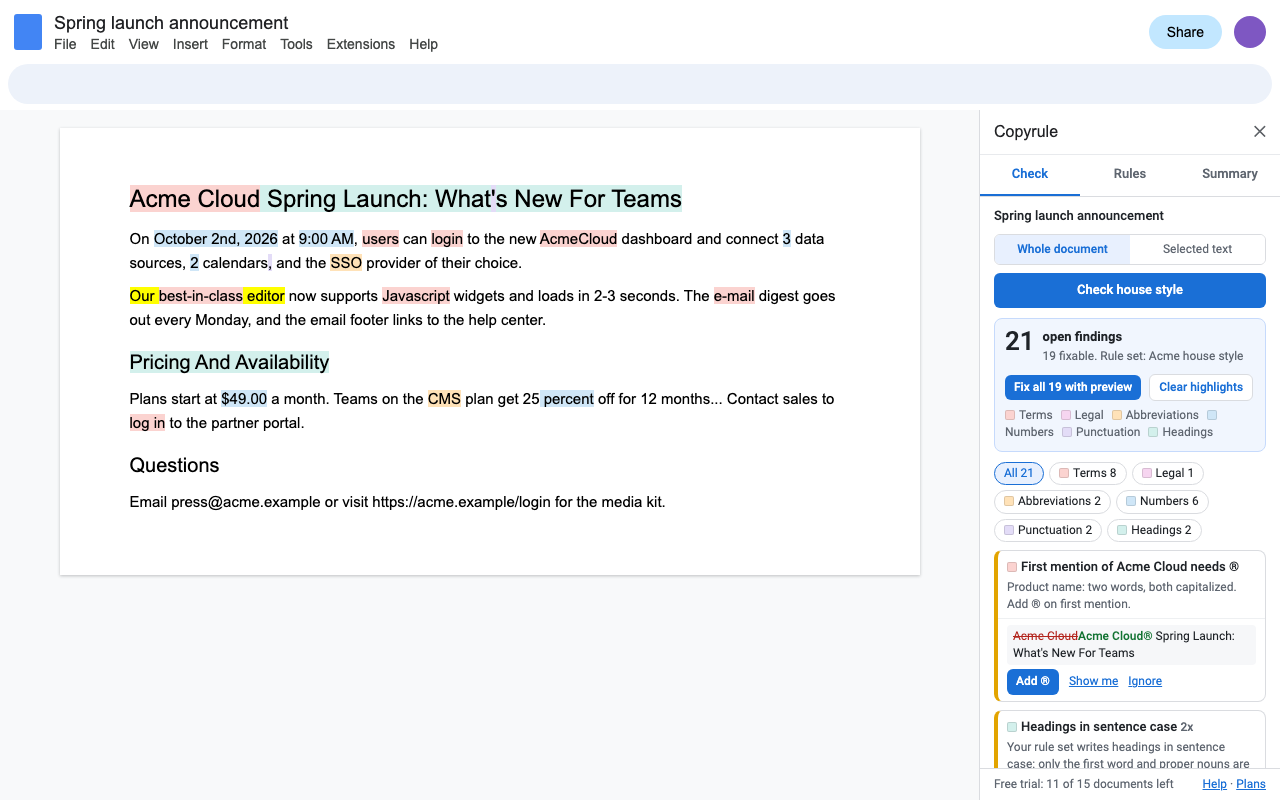
Your house style, as rules
Terms and banned words
"login" becomes "sign in"; "best-in-class" is flagged with your note. Matches any case, keeps capitals at the start of a sentence.
Brand and product names
JavaScript, not Javascript. Acme Cloud with a registered or trademark mark on the first mention.
Numbers, dates and money
Spell out one to nine (or to one hundred), October 2, 2026 or 2 October 2026, 9 a.m. or 09:00, $5 or USD 5, 5% or 5 percent, 10 km.
Punctuation and headings
Serial comma or not, curly quotes, your dash style, en dash ranges, ellipses, sentence case or Title Case headings.
Abbreviations
Defined on first use, never used before the definition, defined once. Your known list fills in the expansion.
Legal wording
Defined terms (the "Agreement") capitalized after the definition; required wording such as disclaimers present.
Spelling
US, UK or Oxford (colour with organize), applied to the whole document.
Consistency
Even without a rule: e-mail and email, website and web site, Internet and internet, 3 and three, mixed quotes, double spaces.
Start from a preset (news style like AP, book and academic style like Chicago, government plain language, legal drafting) and edit it into your own. Presets are written by Great Work; they set the choices those styles are known for and don't include the licensed AP or Chicago text.
One rule file for the whole team
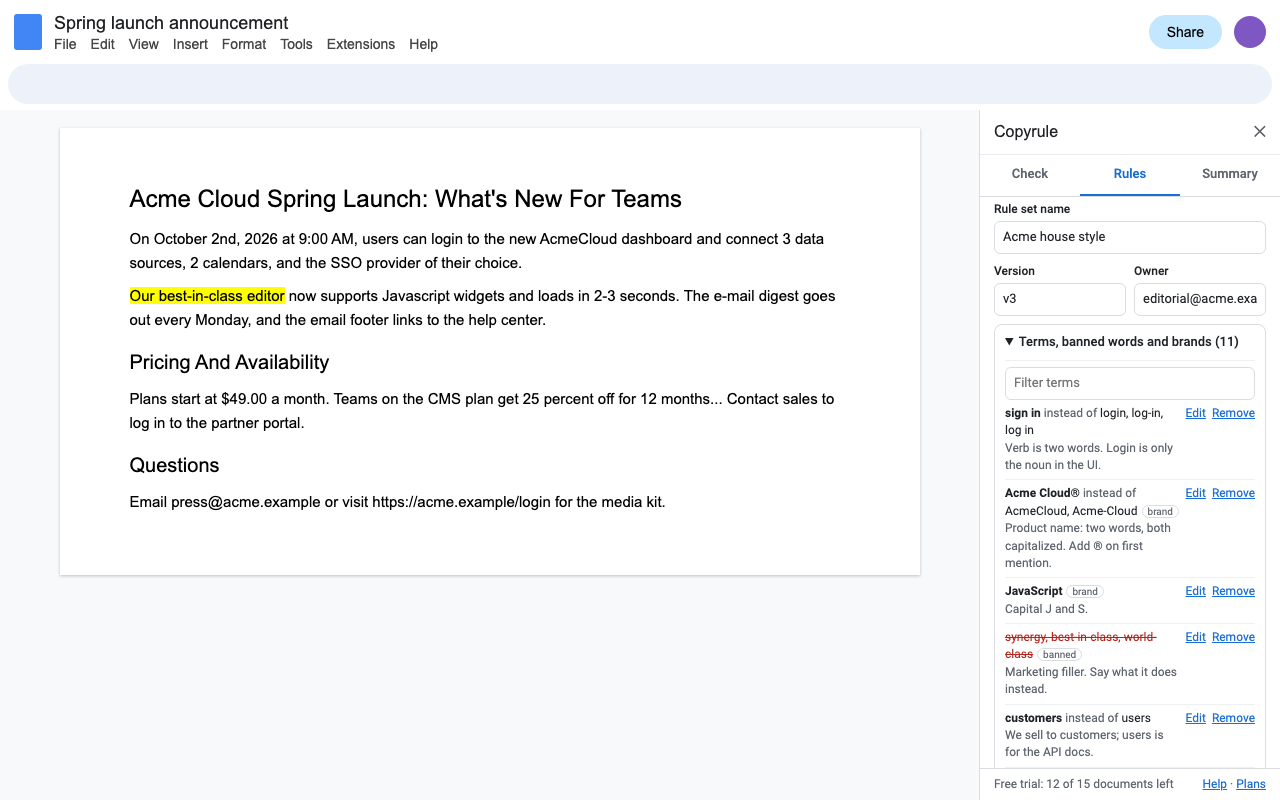
An editor saves the rules to Drive and shares the file with the company. Each writer picks it once in Copyrule. Every check reloads the file when it changes, so one edit reaches everyone. The rules are also saved inside each document, so a freelancer or reviewer who can't open the file still checks against the same rules. You can also paste rules as JSON, or paste terms from a spreadsheet as CSV.
Fix with a preview, ignore with a reason
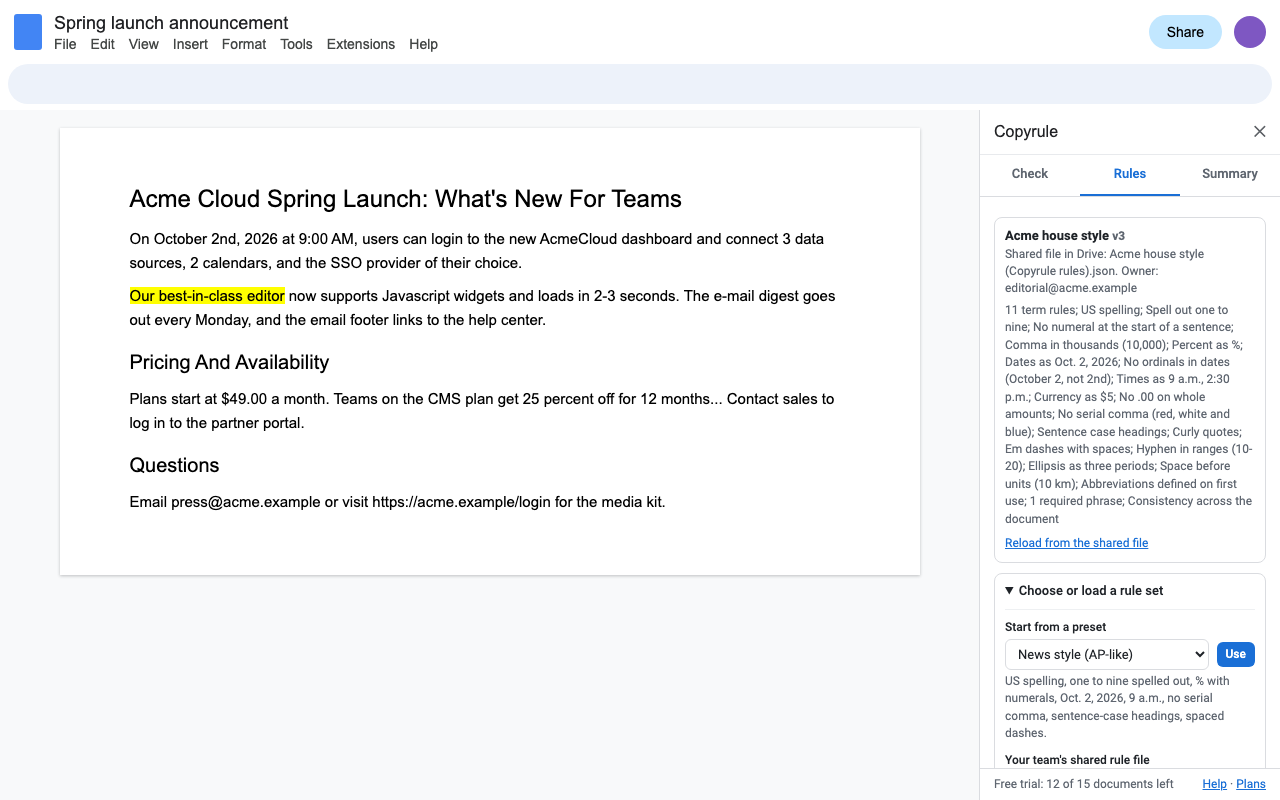
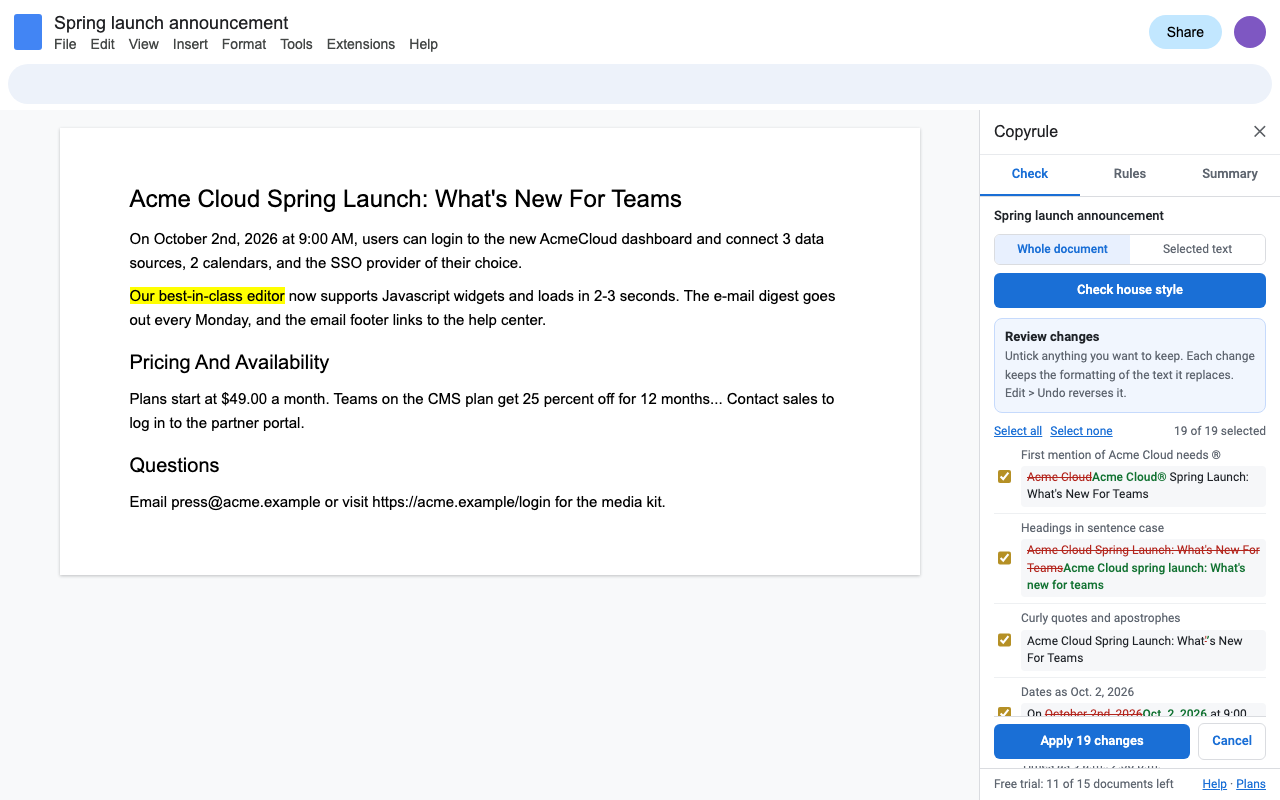
Every finding is one place in the document. Fix it, jump to it, or ignore it with a reason that everyone on the document can see. Fix a whole group at once, or review every change in one list, before and after, and untick anything you want to keep. Each fix keeps the formatting of the text it replaces, and Edit > Undo reverses it. Words inside web and email addresses are never touched.
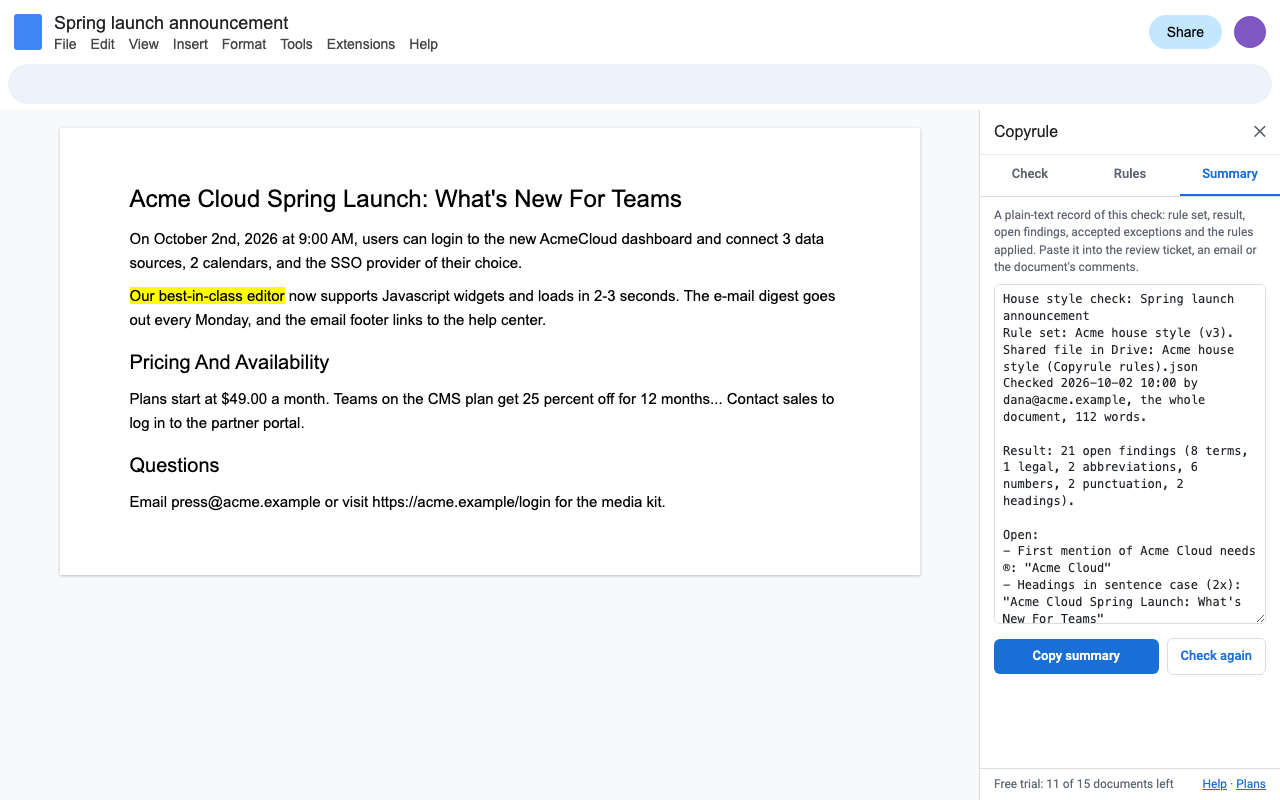
A compliance summary for the review
One click copies a plain-text record: rule set and version, who checked and when, open findings by category, accepted exceptions with who ignored them and why, and every rule applied. Paste it into the ticket, the email or the document's comments.
Moving from PerfectIt to Google Docs?
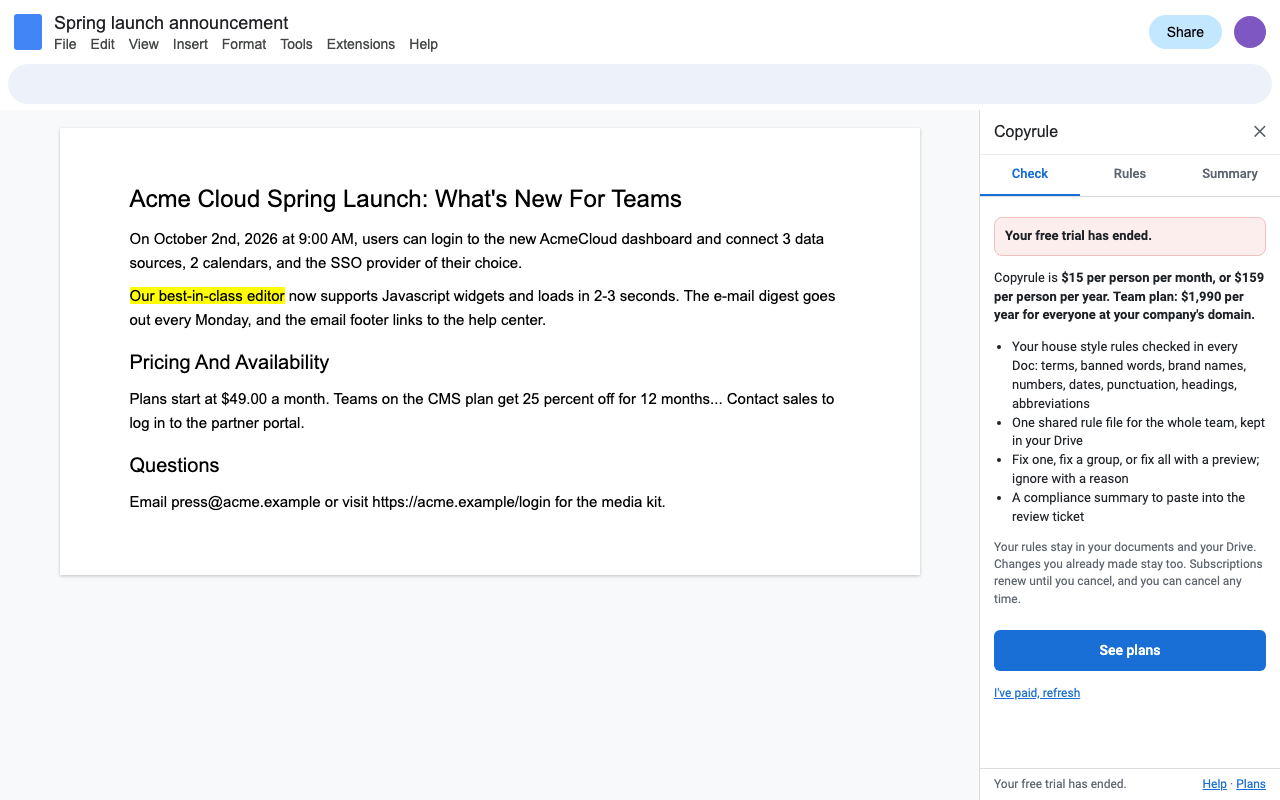
PerfectIt's own knowledge base says it isn't available for Google Docs. If your team moved to Google Workspace, Copyrule covers the same job in Docs: consistency checks, abbreviations, your house style and shared style sheets, with fixes. PerfectIt's published prices on October 2, 2026 were $115, $145 and $155 per user per year, billed annually; Copyrule is $159 per person per year, $15 month to month, or $1,990 a year for your whole company domain.
PerfectIt is a trademark of Intelligent Editing Ltd. Copyrule is not affiliated with it. Copyrule doesn't check spelling or grammar: Google Docs already does, so Copyrule covers your house style.
Pricing
One Google account. Cancel any time.
One Google account. Two months free compared with monthly.
Team plan: everyone at your company's email domain, one invoice. Bought by one person at the company.
Free trial: 15 documents or 14 days, whichever comes first. No card needed. Checking the same document again within 24 hours, fixes and highlights are included. Setting up rules, presets and shared files never needs a plan.
Renewal: subscriptions renew automatically at the same price each month or year until you cancel. Cancel any time from Extensions > Copyrule > Plans and billing (Manage billing); you keep access until the end of the period you paid for. Your rules stay in your documents and your Drive, and changes you made stay in your documents.
UK and EU customers: you can cancel within 14 days of your first purchase for a full refund, no reason needed. Email hello@greatwork.company.
Privacy and permissions
- Copyrule only opens the Doc you use it in (Google's "current document only" permission), and only Drive files you pick in the Google Picker or that Copyrule creates for you ("files you use with this app"). It can't see anything else in your Drive.
- The check runs inside Google Apps Script under your own account. No text is sent to Great Work, and nothing goes to any AI service.
- We receive your Google account email (for your license) and, during the trial, a count of documents checked.
- Rules and ignored findings are saved in the document's own add-on storage, so collaborators get the same rules and see the same exceptions.
Full policy: addons.greatwork.company/privacy. Terms: addons.greatwork.company/terms.
Questions
Will it change our documents without asking?
No. Highlights only change background colors, and Clear highlights restores them. Text changes only when you click a fix or apply the preview, and Edit > Undo reverses it.
Can different clients or teams have different rules?
Yes. Each document keeps its own rule set. Keep one rule file per client in Drive and pick the right one for each document.
Is this the AP Stylebook or the Chicago Manual?
No. Those are licensed works. Copyrule's presets set the choices those styles are known for, and you add your own terms and choices on top.
Does it use AI?
No. Every check is a rule you can read and change, and the same document always gets the same result.