Your Google Sheet, tidied up as you work.
Rowhand moves rows to another tab when they're done, stamps when rows were created and changed and by whom, keeps tabs sorted and archives old rows. Simple rules, no code, and it works with the spreadsheet closed.
Email us to get RowhandFree trial: 250 runs or 14 days, whichever comes first. Then $10.99/month or $109/year. No charge unless you subscribe through checkout.
When someone edits "Status", for rows where Status is "Done": fill "Completed at" with the date and time, then move the row to "Done".
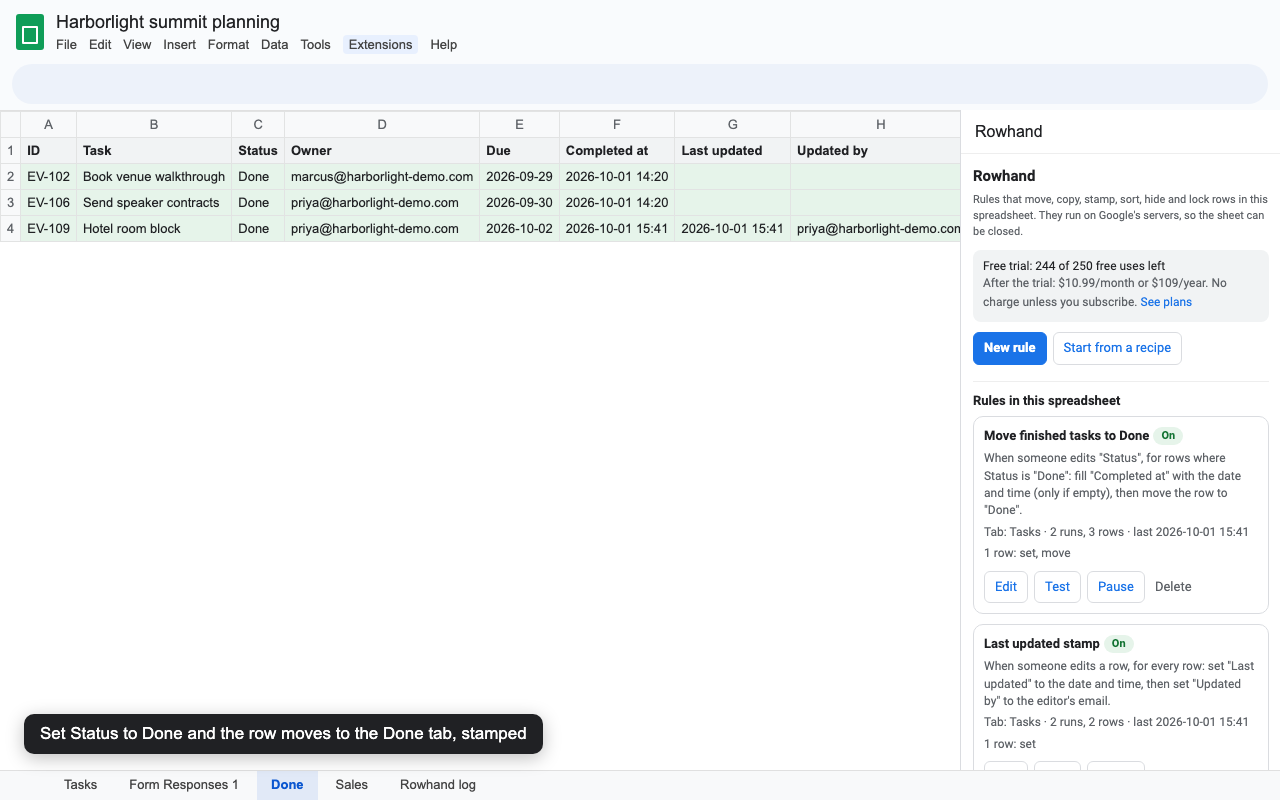
What a rule can do
Move or copy rows
Send a row to another tab when it matches, like Status is Done or Team is Sales. Columns are matched by name, the tab is created if needed, and nothing is dropped.
Stamp times and people
Created at, Last updated, Updated by, Status changed at. Real dates you can sort and filter, and "only if empty" for stamps that never change.
Keep tabs sorted
Sort by up to three columns after every relevant edit, form response or on a schedule. Several tables on one tab each keep their own order.
Archive on a schedule
Every night, move rows whose date is more than 30 days ago to an Archive tab. Hourly rules also catch rows changed by formulas and imports.
Route form responses
Copy each new Google Form response to the tab for its team, region or request type, once.
Hide, lock, clear, delete
Hide rows when a box is ticked, lock rows once approved so only you can change them, clear a cell, or delete rows you don't need.
Trust it before it runs
- Test first. Every rule has a Test button that lists exactly which rows would change and how. It changes nothing.
- Every change is logged on a "Rowhand log" tab: when, which rule, which row, what happened, who made the edit. Moved and deleted rows keep their values there, so nothing is lost.
- No loops. Rowhand's own changes never set off other rules.
- Never silent. If a column is renamed or a tab deleted, the rule card says so. If Google drops a trigger, a red banner offers a one-click fix.
- Anyone can stop it. Any editor can pause a rule, or use Extensions > Rowhand > Stop all rules in this spreadsheet.
Set up in two minutes
- Install Rowhand and open your Google Sheet (column names in the first row).
- Choose Extensions > Rowhand > Open rules, then Start from a recipe.
- Pick the tab and a recipe. Rowhand fills in your column names; adjust anything you like.
- Click Test to see which rows it would change, then Save and turn on.
- Existing rows are left alone unless you click Run now on the test result.
Pricing
- Free trial first. 250 runs or 14 days, whichever comes first. A run is one rule doing something for one edit, form response or scheduled check, however many rows it touches. Runs that change nothing and tests don't count. No card needed for the trial.
- What a plan includes: unlimited rules, runs and spreadsheets for one Google account, every trigger and action on this page, and email support from a person. There is no monthly run quota.
- When the trial ends your rules pause and the log tab says so. Nothing is charged automatically; you pay only if you choose a plan in Stripe checkout.
- Prices are in US dollars. If sales tax or VAT applies where you live, checkout shows it before you pay.
- Renewal and cancellation. Plans renew automatically at the same price until you cancel. Cancel any time from Extensions > Rowhand > Upgrade or manage billing > Manage billing; you keep access until the end of the period you paid for.
- UK and EU customers: you can cancel within 14 days of subscribing for a full refund. Email hello@greatwork.company or cancel in Manage billing and ask for the refund; one step, no questions.
Compared with other automation add-ons
| What people run into elsewhere | Rowhand |
|---|---|
| Monthly run quotas, after which rules stop; every trigger counts even when nothing happens. | No run quota on paid plans. In the trial, only runs that change something count. |
| "Trigger when data changes" only on a higher tier. | One plan with every trigger: edits, form responses, hourly and daily. |
| "It was very good two years ago, but not anymore." | A log of every change, problems shown on each rule, and a one-click fix if a trigger goes missing. |
| Kept charging after asking to cancel. | Cancel yourself in one step in Manage billing. A person answers email within one business day. |
| Can't sort stacked tables. | Give each table its own range. |
| Asks to see all your spreadsheets and send email as you. | Only the spreadsheet you use it in. No email permission at all. |
Permissions, in plain words
| Permission | Why |
|---|---|
| See and edit the spreadsheet the add-on is used in | Read the tabs your rules work on, make the changes your rules describe, and keep the log tab. It can't open any other file. |
| Run when you're not present | Act on edits, form responses and schedules with the spreadsheet closed. |
| Display content in Google apps | Show the sidebar, menu and help. |
| Connect to an external service | Check your trial or subscription at addons.greatwork.company. Only your email address and a run count are sent, never spreadsheet data. |
| See your email address | Identify your license and record you as the owner of the rules you create. |
Details: Great Work privacy policy, terms. Rowhand-specific: the "Rowhand log" tab in your spreadsheet records each change, including the editor's email when Google shares it (only inside your organization) and the values of moved or deleted rows. Delete it any time.
Alerts
Rowhand changes rows; it doesn't send email. For an email, Slack or Teams message when a row changes, see our sister add-on Rowbell.
Help
Email hello@greatwork.company. A person replies within one business day.