
Glosslark
Localization export and import for Figma
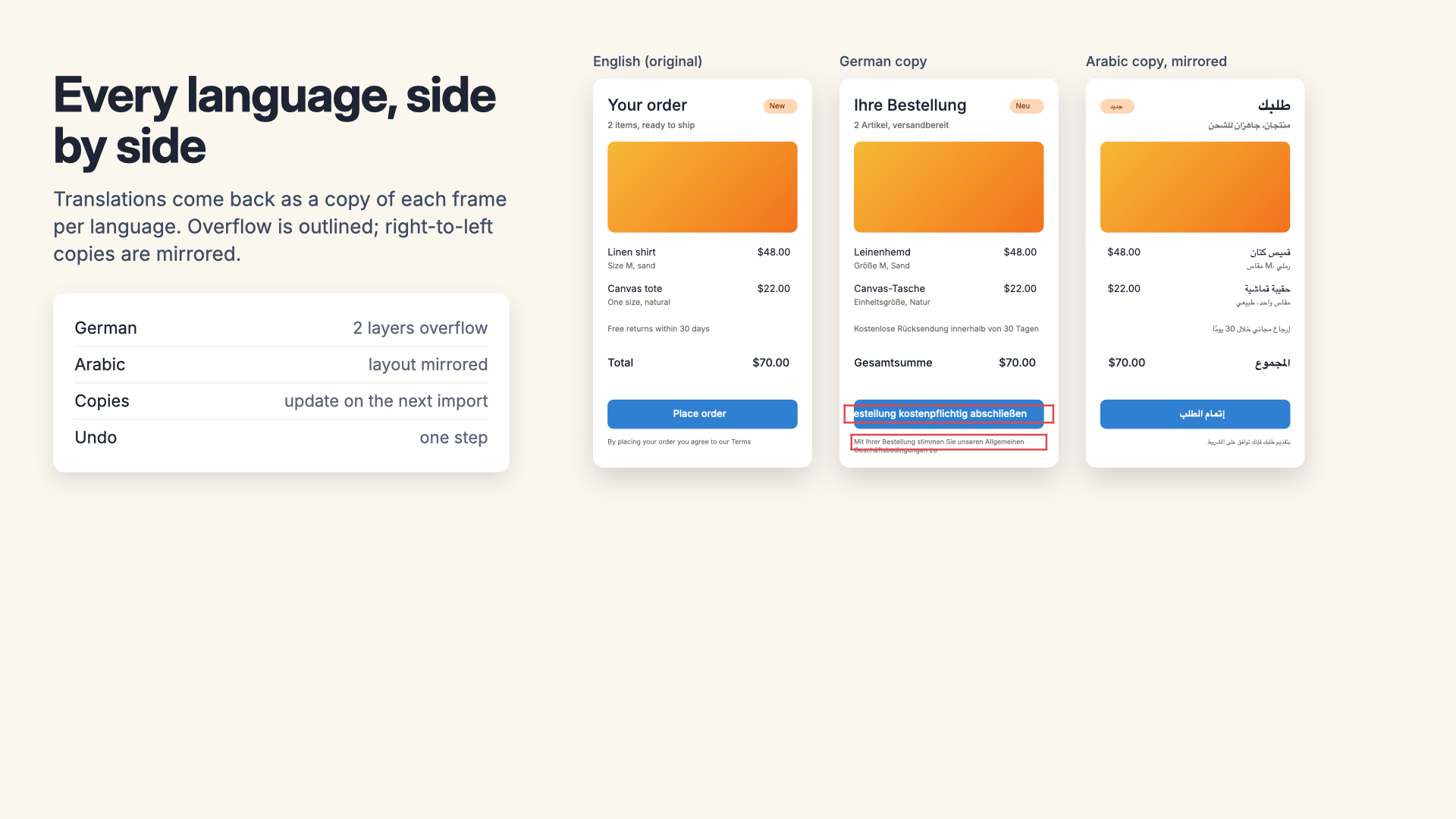
Glosslark exports every string in your design, with a stable key and the context a translator needs, in the format your translators, agency or translation platform use. When the translations come back, it puts them on the canvas as a copy of each frame per language (or as string variable modes), checks them first, and shows you every text that no longer fits.
Email us to get GlosslarkBuy a license
What you get
- Every text layer in the selection, page or file as a string with a stable key: from your layer names, a tag, or generated from the frame, then saved on the layer
- Exports to XLIFF 1.2 and 2.0, Apple String Catalogs and .strings, Android strings.xml, i18next JSON, ICU JSON (FormatJS, Lingui, next-intl), Flutter ARB and CSV
- Context on every string: page and frame path, the width it has to fit, line and character limits, your note, and a screenshot of its frame
- Plurals and variables as ICU messages, written in each platform's own plural syntax and shown on the canvas with sample values
- Only new or changed strings since the last export to each language
- Imports of the same formats with a preview: matches, missing strings, translations made for older text, lost placeholders, missing plural forms, glossary misses
- Translations as a copy of each frame on a page per language, next to the original, as string variables with a mode per language, or in place; importing again updates the same copies
- Right-to-left copies with auto layout rows reversed and positions and alignment mirrored, and a font per script
- An overflow report after every import: text cut off in fixed boxes, text running past its frame or auto layout, letters the font doesn't have
- Pseudo-localization with accents, 30 to 40% longer text, brackets and a right-to-left pseudo-locale
- A glossary and do-not-translate list kept in the file, written into translator notes and checked on import
What Figma does on its own, and what it doesn't
Figma AI can translate a text layer (Actions > Translate to), and Figma's agent can translate copy and adapt layouts for right-to-left on the canvas. Both are machine translation on AI credits, and neither produces a file. Teams that use human translators, an agency or a translation management system need the text out in XLIFF, String Catalogs, strings.xml or JSON with context, and the reviewed translations back in, and Figma has no export or import for that. Figma does lay out Arabic and Hebrew text right to left, but text stays left aligned and auto layout has no direction setting, so the layout around the text isn't mirrored.
What Glosslark doesn't do
No machine translation and no AI credits. It doesn't log in to a translation platform: it writes and reads the files every platform and CAT tool use. Language copies are copies: change the original and import again (or tick Replace) to bring them up to date. Icons in right-to-left copies move but aren't flipped.
Pricing
Buying here gets you a license key by email. Buying inside the app links the plan to your account. Change or cancel any time in Manage billing.
7-day free trial with 10 runs, starting with your first export or import: each export, import or set of pseudo-localized copies is one run (up to 300 strings during the trial). Finding strings, keys, the glossary, previewing a file and the overflow check are always free. Then $29 a month or $299 a year per designer, billed by Great Work LLC through Stripe. Translators and people who only view the file need nothing. Buying for a team? Choose the number of seats at checkout; one license key covers them all. Subscriptions renew automatically until you cancel in Manage billing. Refunds and switching between monthly and annual: email us and a person handles it.
Privacy
Glosslark writes and reads translation files on your computer. Nothing about your file or your translations is uploaded. The plugin only contacts addons.greatwork.company to check your license key. Privacy policy and terms.