
Pictokiln
Icon export to code, fonts and sprites for Figma
Pictokiln takes the icon set in your Figma file (components, variants or plain frames) and writes everything a product team ships from it: optimized SVGs, an icon font, a sprite, component packages for React, Vue, Svelte and Web Components, iOS and Android assets and a searchable catalog. It checks the set before you export, tells you what changed since last time, and can open the result as a pull request on GitHub.
Email us to get PictokilnBuy a license
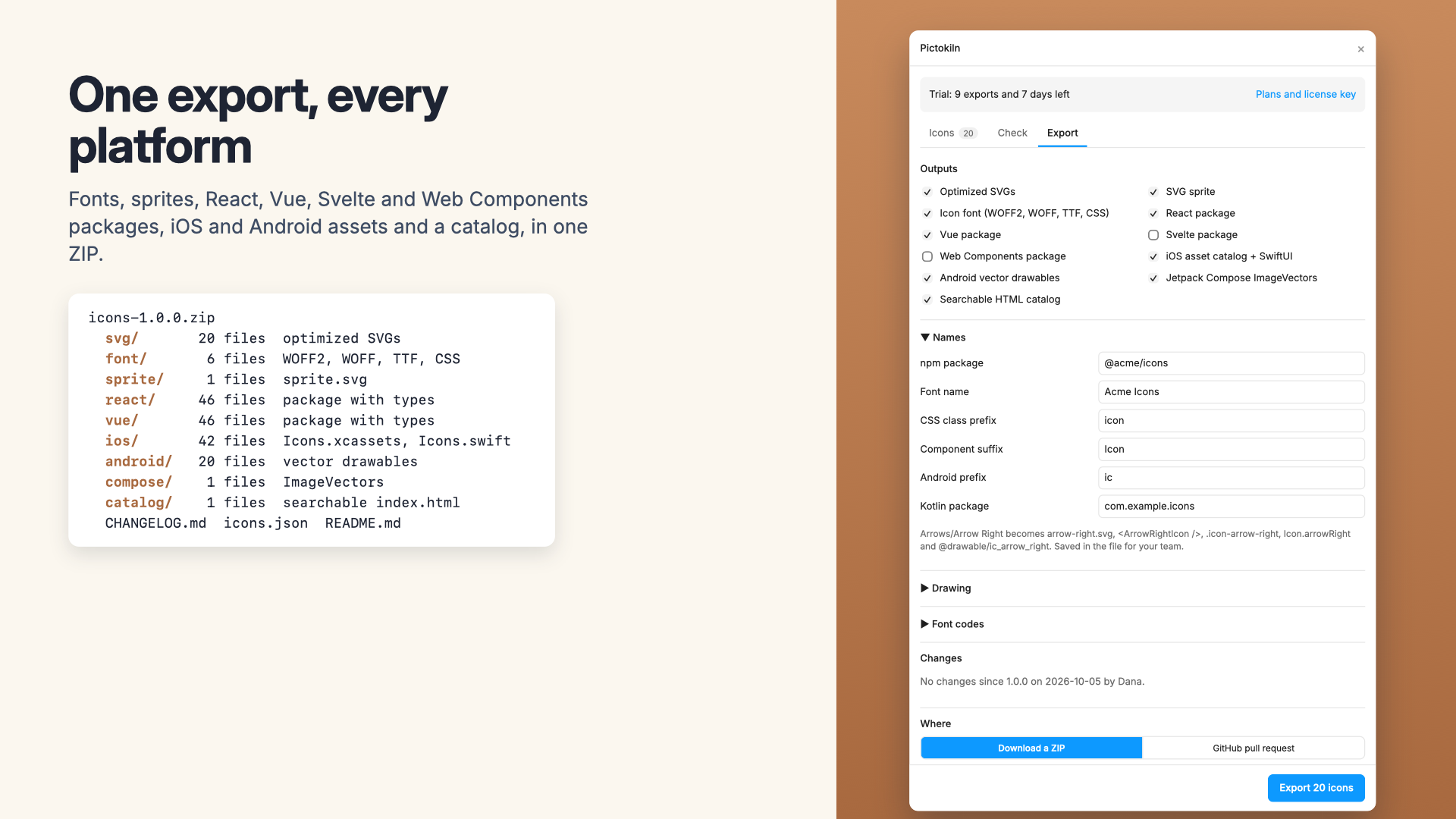
What you get
- Optimized SVGs: Figma's frame clip removed, short path data, transforms baked in, unused ids gone, and one-colour icons in currentColor so they take the text colour
- Optional stroke outlining, so line icons export as filled shapes
- An icon font in WOFF2, WOFF and TTF with CSS classes, a Sass map and a codepoints file
- Font codes that never move: an icon keeps its code through renames and redraws, and a deleted icon's code is never reused
- An SVG sprite of symbols
- React, Vue, Svelte and Web Components packages with TypeScript types, one file per icon, ready to publish to npm
- An iOS and macOS asset catalog, as SVG or vector PDF, with template rendering for one-colour icons, and a Swift enum of the names
- Android vector drawables and Jetpack Compose ImageVectors
- A searchable HTML catalog with copy-ready snippets for every output
- A check of the whole set: duplicate names, sizes, points off the pixel grid, stroke weights, inside or outside strokes, filled open paths, and text, pictures or effects that won't export
- A change list since the last export, a CHANGELOG entry and the next version number
- A ZIP, or a pull request on GitHub made with your own token
What Figma does on its own, and what it doesn't
Figma exports a layer as an SVG (with options to outline text, simplify strokes and add ids), and its MCP server lets coding agents download single SVG, PDF or PNG files. Nothing in Figma writes an icon font, a sprite, component packages, an asset catalog or Android drawables, keeps font codes stable between exports, checks a set for consistency, or tells you what changed since the last release.
What Pictokiln doesn't do
It doesn't draw or fix icons for you: the check points at problems and Select takes you to them. Fonts and Android drawables are one colour per shape, so gradients become their first colour and masks are ignored there (the SVG, sprite and packages keep them). It doesn't publish to npm for you; the packages are ready for npm publish or your own release process.
Pricing
Buying here gets you a license key by email. Buying inside the app links the plan to your account. Change or cancel any time in Manage billing.
7-day free trial with 10 exports of up to 100 icons each, starting with your first export. Finding icons, the set check, previews and the change list are always free. Then $19 a month or $190 a year per person who exports, billed by Great Work LLC through Stripe. Developers who use the files need nothing. Buying for a team? Choose the number of seats at checkout; one license key covers them all. Subscriptions renew automatically until you cancel in Manage billing. Refunds and switching between monthly and annual: email us and a person handles it.
Privacy
Pictokiln makes every file on your computer. Nothing about your file is uploaded to us. The plugin contacts addons.greatwork.company to check your license key, and api.github.com only when you open a pull request, with your own token, which stays on your computer. Privacy policy and terms.