
Guidelark
Design system documentation site, straight from your Figma library
Guidelark reads the components, variables and styles in your Figma library and writes the documentation site for them: a page per component with a picture of every variant, its properties, specs, Do and Don't examples and your notes; a page per variable collection with every mode; your styles; search; and a changelog that updates itself with each export. Host it anywhere, or send it to Docusaurus, Storybook or a GitHub repository.
Email us to get GuidelarkBuy a license
What you get
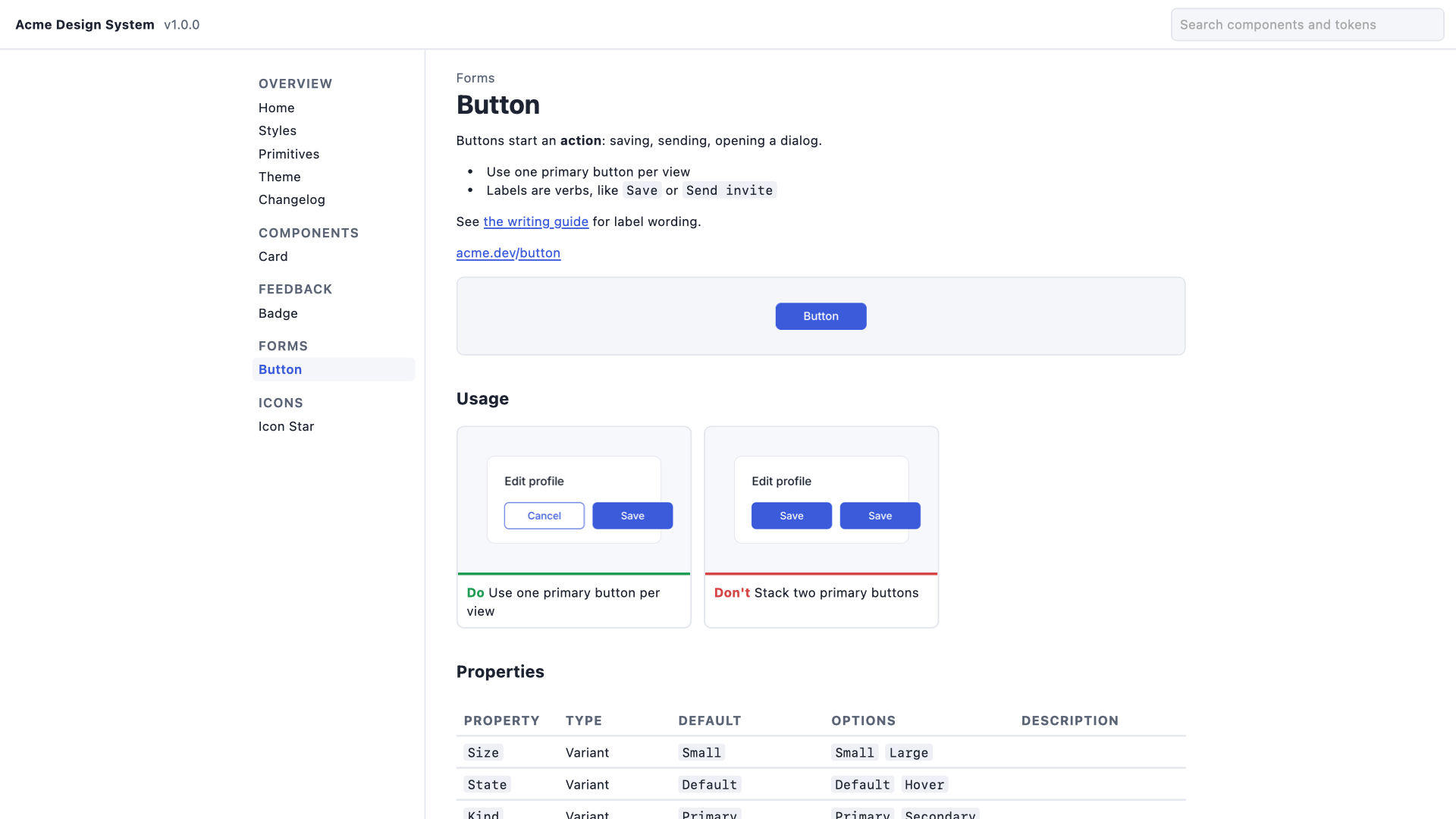
- A page for every component: your description (with its formatting and links), documentation links and a preview
- Variant tables with a picture of every variant: one property down the side, one across the top, a table for each value of the rest
- Properties with type, default, options and the description you gave each one
- Specs: size, auto layout padding and gap, corner radius, and the variables and styles the component uses
- Dev Mode annotations as notes, with the values they pin
- Usage examples from frames named Do, Don't or Caution, linked to their component by name or by section
- A page per variable collection with every mode side by side, color swatches, spacing bars and aliases
- Color, text, effect and grid styles with live previews
- Search over components, properties, tokens and styles
- A changelog with a semver version for each export: added, removed, renamed and changed, with breaking changes marked
- Tokens as CSS custom properties and W3C design tokens JSON, and the whole library as JSON
- A static website, Docusaurus pages, Storybook docs pages or plain Markdown, as a ZIP or a GitHub pull request made with your own token
- A free gap list before you export: missing descriptions and examples, default names, missing variant combinations
What Figma does on its own, and what it doesn't
Figma shows component descriptions, documentation links, properties and annotations inside the file, in the assets panel and in Dev Mode, and its MCP server hands them to coding agents. Figma Sites can publish a site you design by hand. Nothing in Figma turns a library into documentation that lives outside Figma: no generated site, no Docusaurus or Storybook pages, no variant tables, no token pages per mode, and no record of what changed between releases.
What Guidelark doesn't do
It doesn't host your docs or give you a web editor: the files are yours, for any static host or your own docs tool. It doesn't write guidance for you; it publishes the descriptions, annotations and examples that are in Figma. Pictures are Figma's PNG renders, not live code components. Variables from other libraries show by name, because their values live in that library's file.
Pricing
Buying here gets you a license key by email. Buying inside the app links the plan to your account. Change or cancel any time in Manage billing.
7-day free trial with 10 exports of up to 25 components each, starting with your first export. Reading the library, the gap list and the change list are always free. Then $59 a month or $590 a year per person who exports, billed by Great Work LLC through Stripe. Everyone who reads the docs needs nothing. Buying for a team? Choose the number of seats at checkout; one license key covers them all. Subscriptions renew automatically until you cancel in Manage billing. Refunds and switching between monthly and annual: email us and a person handles it.
Privacy
Guidelark writes every file on your computer. Nothing about your file is uploaded to us. The plugin contacts addons.greatwork.company to check your license key, and api.github.com only when you open a pull request, with your own token, which stays on your computer. Privacy policy and terms.