One Word file or PDF for every row of your spreadsheet
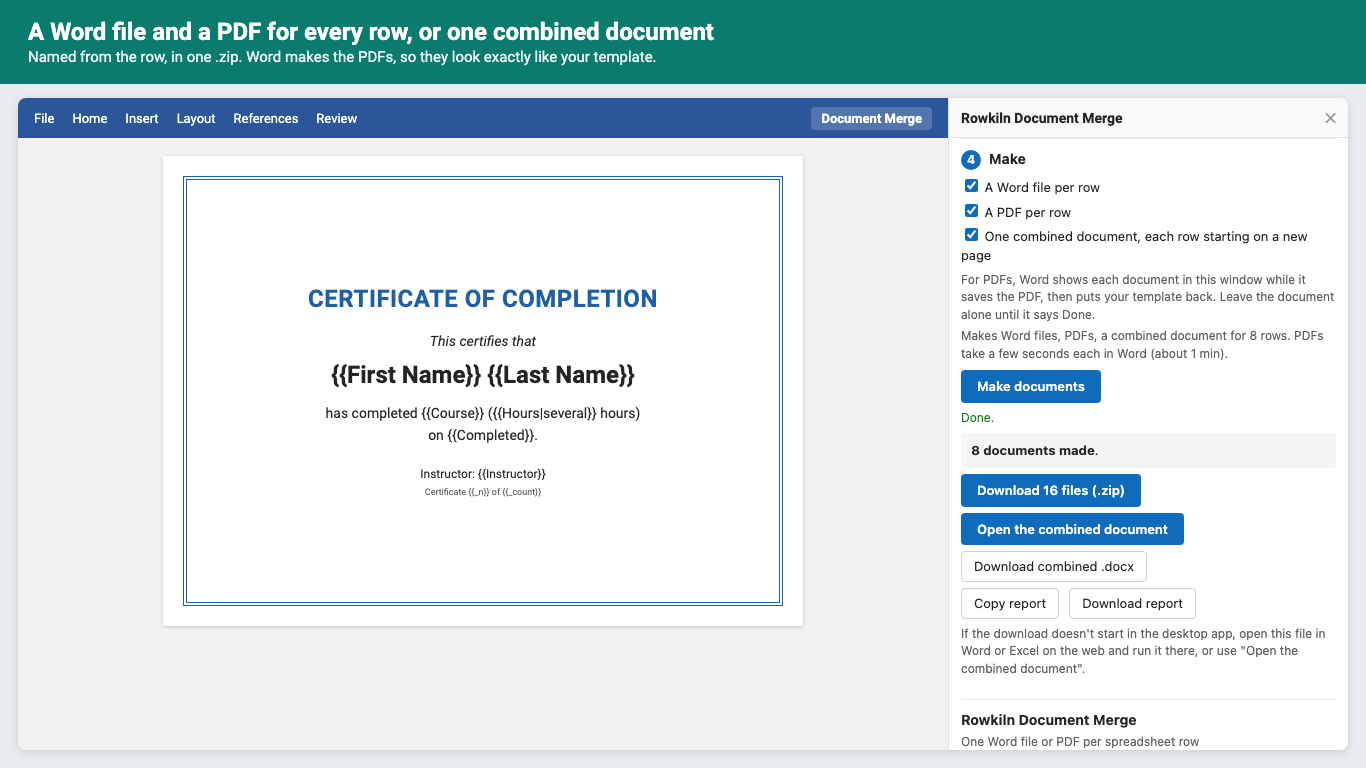
Rowkiln Document Merge is an add-in for Word and Excel on the web, Windows and Mac. Write the document once in Word, put {{Column name}} where each value goes, and get a Word file and a PDF for every row, named from the row, or one combined document. Certificates for a class of 40, offer letters, contracts and invoices, without the afternoon of copy, paste and save as.
Get started
- Install Rowkiln Document Merge from Microsoft AppSource (in Word or Excel: Home, Add-ins, search "Rowkiln").
- Click Document Merge on the Home tab, then Try the sample to see 5 certificates made from a sample template. The sample is free.
- In Word, your open document is the template: type
{{Column name}}where each value goes. In Excel, your sheet is the data and you pick the Word template. - Add your rows, check the preview, choose Word files, PDFs or one combined document, and click Make documents. Sign in with your Microsoft account to start the trial: 50 documents or 14 days, no card needed.
What it does
Your template, untouched
Fonts, tables, pictures, headers and footers stay exactly as you made them. Tags work in tables, headers, footers, footnotes and text boxes, and take the formatting of where you typed them.
A file per row, named for it
{{Last Name}} {{First Name}} certificate.pdf, all in one .zip, as Word files, PDFs or both.
Or one combined document
Every row on its own pages, with its own headers, footers and page numbers starting at 1. Ready to print.
PDFs made by Word
Word lays out every PDF from your template, so each line of text lands where Word would print it.
Checked first
Preview every document. A tag that isn't a column is flagged with the closest match. Fallbacks for empty cells: {{Discount|0%}}.
From Excel, run after run
Each row gets marked Done in a "Rowkiln Status" column, so next week's run makes only the new rows. Filter by any column or pick a row range.
Pricing
Standard. 100 documents a month. Or $120/year.
Pro. 1,000 documents a month. Or $320/year.
Business. Unlimited documents. Or $840/year.
Teams. Microsoft 365 work or school accounts buy seats for colleagues in their organization, Pro for each person. Or $450/year per person.
Standard $12/month or $120/year, Pro $32/month or $320/year, Business $84/month or $840/year, teams $45/month or $450/year per person. Trial: 50 documents or 14 days, whichever comes first. No card needed. One row counts once, whatever you make for it (its Word file, its PDF and its pages in a combined document); previews and the sample don't count. Monthly allowances reset on the 1st (UTC). Prices in US dollars; billing by Great Work LLC through Stripe. Move between plans or cancel any time in Manage billing. First purchases can be refunded within 14 days.
Questions
Which versions of Word and Excel does it work with?
Word and Excel on the web (Edge, Chrome, Firefox, Safari), and on Windows and Mac (Microsoft 365, 2016 and later). PDFs need Word on the web or Microsoft 365 Word; on an older Word the pane says so and still makes Word files and the combined document. Not on iPad, iPhone or Android.
Why are PDFs only in Word?
Word is what lays a document out, so Rowkiln asks Word to save each PDF. While it runs, you'll see each row's document in the window for a moment; your template comes back when it's done.
Does my data go to your server?
No. Your template and rows are read and merged inside the add-in on your computer. See the privacy policy.
Can each document have its own picture?
Not yet. Pictures in the template (a logo, a signature) appear in every document.
The download didn't start in the desktop app
Open the same file in Word or Excel on the web and run it there, or use Open the combined document in Word and save it from Word.
How do I cancel or manage billing?
In the Rowkiln pane, open the account section and click Manage billing. Bought a license key? Use addons.greatwork.company/billing.
Support
Email hello@greatwork.company. A person replies within one business day. Full help: Rowkiln help.