Google Slides to video and GIF
Deckflick turns the presentation you have open into an MP4 video or an animated GIF. Set how long each slide shows, add transitions and a soundtrack, and watch the exact result before you export. It's built in your browser, so your slides are never uploaded to us.
Email us to get Deckflick See pricing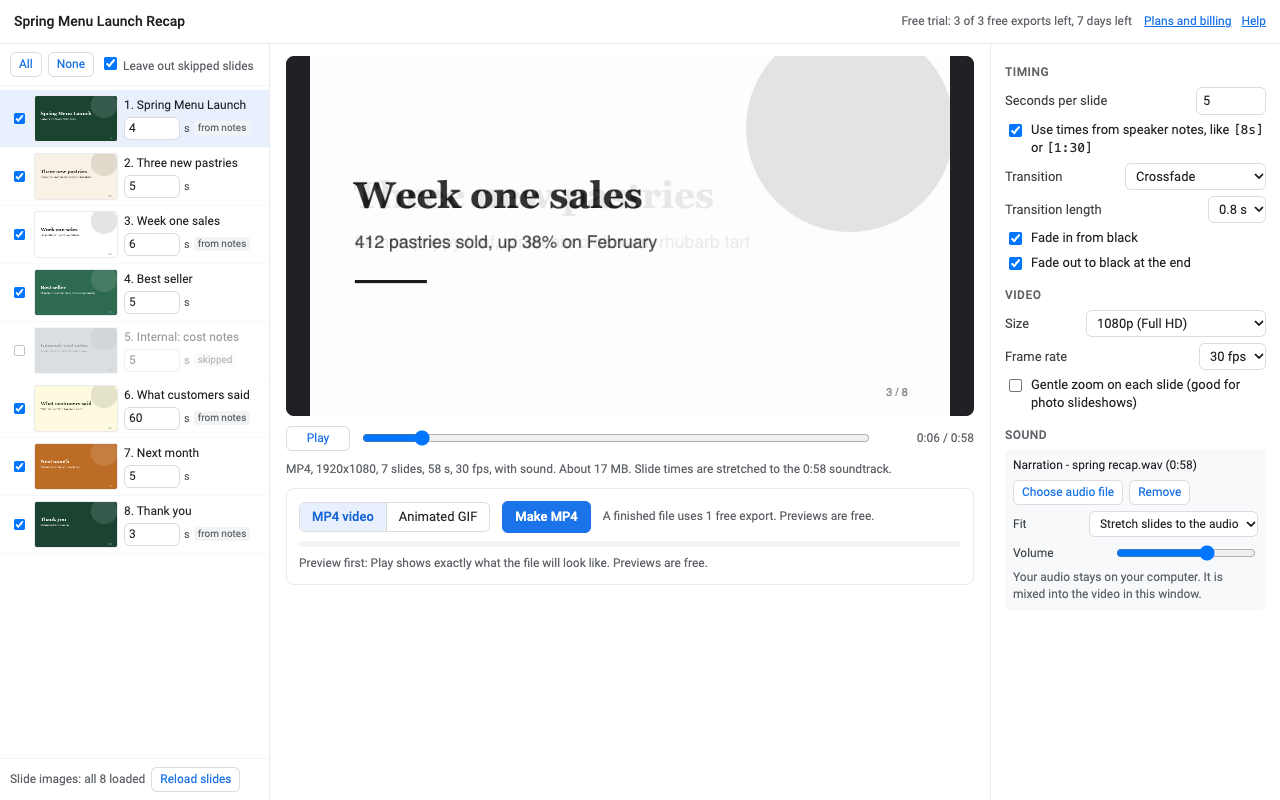
What it does
720p, 1080p or Slides' own 1600 px width, at 24, 30 or 60 fps. Plays on YouTube, Vimeo, LinkedIn, Classroom, Canvas, phones and TVs.
480 to 1200 px wide, looping or played once. Insert it on a slide in one click, or use it in email and docs.
Type a time next to any slide, or write [8s] or [1:30] in the speaker notes so the timing travels with the deck.
Crossfade, fade through black, slide left, wipe, zoom fade or cut. Fade in and out, and a gentle zoom for photo slideshows.
Add an MP3, WAV, M4A or OGG. Stretch the slides to match it, cut it at the end, or loop it. Volume and a soft fade out.
Press Play to see exactly the file you'll get. Previews never use an export, and a failed or cancelled export never counts.
How to turn Google Slides into a video
- Install Deckflick, open your presentation and choose Extensions > Deckflick > Make video or GIF.
- The first time on a deck, Google shows that presentation in a picker. Click Select. This lets Deckflick read that deck and nothing else in your Drive.
- Tick the slides you want, set times, pick a transition, and add music or a voiceover if you like.
- Press Play to preview. Then click Make MP4 (or switch to GIF). The file downloads; you can also save it to Drive.
Google Slides on its own exports PDF, PowerPoint and single images, but not video or GIF. That's the gap Deckflick fills.
Pricing
About $12.42 a month. Every feature, one Google account.
Same features, billed monthly. Good for a one-off project: cancel when you're done.
Team plan: everyone at your school's or company's Google Workspace domain.
3 finished videos or GIFs, or 7 days, whichever comes first. Full decks, no watermark, no card needed. The 7 days start when you first open Deckflick.
No surprise charges. We never charge you unless you start a checkout yourself. Deckflick shows your trial status and these prices from the first minute. When the trial ends, it shows the plans; nothing is charged and your slides aren't changed.
Renewal. Monthly, annual and team plans renew automatically at the same price until you cancel. Cancel any time from Extensions > Deckflick > Plans and billing, in one step. You keep access until the end of the period you paid for.
Right to cancel (UK and EU). If you're a consumer in the UK or EU, you can cancel within 14 days of buying and get a full refund. Email hello@greatwork.company or cancel in Plans and billing and reply to the receipt.
Mistakes. Charged twice or by accident? Email us and we'll refund it.
Prices are in US dollars and exclude any sales tax or VAT that applies where you live. Payments are processed by Stripe; we never see your card number.
Why switch
| What people complain about in other add-ons | What Deckflick does |
|---|---|
| "Only one free use with no preview" | Unlimited free previews of the exact video, plus 3 full exports. |
| "Says it's free", "pricing not disclosed until you log in" | Prices on the listing, this page and inside the add-on from the start. |
| "Videos with only a few slides", free plan limited to 3 slides | The whole deck, every time, trial included. You choose which slides. |
| "Converted to a static image", "fails 9 of 10 times" | Built in your browser with the same code as the preview, and a failed export never counts. |
| Asks to "see, edit, create and delete all your Google Slides presentations" | Opens only the decks you select, and never uploads them to us. |
Help
Are my slide animations included?
Click-by-click animations and embedded videos aren't: Google gives add-ons a still image of each slide. Everything visible on the slide is included, and Deckflick's own transitions run between slides.
Why does Google ask me to select my presentation?
It's how Deckflick gets permission to read that one deck without access to the rest of your Drive. Google asks once per presentation.
Why not 4K?
Google draws slides for add-ons at 1600 px wide. 1080p is a slight enlargement and looks sharp; 4K would only be bigger, blurrier pixels, so we don't offer it.
The download didn't start.
Some browsers and school Chromebooks block downloads from add-on windows. Click Save to Drive and open the file from the link that appears.
Which browsers work?
MP4 needs a current Chrome, Edge or Safari. GIF works in any modern browser.
What counts as a trial export?
A video or GIF that finishes building. Previews, failed or cancelled exports, and saving the same file again don't count.
Still stuck?
Email hello@greatwork.company. A person replies within one business day.
Privacy
- Google data it accesses: only the presentation you open it in and select once: its slides, titles and speaker notes, and an image of each slide drawn by Google. With Save to Drive it creates a new file in your Drive; with Insert GIF it adds an image to your deck.
- Where your slides and audio go: the video is built inside Google and your browser. Slides and audio are never sent to Great Work, and nothing is stored after you close the window.
- What reaches Great Work: your Google account email, the product id and a count of trial exports, for billing. See the full privacy policy.
- Sharing: we don't sell data, use it for ads, or use it to train AI models.
- Deckflick's use and transfer of information received from Google APIs adheres to the Google API Services User Data Policy, including the Limited Use requirements.