Code blocks for Google Slides and Google Docs
Syntaxwell puts colored, copyable code on your slides and in your documents. Paste, pick a theme, insert. Click any block later to change it.
Email us to get Syntaxwell See pricing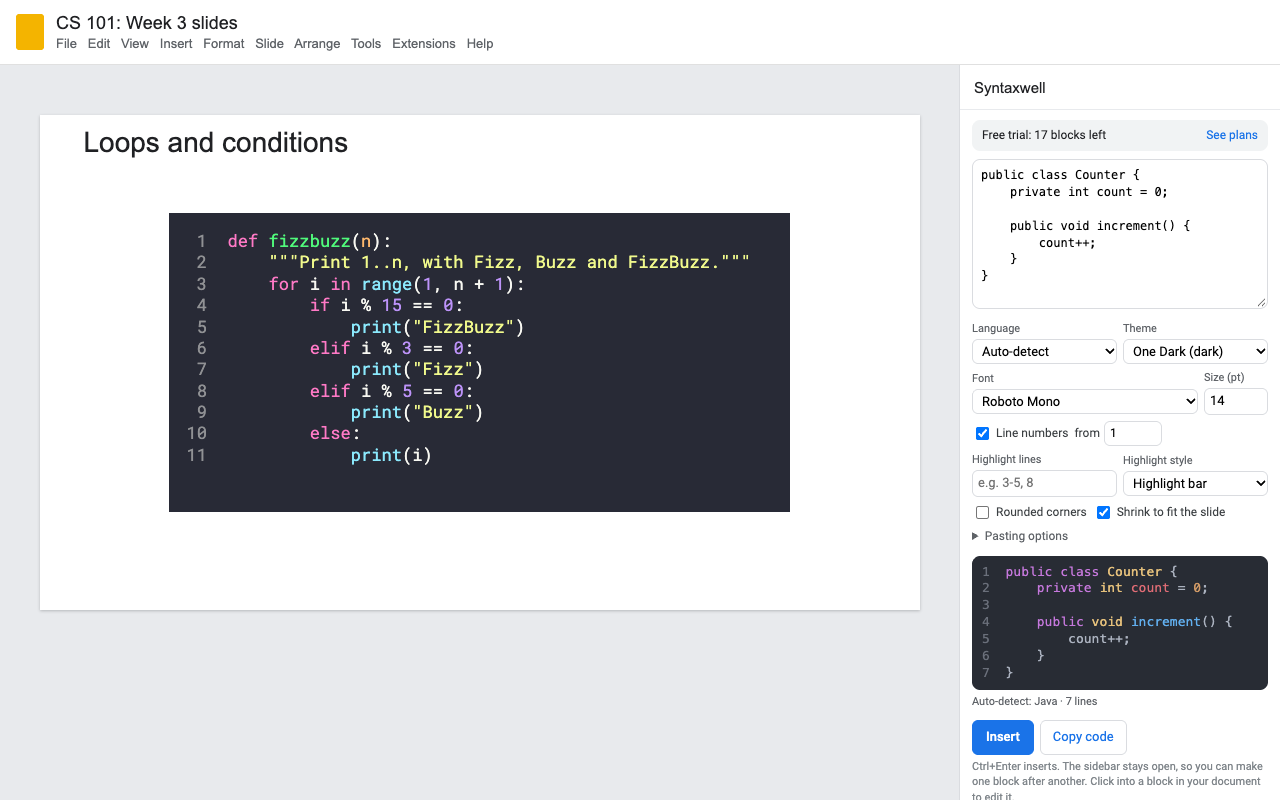
What it does
Blocks are styled text, so students can copy the code and search finds it. Copy code skips the line numbers.
Python, Java, JavaScript, TypeScript, C, C++, C#, Go, Rust, Kotlin, Swift, SQL, R, HTML, CSS, Bash, Sheets formulas and more. Auto-detect picks one for you.
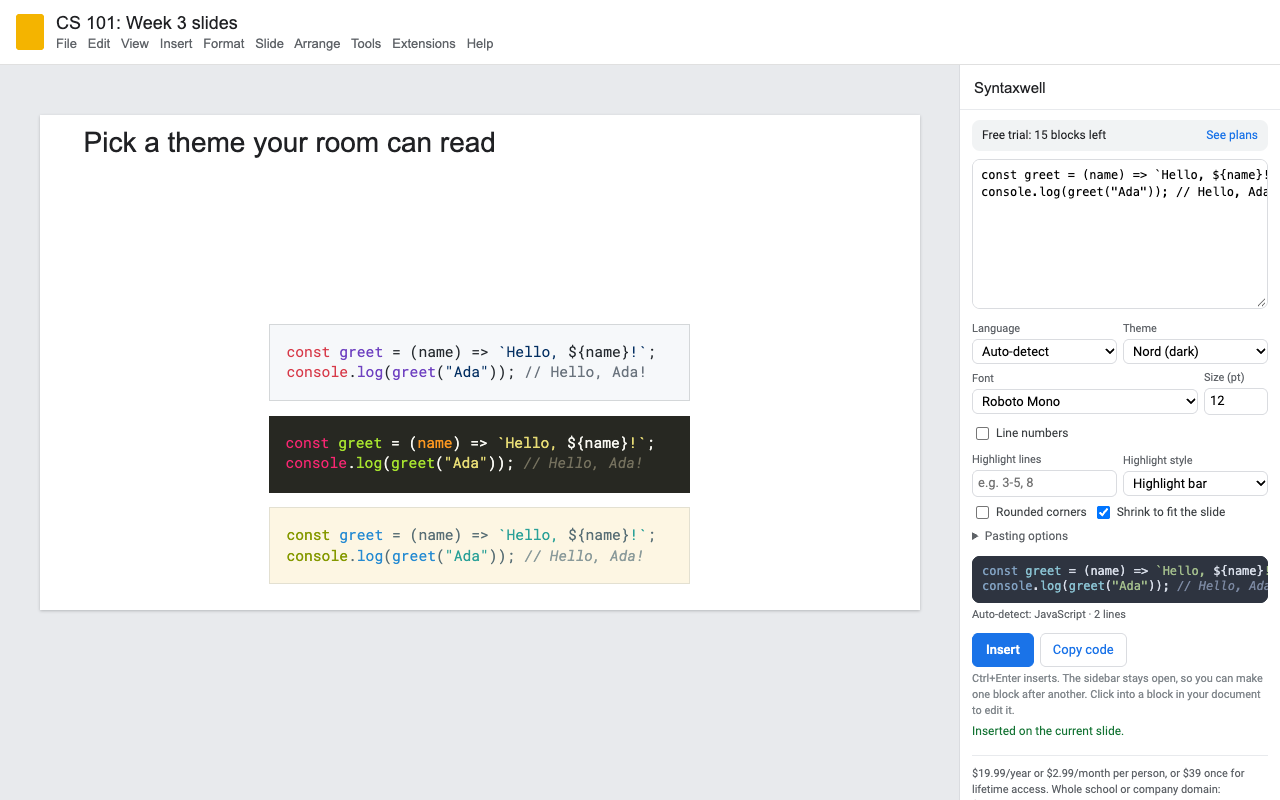
GitHub, VS Code, Dracula, Monokai, One Dark, Solarized, Nord, Night Owl, Tokyo Night, Catppuccin, plus a high-contrast theme for projectors and a grayscale one for printing.
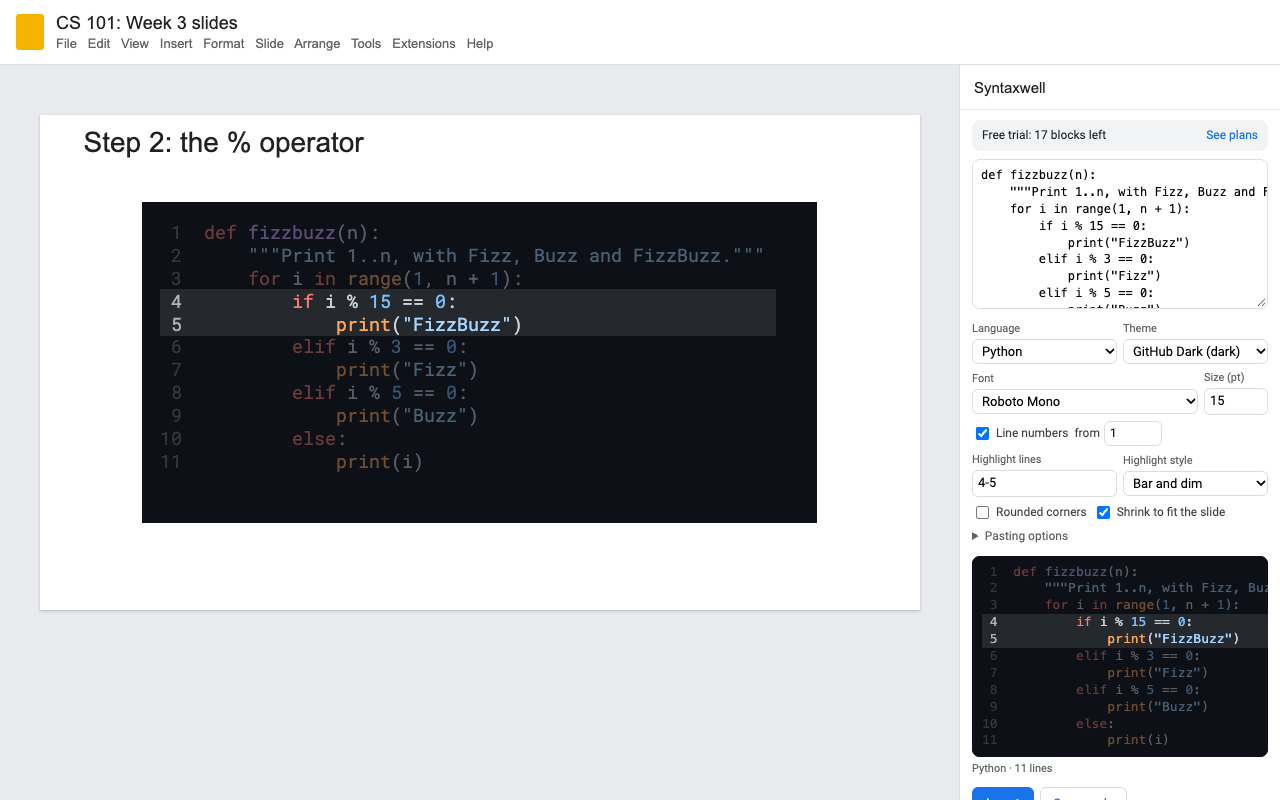
Number lines from any start, highlight lines with a bar, dim the rest, or both.
Click a block and it loads back into the sidebar with its settings. Fix a typo right in the block and Syntaxwell keeps it. Edits are free.
Long code shrinks to fit the slide. Rounded or square corners, 14 programming fonts, any size.
How to add code to Google Slides
- Install Syntaxwell and open your deck.
- Choose Extensions > Syntaxwell > Open code editor.
- Paste your code, pick the language (or leave Auto-detect) and a theme.
- Press Insert. The block lands on the current slide; the next one stacks below it.
Already pasted code into a text box? Click the box, press Use it, then Convert text box.
Walk through code one step per slide
Duplicate a slide, click the block, type the lines to focus on (like 4-5) and choose Bar and dim. Do it again on the next copy with the next lines. When you present, the highlight moves through the code.
Code blocks in Google Docs, on any account
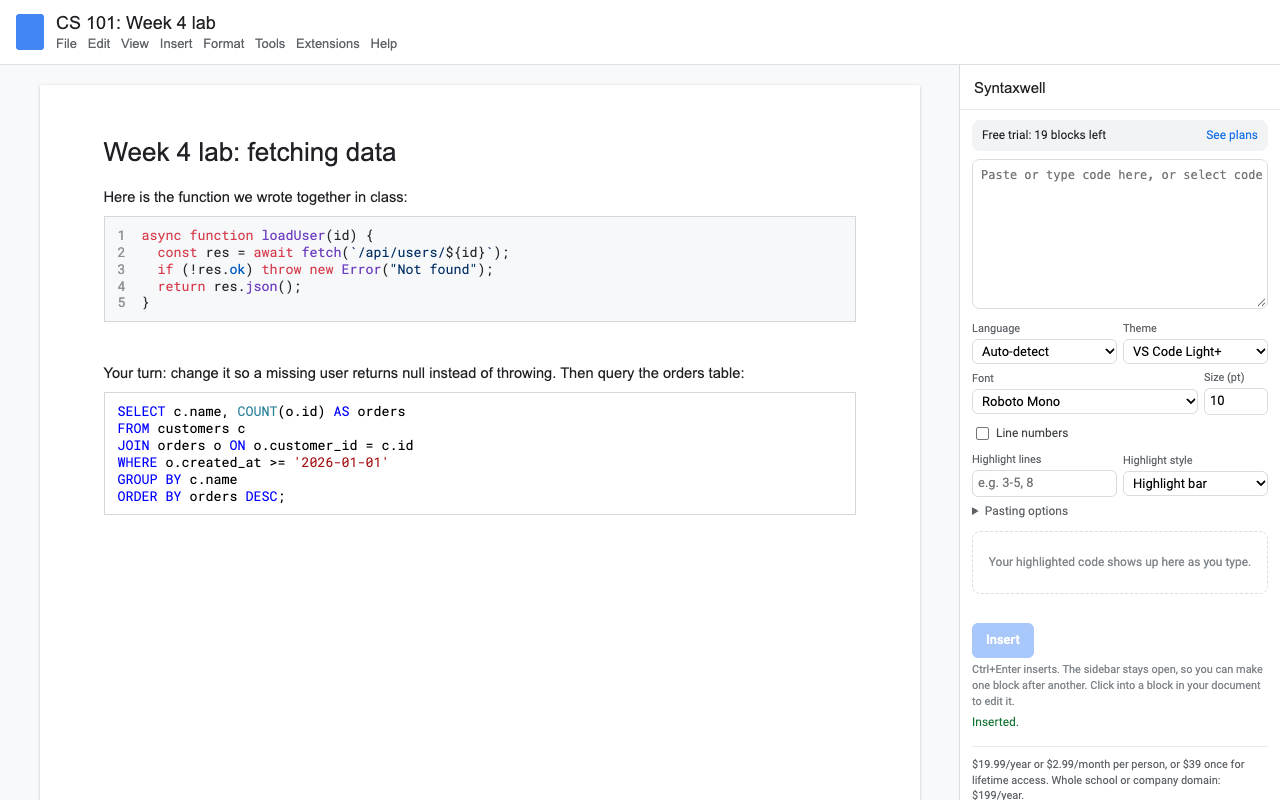
Click where the code should go, open the code editor and press Insert. Syntaxwell works the same on a personal Gmail account, Google One, and every Workspace edition, including Business Starter and Education Fundamentals.
- Insert code in Google Docs as a shaded block with line numbers if you want them.
- Format code already in your Doc: select the lines, press Use it, then Convert selection.
- Inline code: select a bit of code in a sentence and press Format inline to color it in place.
- The sidebar tells you when a long line will wrap at the current font size.
Pricing
Every feature, one Google account, Slides and Docs.
Same features, billed monthly. Handy for one course or one conference talk.
Lifetime access for one Google account. One payment, never renews.
Domain plan: everyone on your school's or company's Google Workspace domain.
25 code blocks or 14 days, whichever comes first. No card needed. Previews and edits to a block you already made don't count.
No surprise charges. We never charge you unless you start a checkout yourself. Syntaxwell shows your trial status and these prices in the sidebar from the first minute. When the trial ends it shows the plans; nothing is charged and every block you made stays in your file.
Renewal. Monthly, yearly and domain plans renew automatically at the same price until you cancel. Cancel any time from Extensions > Syntaxwell > Plans and billing, in one step. You keep access until the end of the period you paid for. Lifetime never renews.
Right to cancel (UK and EU). If you are a consumer in the UK or EU, you can cancel within 14 days of buying and get a full refund. Email hello@greatwork.company or cancel in Plans and billing and reply to the receipt.
Mistakes. Charged twice or by accident? Email us and we'll refund it. A person answers within one business day.
Prices are in US dollars and exclude any sales tax or VAT that applies where you live. Payments are processed by Stripe; we never see your card number.
Why switch
| What people say about other code add-ons | What Syntaxwell does |
|---|---|
| "Requires a license key, but ... the domain is expired" | Your license follows your Google account. No keys to copy, and billing lives inside the add-on. |
| "It stopped working today" | Built on Google's current Apps Script runtime, and a person answers support within one business day. |
| Works in Docs only, or Slides only | Slides and Docs, same sidebar, same themes. |
| "The colors are quite ugly ... Same for the font" | 22 themes, 14 fonts, any size. |
| No line numbers | Line numbers from any start number, plus highlighted and dimmed lines. |
| Code block missing from the Insert menu on my account | Works on any Google account, personal or Workspace. |
Help
Can I edit a block after inserting it?
Yes. Click into it (Docs) or click it (Slides) and the sidebar loads its code and settings. Change anything and press Update block. You can also type a fix straight into the block; Syntaxwell reads it back next time.
What counts as a trial block?
Each new block, converted selection or inline format. Previews and updates to an existing block don't count.
Can collaborators edit my blocks?
Anyone with Syntaxwell installed and edit access to the file can click a block and update it. Everyone else sees normal colored text.
Why does a long line wrap in Docs?
A Docs page is about 74 characters wide at 10 pt in a monospace font. The sidebar warns you; drop the size a point or two.
Still stuck?
Email hello@greatwork.company. A person replies within one business day.
Privacy
- Google data it accesses: only the deck or Doc you open Syntaxwell in. It writes code blocks there, reads a block you click so you can edit it, reads and restyles text you select to convert, and reads the slide or page size so blocks fit. No access to the rest of your Drive.
- Your code stays with you: it is highlighted in your browser by code inside the add-on. It is never sent to Great Work or any other service.
- What it saves in your file: each block's settings (Slides: alt-text title; Docs: a named range around the block) and, in Slides, a copy of the code in the block's alt-text description.
- What reaches Great Work: your Google account email, the product id and a count of trial blocks, for billing. See the full privacy policy.
- Sharing: we don't sell data, use it for ads, or use it to train AI models.
- Syntaxwell's use and transfer of information received from Google APIs adheres to the Google API Services User Data Policy, including the Limited Use requirements.