Randomize Google Slides, the way a review game needs
Deckdraw shuffles every slide in your deck while your title slide, pinned slides and question/answer pairs stay where they belong. It can reshuffle every time the deck opens. And it brings the tools you reach for in class: a random name picker, random groups, a timer and flashcards.
Email us to get Deckdraw See pricing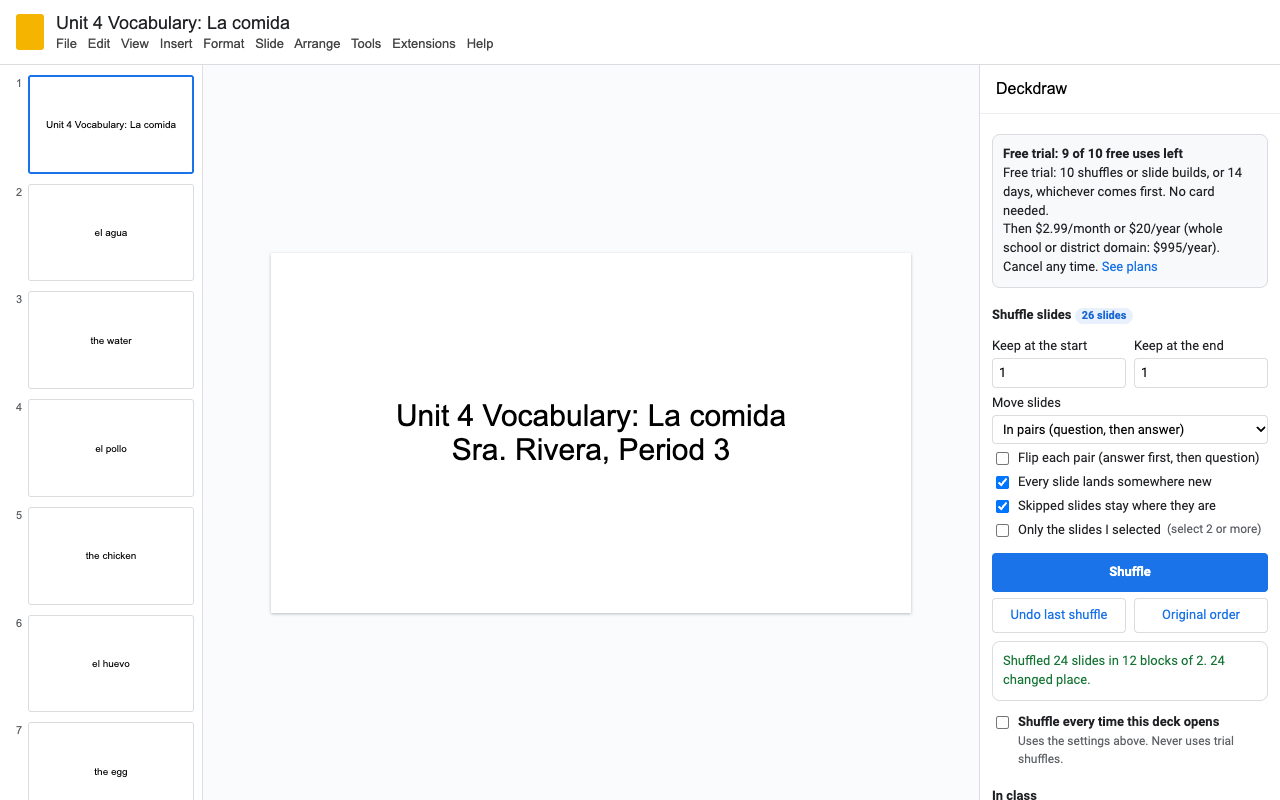
What it does
Every movable slide changes place, whether the deck has 10 slides or 1,000. Keep any number of slides at the start and end.
A question slide and its answer slide move as one. Flip each pair to show the answer first for vocabulary both ways.
Select slides in the filmstrip and pin them. They never move. Skipped slides stay put too.
Tick one box and the deck shuffles itself each time you open it. It never uses trial shuffles.
Undo the last shuffle or put the original order back in one click, free. Slides you added since stay where they were.
Paste term | definition lines, or two columns from Sheets, and get front and back slides in random order.
In class: random name picker, groups and timer
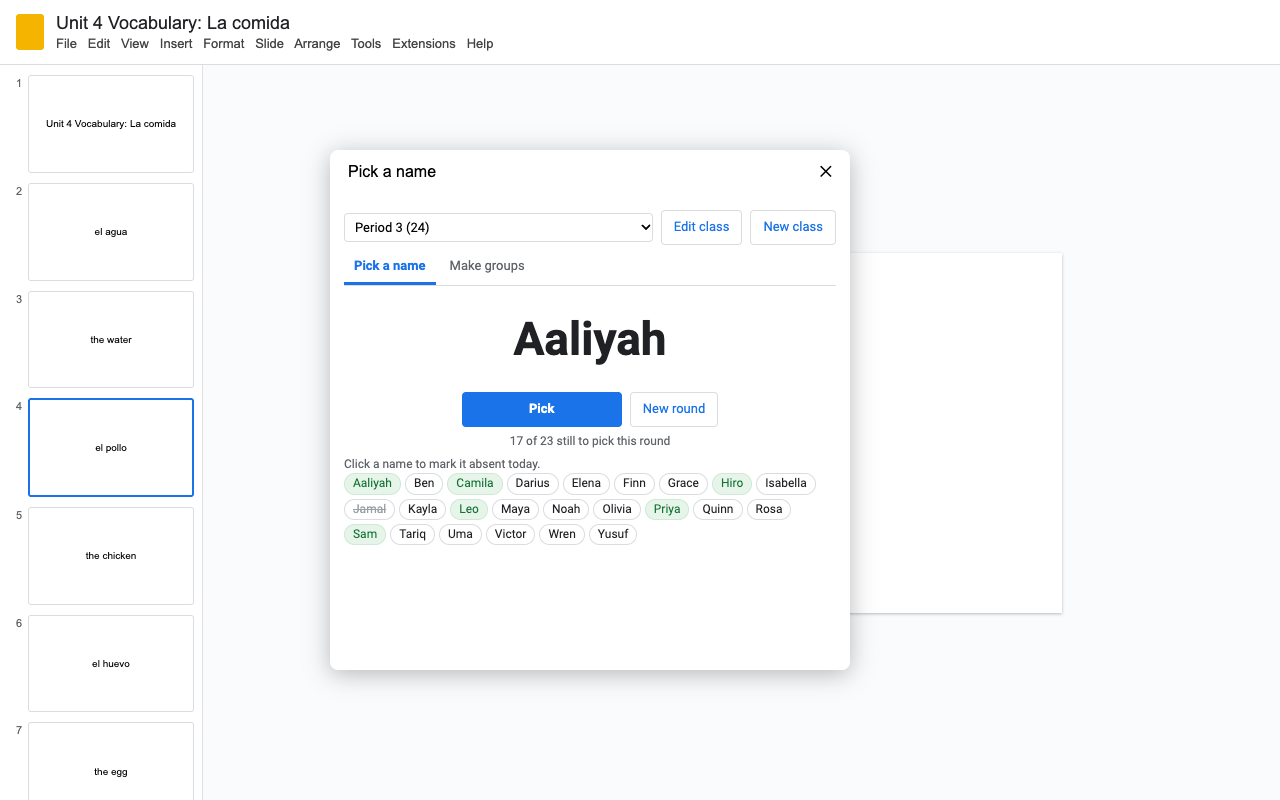
Save each class list once. Nobody is picked twice until everyone has had a turn, and absent students are one click away. Lists stay in your own Google account, never in the deck.
Groups of 4, or 6 groups: your choice. Put them on a slide in one click.
A big countdown with a chime, in a window you can drag anywhere. 1, 3, 5, 10 minutes or any time you type.
Jump to a random question slide, with no repeats until every slide has had a turn.
How to shuffle slides in Google Slides with Deckdraw
- Install Deckdraw, open your presentation and choose Extensions > Deckdraw > Open Deckdraw.
- Set how many slides to keep at the start and end. Choose In pairs if each question has an answer slide after it.
- Click Shuffle. Click it again for another order, or Undo last shuffle to go back.
- To shuffle every time the deck opens, tick Shuffle every time this deck opens.
- For a quick reshuffle later, use Extensions > Deckdraw > Shuffle now; it remembers your settings for this deck.
Pricing
Every feature, one Google account.
Same features, billed monthly. Cancel when the term ends.
Domain plan: every teacher and student account at your school's or district's Google Workspace domain.
10 shuffles or slide builds, or 14 days, whichever comes first. No card needed. The 14 days start when you first open Deckdraw.
No surprise charges. We never charge you unless you start a checkout yourself. Deckdraw shows your trial status and these prices from the first minute. Undo, original order, shuffling on open, random slide, the name picker and the timer never count against the trial. When the trial ends, Deckdraw shows the plans; nothing is charged and your slides stay as they are.
Renewal. Monthly, annual and domain plans renew automatically at the same price until you cancel. Cancel any time from Extensions > Deckdraw > Plans and billing, in one step. You keep access until the end of the period you paid for.
Right to cancel (UK and EU). If you are a consumer in the UK or EU, you can cancel within 14 days of buying and get a full refund. Email hello@greatwork.company or cancel in Plans and billing and reply to the receipt.
Mistakes. Charged twice or by accident? Email us and we'll refund it.
Prices are in US dollars and exclude any sales tax or VAT that applies where you live. Payments are processed by Stripe; we never see your card number. Schools that need a quote or invoice: email us.
Why switch
| What teachers say about other slide randomizers | What Deckdraw does |
|---|---|
| "Over 190 slides... it only randomized the 2nd slide" | Plans the whole new order first, then moves every slide into place. Tested on decks up to 1,000 slides. |
| "The option to automatically randomise slides... doesn't actually work" | Shuffle on open runs inside Slides when the deck opens. Nothing to schedule. |
| "Hasn't been updated in years" | Built in 2026. A person answers email within one business day. |
| "You must be the owner of the source presentation" | Works on any deck you can edit. |
| Asks for access to all your presentations | Sees only the presentation you open it in. |
Help
Will students see a different order?
Shuffle on open runs when someone with edit access opens the deck, so open it yourself before class, or give each class its own copy and turn it on in each. Students who only view the deck see the order it was last saved in.
Can I get my original order back?
Yes. Original order restores the order the deck had before Deckdraw first shuffled it. Use Save the current order as the original at the bottom of the sidebar to change what counts as the original. Slides' version history works too.
My deck has an odd number of question slides.
In pairs mode the last odd slide moves on its own, and Deckdraw tells you. Pin it if it should stay put.
What counts as a trial use?
A shuffle that moves slides, a flashcard build, or a groups slide. Everything else is free while your trial or plan is active.
Still stuck?
Email hello@greatwork.company. A person replies within one business day.
Privacy
- Google data it accesses: only the presentation you open Deckdraw in: the order of its slides, which are skipped, and your selection. It changes only the slide order and adds the slides you ask for.
- Class lists live in your own Google account's private add-on storage, not in the deck and not on our servers. Deckdraw collects no student data.
- What reaches Great Work: your Google account email, the product id and a count of trial uses, for billing. Never any slide content or names. See the full privacy policy.
- Sharing: we don't sell data, use it for ads, or use it to train AI models.
- Deckdraw's use and transfer of information received from Google APIs adheres to the Google API Services User Data Policy, including the Limited Use requirements.