Optiseek: Statistics, Solver & Goal Seek
Statistics, Solver and Goal Seek for Google Sheets
Optiseek gives Google Sheets the analysis tools you used in Excel: regression, t-tests and ANOVA written as Excel-style tables, a Solver for linear, integer and nonlinear models, and a Goal Seek that lands in a few recalculations.
Coming soon to Google Workspace Marketplace See pricing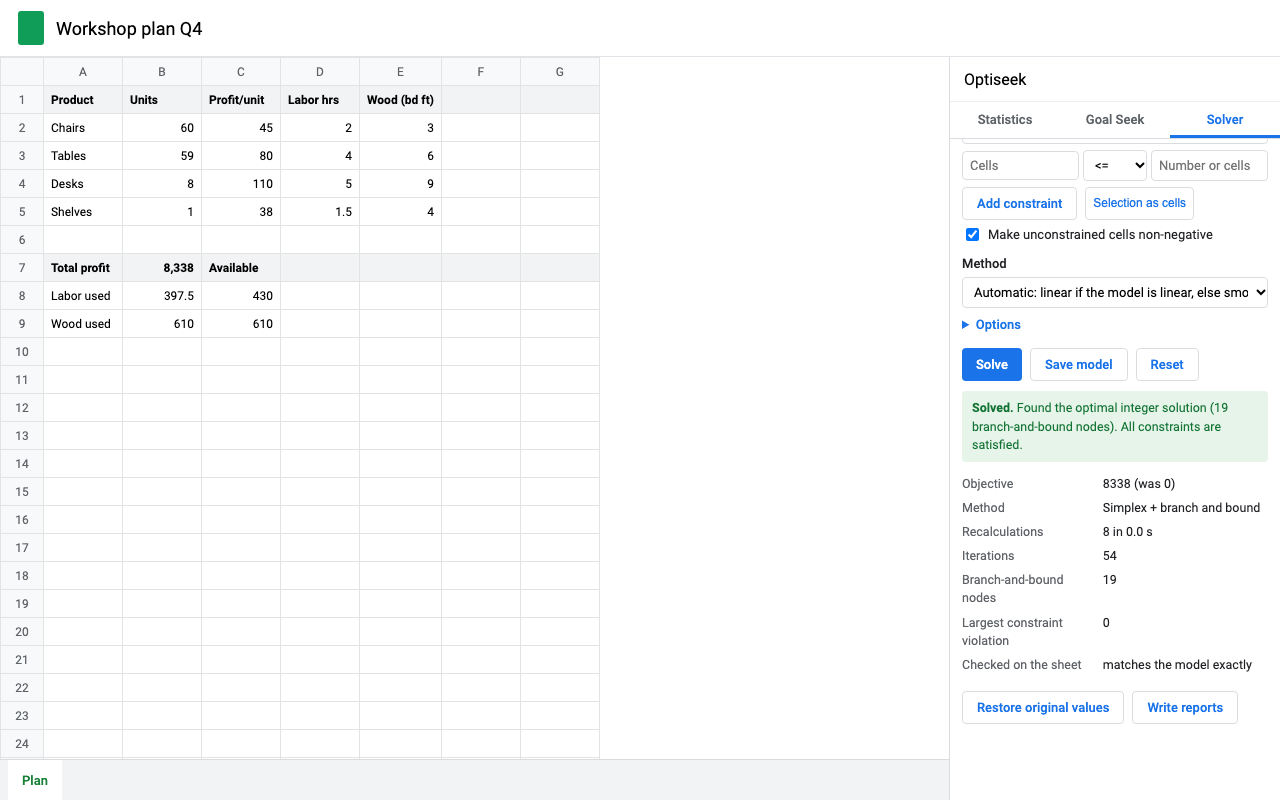
What it does
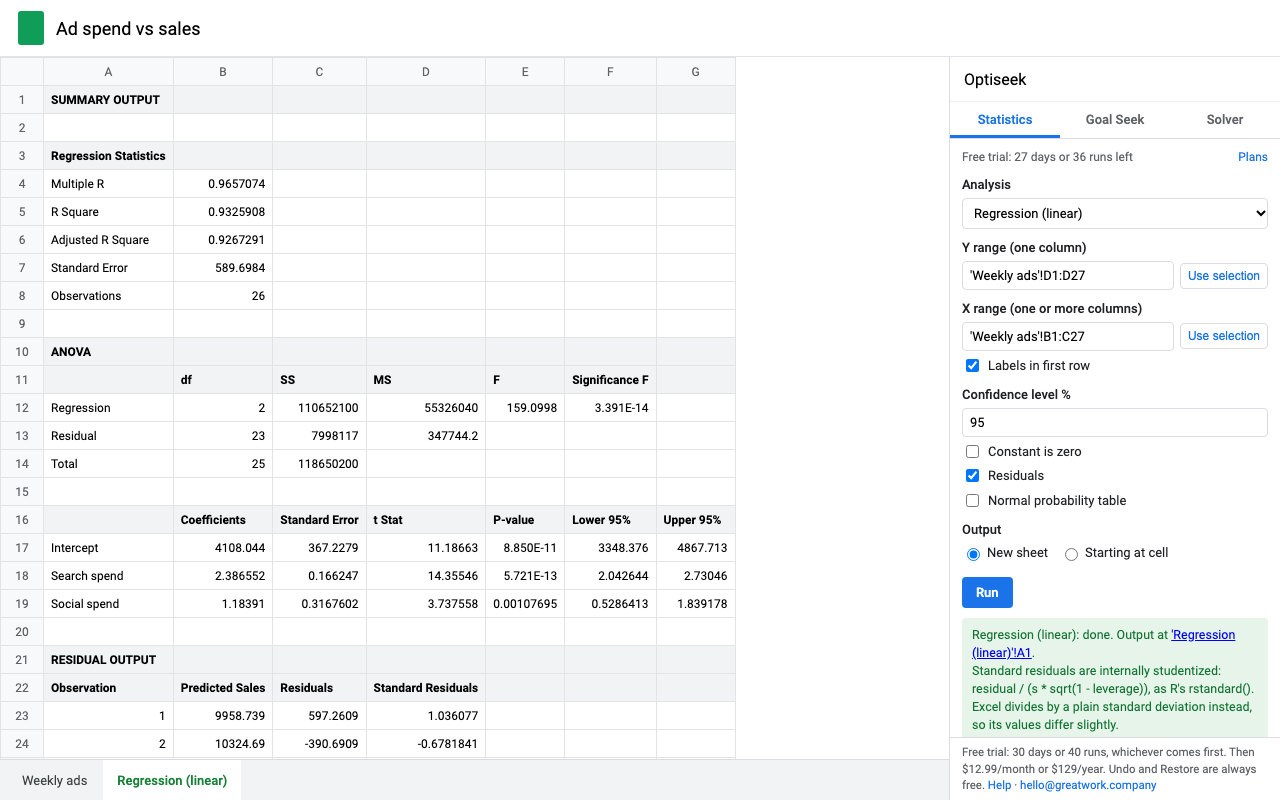
Descriptive statistics, histogram, correlation, covariance, rank and percentile, t, z, F and chi-square tests, ANOVA, regression, logistic regression, moving average, exponential smoothing, Fourier, sampling and random numbers.
Maximize, minimize or hit a value by changing cells, subject to constraints. Linear models get the exact global optimum; integer and binary cells use branch and bound; nonlinear models use SQP.
Pick the formula, the target and the input. It usually lands in under 10 recalculations, to full precision, with Undo. Seek every row handles a whole table.
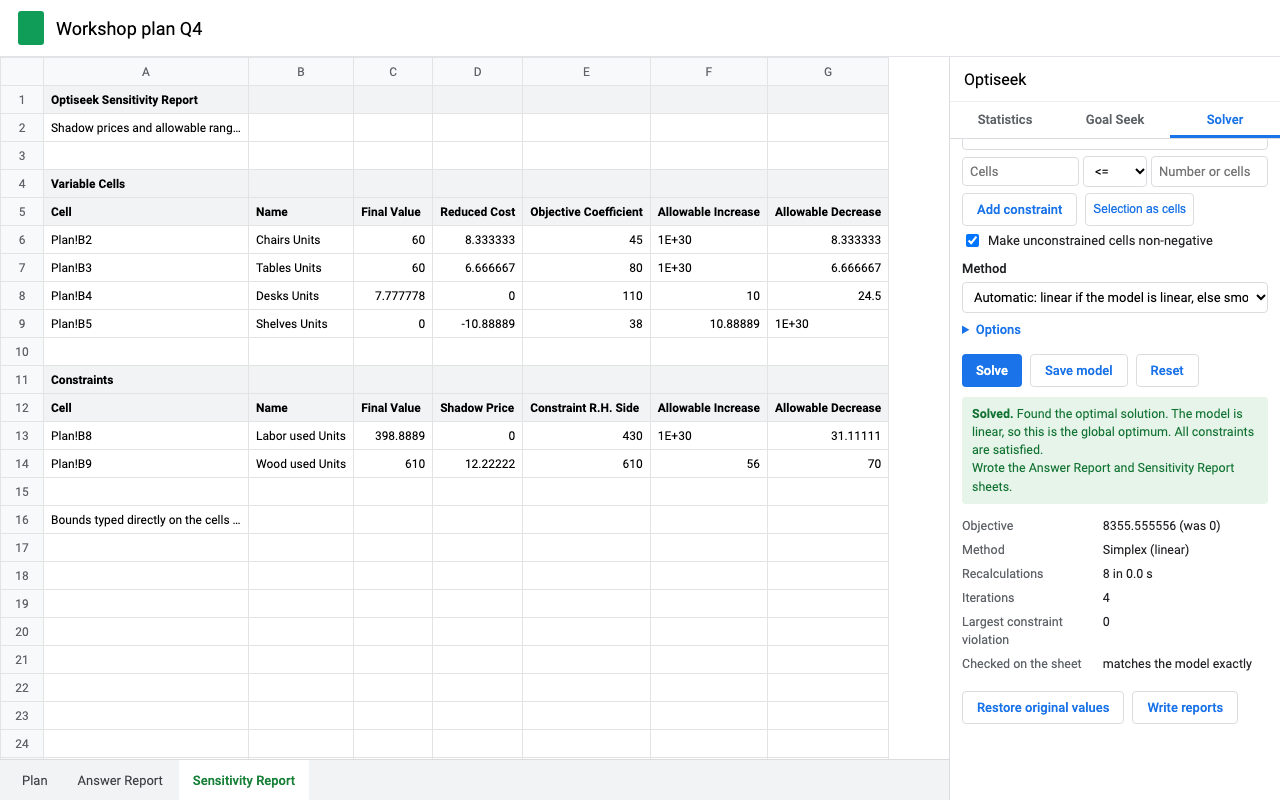
Answer and Sensitivity reports: final values, binding constraints, slack, shadow prices, reduced costs, allowable increase and decrease.
SUM, SUMPRODUCT, lookups, other tabs. Sheets calculates the model; Optiseek never rewrites your formulas.
Works only in the spreadsheet you open it in. Statistics run in Google Apps Script, the Solver in your browser.
Numbers you can check
Every statistic is tested against reference software. From our test suite:
| What | Checked against | Agreement |
|---|---|---|
| t, F, chi-square and normal p-values, including far tails | SciPy | 10 or more significant digits |
| Regression coefficients, standard errors, p-values | statsmodels | 13 or more digits |
| Longley regression (a classic accuracy test for spreadsheets) | NIST certified values | 10 or more digits |
| t-tests, ANOVA, chi-square, logistic regression | SciPy, statsmodels | 13 or more digits |
| Linear and integer optimum, shadow prices | HiGHS | to the last digit |
| Nonlinear test problems (Hock-Schittkowski 35 and 71, portfolio) | published optima | 10 or more digits |
Where Optiseek differs from Excel on purpose, the output tells you: Welch's t-test uses the exact degrees of freedom (as T.TEST, R and SciPy do), and standardized residuals account for leverage.
How the Solver decides
- Automatic first checks whether your model is linear, by evaluating it at several points. If it is, the simplex method finds the global optimum (branch and bound adds integer and binary constraints), and you can write a Sensitivity report.
- If it isn't linear, it switches to Smooth nonlinear (sequential quadratic programming, the same family as Excel's GRG). It says Solved only after checking the optimality conditions; otherwise it says Converged and why.
- Nonsmooth handles IF, MAX, ABS and lookup-shaped models. Extra starting points search more widely when a model has several local optima.
- Every answer is checked on your sheet before it's reported. Stop keeps the best point so far; Restore original values puts your numbers back.
Get started
- Install Optiseek, open a spreadsheet and choose Extensions > Optiseek, then Statistics, Goal Seek or Solver.
- Statistics: pick an analysis, select the data (with headers if you tick Labels), click Run. Output goes to a new tab.
- Goal Seek: select the formula cell first and it's filled in; type the target and the input cell, click Seek.
- Solver: objective cell, Max, Min or Value of, cells to change, constraints like
B8:B9 <= C8:C9orB2:B5 int, then Solve.
Pricing
About $10.75 a month. Statistics, Solver and Goal Seek, in any spreadsheet, for one Google account.
Same features, billed monthly.
Team plan: everyone at your company's Google Workspace domain.
30 days or 40 runs, whichever comes first. A run is one analysis, one goal seek or one solve. Undo, Restore and reports are free. No card needed.
No surprise charges. We never charge you unless you start a checkout yourself. The add-on shows your trial status and these prices from the first minute. When the trial ends, Run, Seek and Solve ask you to pick a plan; nothing is charged and your sheet isn't changed.
Renewal. Monthly, annual and team plans renew automatically at the same price until you cancel. Cancel any time from Plans and billing in the add-on, in one step. You keep access until the end of the period you paid for.
Right to cancel (UK and EU). If you're a consumer in the UK or EU, you can cancel within 14 days of buying and get a full refund. Email hello@greatwork.company or cancel in Plans and billing and reply to the receipt.
Mistakes. Charged twice or by accident? Email us and we'll refund it.
Prices are in US dollars and exclude any sales tax or VAT that applies where you live. Payments are processed by Stripe; we never see your card number.
Help
My results differ slightly from Excel's.
Two differences are deliberate and labeled in the output: Welch's t-test uses exact (not rounded) degrees of freedom, and standardized residuals use leverage. Excel's Goal Seek also stops at a change of 0.001, so its answers are rounder than ours. Anything else: send us the sheet and we'll look.
The Solver says my model isn't linear.
It names the cell that doesn't change in straight lines (a product of two changing cells, an IF, a lookup). Use Automatic or Smooth nonlinear, or Nonsmooth for IF and lookups.
What counts as a run?
One analysis written to the sheet, one goal seek (or one Seek every row), or one solve. Undo, Restore original values, writing reports and saving a model don't count.
Still stuck?
Email hello@greatwork.company. A person replies within one business day.
Permissions Optiseek asks for, and why
When you install Optiseek, Google asks you to allow four things. Each one has a single job:
- See, edit, create and delete only the spreadsheet you open it in (
spreadsheets.currentonly): to read the ranges you pick for an analysis, write result tables and report tabs, and put Goal Seek and Solver answers into the cells you name. - Display and run third-party web content in prompts and sidebars (
script.container.ui): to show the Optiseek sidebar and dialogs inside Sheets. - Connect to an external service (
script.external_request): one call only, the license check to addons.greatwork.company. No spreadsheet data is sent. - See your primary Google Account email address (
userinfo.email): so your free trial or subscription belongs to your account.
Optiseek doesn't ask for your Drive, your other spreadsheets or your Gmail.
Privacy
- Google data it accesses: the spreadsheet you open it in: the ranges you select for analysis, and the cells you name for Goal Seek and Solver (it writes values into those cells and adds result tabs). It can't open your other files, your Drive or your Gmail.
- Where things are stored: your last Solver model (cell references and options) is saved with the tab; original values for Undo and Restore are kept in Google's cache for your account for up to 6 hours. Your license status lives in Google's add-on storage for your account.
- What reaches Great Work: your Google account email, the product id and a count of runs, for billing. Spreadsheet contents never leave Google. See the Optiseek privacy policy.
- Sharing: we don't sell data, use it for ads, or use it to train AI models.
- Optiseek's use and transfer of information received from Google APIs adheres to the Google API Services User Data Policy, including the Limited Use requirements.