Fill PDF forms from Google Sheets, one PDF per row
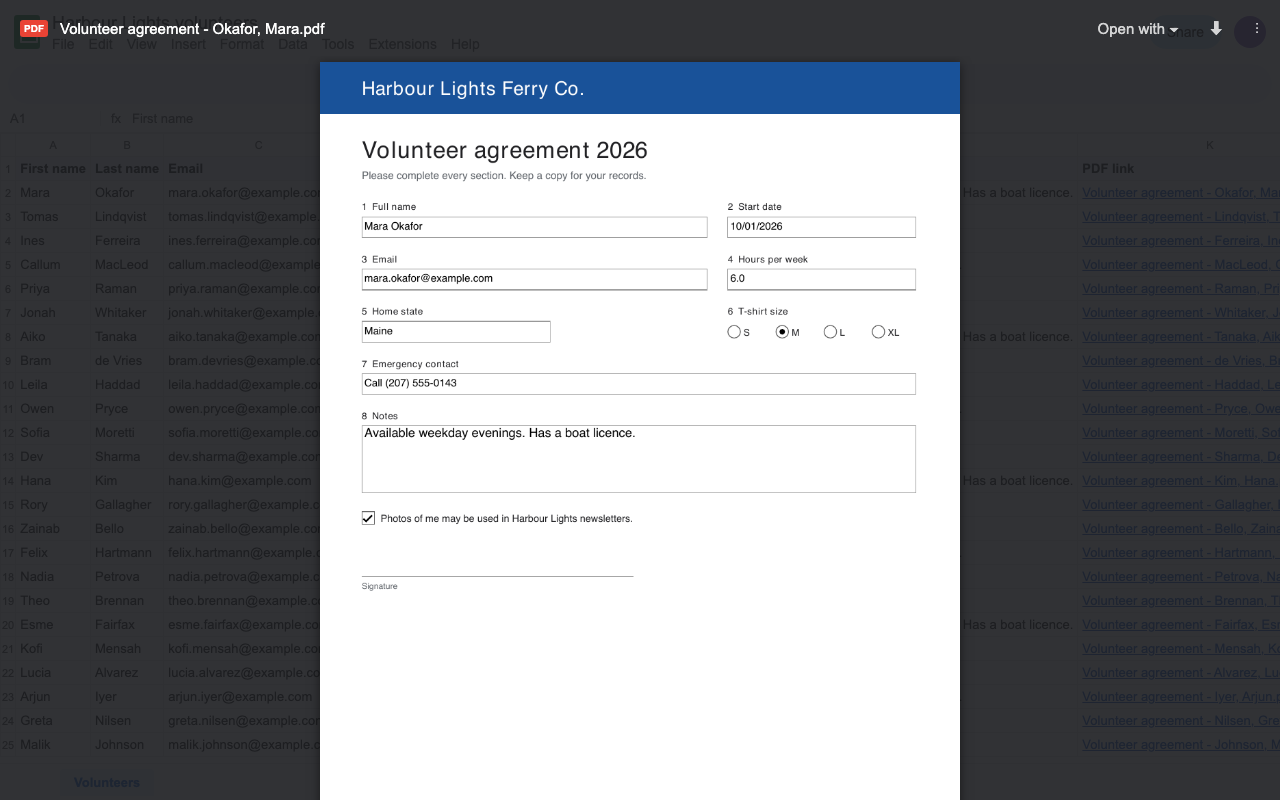
Fillferry fills a PDF form with each row of your sheet: text, checkboxes, option buttons, dropdowns, dates and money in the form's own format. Every PDF lands in the Drive folder you choose, named from your columns, with its link written next to its row.
Email us to get Fillferry See pricing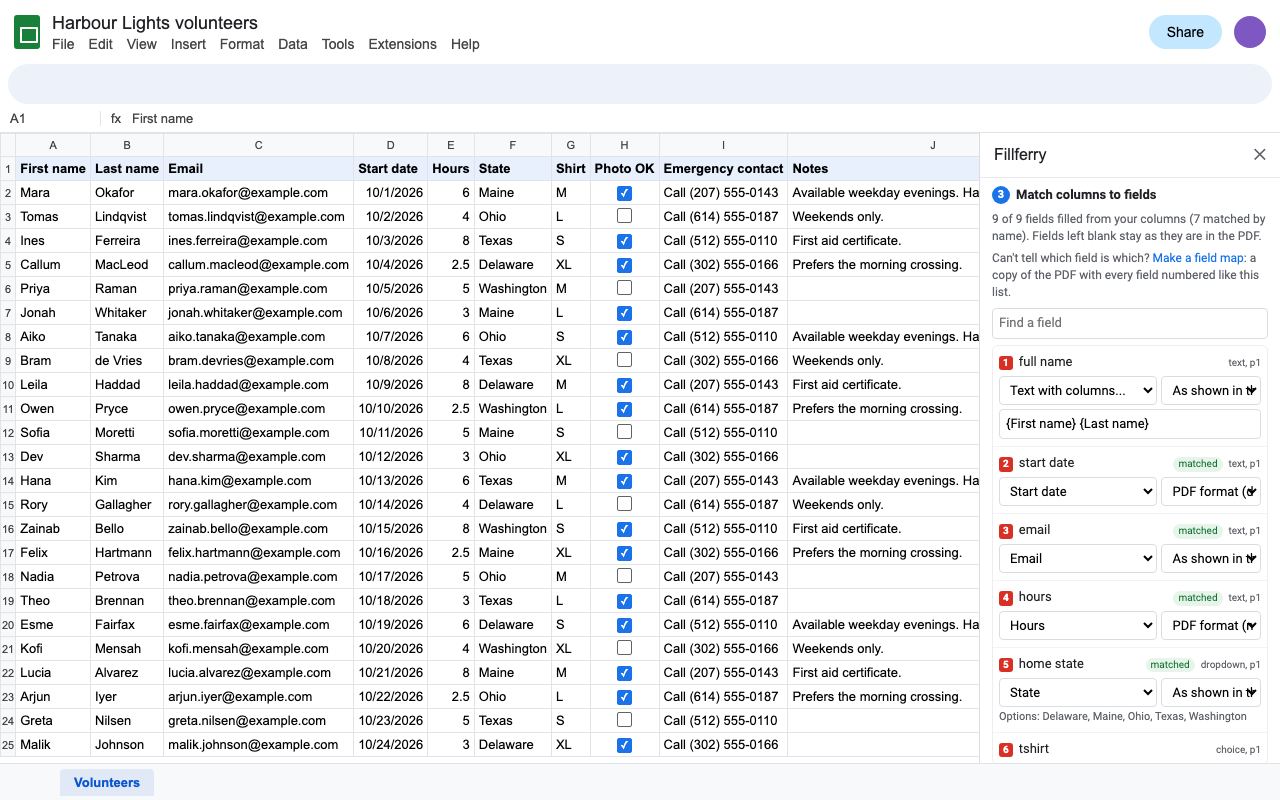
What it does
- Any fillable PDF. Tax and government forms like the W-9, insurance and HR forms, school forms, or your own Acrobat form.
- Columns matched to fields automatically. Change any match, or combine columns in one field:
{First name} {Last name}. - Every field type. Text, multi-line boxes, character boxes, checkboxes (TRUE, yes, x or 1), option buttons, dropdowns and list boxes.
- Dates and numbers done right. The form's own format (03/07/2026, $1,234.50), or one you pick.
- A field map for forms whose fields are named f1_01, f1_02: a copy of the PDF with every field numbered like the sidebar list.
- Free preview of any row before you fill hundreds.
- Optional flatten, so the filled values can't be edited.
- Links back in the sheet. Fill only new rows next week; filling a row again replaces its PDF in place, so shared links keep working.
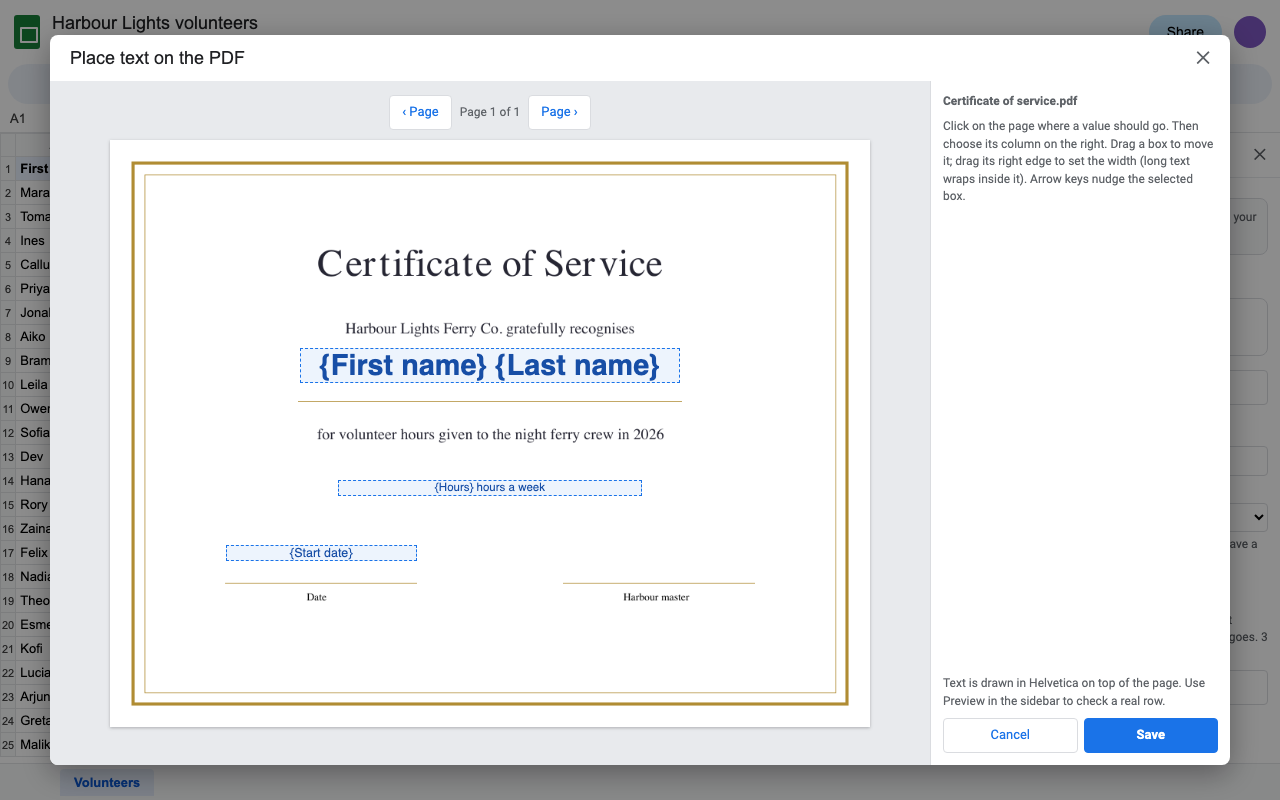
- PDFs without fields too: click where each value goes on the page.
How to fill a PDF form from Google Sheets with Fillferry
- Open your sheet. The first row holds the column names, one person or record per row.
- Extensions > Fillferry > Fill PDFs from this sheet.
- Click Choose a PDF form and pick the PDF in Google Drive (or upload it there).
- Check the matches. Pick a column for any field left blank, or a format for dates and money.
- Set the file names and the folder, then click Preview the first row.
- Click Fill the PDFs. The links appear in the "PDF link" column as each batch is saved.
Who uses it
W-9s, W-4s and state forms for every contractor or employee from one sheet.
The same client details into every form in a packet, without retyping.
Enrollment forms, permission slips and certificates for a whole class.
Onboarding forms, badges and work orders from a roster.
Pricing
About $16.58 a month. Every feature, one Google account, no per-run or monthly PDF cap.
Same features, billed monthly. Cancel when the season is over.
Team plan: everyone at your company's or school's Google Workspace domain.
50 filled PDFs or 14 days, whichever comes first. Every feature. No card needed. Previews and field maps are free.
No surprise charges. We never charge you unless you start a checkout yourself. Fillferry shows your trial status and these prices from the first minute. Rows that fail are never counted. When the trial ends, it shows the plans; nothing is charged and your PDFs stay yours.
Renewal. Monthly, annual and team plans renew automatically at the same price until you cancel. Cancel any time from Extensions > Fillferry > Plans and billing, in one step. You keep access until the end of the period you paid for.
Right to cancel (UK and EU). If you are a consumer in the UK or EU, you can cancel within 14 days of buying and get a full refund. Email hello@greatwork.company or cancel in Plans and billing and reply to the receipt.
Mistakes. Charged twice or by accident? Email us and we'll refund it.
Prices are in US dollars and exclude any sales tax or VAT that applies where you live. Payments are processed by Stripe; we never see your card number.
Why switch
| What people say about other PDF add-ons | What Fillferry does |
|---|---|
| "Can't fill more than 20 at a time ... and that's all on the highest-paid version" | No per-run cap. Big sheets fill in batches with a progress bar and resume where they stopped. |
| "Doesn't work" (2026), "turn off your ad blocker" | Built and tested in 2026. No ads. A person answers email within one business day. |
| Can't authorize, only Help shows | Asks only for this spreadsheet and the files you pick, not all your spreadsheets. |
| Uploads your documents to another company's servers | PDFs are filled inside your own Google account. Nothing is sent to Great Work. |
| Can't download more than 5 at a time | Every PDF is already in your Drive folder, with its link next to its row. |
Help
Which PDFs work?
Any PDF with form fields (AcroForm), including forms that also carry an Adobe XFA copy, like IRS forms. PDFs without fields work with text placement. Encrypted PDFs and Adobe LiveCycle dynamic (XFA-only) forms can't be filled.
The field names are f1_01, f1_02. Which is which?
Click Make a field map in the sidebar. You get a copy of the PDF with each field outlined in red and numbered like the list.
How do checkboxes and dropdowns work?
A checkbox is ticked when its cell says TRUE, yes, x or 1, or is a ticked checkbox. Option buttons and dropdowns take the option's name in any capitalization; the preview flags any value that isn't one of the options.
Can it email each PDF?
No. Sending email would need a sensitive Google permission to send mail as you, and Fillferry asks only for the minimum. Each PDF's link is in the sheet, ready to share.
What about accented letters and other scripts?
Values are drawn with the PDF standard fonts, which cover English and Western European letters. Other scripts are saved in the fields and show in Acrobat and Chrome, but flattened PDFs show them as ?.
What counts as a trial PDF?
Each filled PDF saved to Drive. Previews, field maps and rows that fail don't count.
Still stuck?
Email hello@greatwork.company and attach the PDF form. A person replies within one business day.
Privacy
- Google data it accesses: the rows of the sheet tab you open it in, the PDF form and the folder you pick in Google's file picker, and the PDFs it creates. It can't see the rest of your Drive or your other spreadsheets.
- What it creates: one PDF per row in your folder, owned by you; a link column in your sheet; a preview PDF that is replaced each time. For page pictures it makes a one-page copy of the form and trashes it straight after.
- What it keeps: each tab's setup (which column goes in which field, options) in the spreadsheet's add-on storage, and the progress of a run in your account's private add-on storage.
- What reaches Great Work: your Google account email, the product id and a count of filled PDFs, for billing. Never any sheet data or PDF content. See the full privacy policy.
- Sharing: we don't sell data, use it for ads, or use it to train AI models.
- Fillferry's use and transfer of information received from Google APIs adheres to the Google API Services User Data Policy, including the Limited Use requirements.
You are responsible for having the right to use the form and the data you fill it with, and for checking filled forms before you submit them anywhere.