Labels from Google Sheets, lined up on the first try
Labelyard turns the rows of your spreadsheet into an exact-size PDF of address labels, name tags, product stickers or envelopes. Pick the code on your label box, check the live preview, print.
Email us to get Labelyard 300 labels free, then $39 a year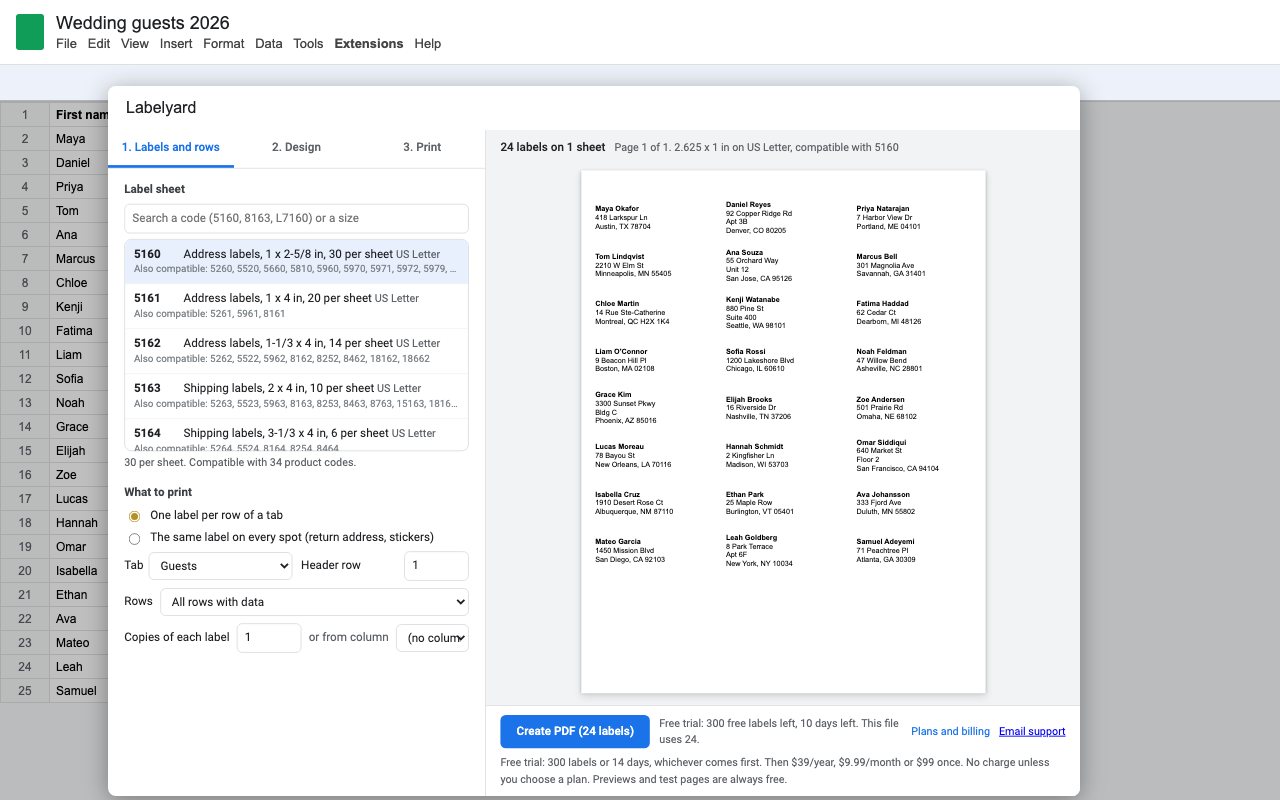
What it does
143 label sheet codes
Layouts compatible with Avery 5160, 8160, 5163, 5167, L7160 and more, on US Letter and A4, plus envelopes and a custom size for anything else.
Text that fits
Long names shrink a little, then wrap. Nothing spills onto the next label. The preview is drawn by the same code that makes the PDF.
Clean addresses
An empty Address 2 line disappears. A missing city doesn't leave a stray comma. Zip codes keep their leading zeros.
QR codes, barcodes, logo
QR, Code 128, UPC-A, EAN-13, EAN-8, Code 39 and ITF-14 from any column, drawn as sharp vectors. Add your logo to every label.
Partly used sheets
Click the first empty spot and the rest of that sheet fills in. Print several copies per row, or take the count from a Qty column.
Free alignment test
A test page with outlines and a ruler that tells you if your printer is scaling the page. Nudge in millimeters if needed. Never counted against your trial.
How it works
- Put one row per label in a tab, with column names in the first row.
- Open Extensions > Labelyard > Create labels and search the code on your label box.
- Write the label with column names in double braces, like
{{Name}}. Check the preview. - Click Create PDF, then print at 100% (Actual size).
Your data stays in Google
Labelyard only reads the spreadsheet you open it in. It never asks to see or change your Google Docs or the rest of your Drive. The PDF is made inside Google Apps Script and downloaded to your computer, and if you like, saved to your Drive (Labelyard can only see files it created). Our licensing server sees your Google account email and how many labels you printed. Nothing else. See the privacy policy.
Pricing
Free trial: 300 labels or 14 days, whichever comes first. No card needed to start. Previews and test pages never count. You're only charged if you choose a plan. Prices are in US dollars, plus sales tax or VAT where it applies.
One Google account, unlimited labels and envelopes.
One Google account, unlimited. Good for a single busy season.
Lifetime for one Google account. Nothing to renew.
Team plan: everyone with an email at your company's domain.
Renewal and cancelling
Monthly and yearly plans renew automatically at the same price until you cancel. Cancel in one step any time from Extensions > Labelyard > Plans and billing > Manage billing; you keep access until the end of the period you paid for.
UK and EU customers: you have a 14-day right to cancel a new subscription and get a full refund. Email hello@greatwork.company or cancel in Manage billing.
Compatible label sheets
Labelyard isn't made by or affiliated with Avery. Product codes are listed only to show which sheets each layout fits. Don't see yours? Use Custom and type the measurements from the box, or email us and we'll add it.
| Code | Layout | Size | Also compatible |
|---|---|---|---|
| 5160 | Address labels, 1 x 2-5/8 in, 30 per sheet | 2.625 x 1 in, US Letter | 5260, 5520, 5660, 5810, 5960, 5970, 5971, 5972, 5979, 5980, 8160, 8250, 8460, 8660, 8810, 15160, 15660, 15960, 16460, 18160, 18660, 28660, 32660, 38260, 48160, 48260, 48360, 48460, 48860, 48960, 55160, 58160, 58660 |
| 5161 | Address labels, 1 x 4 in, 20 per sheet | 4 x 1 in, US Letter | 5261, 5961, 8161 |
| 5162 | Address labels, 1-1/3 x 4 in, 14 per sheet | 4 x 1.333 in, US Letter | 5262, 5522, 5962, 8162, 8252, 8462, 18162, 18662 |
| 5163 | Shipping labels, 2 x 4 in, 10 per sheet | 4 x 2 in, US Letter | 5263, 5523, 5963, 8163, 8253, 8463, 8763, 15163, 18163, 18663 |
| 5164 | Shipping labels, 3-1/3 x 4 in, 6 per sheet | 4 x 3.333 in, US Letter | 5264, 5524, 8164, 8254, 8464 |
| 5159 | Address labels, 1-1/2 x 4 in, 14 per sheet | 4 x 1.5 in, US Letter | |
| 5167 | Return address labels, 1/2 x 1-3/4 in, 80 per sheet | 1.75 x 0.5 in, US Letter | 5267, 6467, 8167, 8667, 18167, 18667 |
| 5195 | Return address labels, 2/3 x 1-3/4 in, 60 per sheet | 1.75 x 0.667 in, US Letter | 8195, 15695, 18195, 18695 |
| 5366 | File folder labels, 2/3 x 3-7/16 in, 30 per sheet | 3.438 x 0.667 in, US Letter | 5066, 5666, 5766, 5866, 5966, 8066, 8366 |
| 5168 | Shipping labels, 3-1/2 x 5 in, 4 per sheet | 3.5 x 5 in, US Letter | 8168 |
| 5126 | Half-sheet labels, 5-1/2 x 8-1/2 in, 2 per sheet | 8.5 x 5.5 in, US Letter | 5526, 8126, 18126 |
| 5165 | Full-sheet label, 8-1/2 x 11 in | 8.5 x 11 in, US Letter | 5265, 8165, 8255, 8465 |
| 5395 | Name badges, 2-1/3 x 3-3/8 in, 8 per sheet | 3.375 x 2.333 in, US Letter | 8395 |
| 5371 | Business cards, 2 x 3-1/2 in, 10 per sheet | 3.5 x 2 in, US Letter | 5376, 5377, 5871, 5911, 8371, 8471, 28371, 38371 |
| 5388 | Index cards, 3 x 5 in, 3 per sheet | 5 x 3 in, US Letter | |
| 8387 | Postcards, 4-1/4 x 5-1/2 in, 4 per sheet | 4.25 x 5.5 in, US Letter | |
| L7160 | Address labels, 63.5 x 38.1 mm, 21 per sheet | 63.5 x 38.1 mm, A4 | J8160, L7560 |
| L7159 | Address labels, 63.5 x 33.9 mm, 24 per sheet | 63.5 x 33.9 mm, A4 | J8159 |
| L7161 | Address labels, 63.5 x 46.6 mm, 18 per sheet | 63.5 x 46.6 mm, A4 | J8161 |
| L7162 | Address labels, 99.1 x 33.9 mm, 16 per sheet | 99.1 x 33.9 mm, A4 | J8162 |
| L7163 | Address labels, 99.1 x 38.1 mm, 14 per sheet | 99.1 x 38.1 mm, A4 | J8163, L7563 |
| L7173 | Shipping labels, 99.1 x 57 mm, 10 per sheet | 99.1 x 57 mm, A4 | J8173 |
| L7165 | Parcel labels, 99.1 x 67.7 mm, 8 per sheet | 99.1 x 67.7 mm, A4 | J8165 |
| L7166 | Parcel labels, 99.1 x 93.1 mm, 6 per sheet | 99.1 x 93.1 mm, A4 | J8166 |
| L7169 | Parcel labels, 99.1 x 139 mm, 4 per sheet | 99.1 x 139 mm, A4 | J8169 |
| L7168 | Shipping labels, 199.6 x 143.5 mm, 2 per sheet | 199.6 x 143.5 mm, A4 | J8168 |
| L7167 | Full-sheet label, 199.6 x 289.1 mm | 199.6 x 289.1 mm, A4 | J8167 |
| L7651 | Mini labels, 38.1 x 21.2 mm, 65 per sheet | 38.1 x 21.2 mm, A4 | J8651 |
| 3474 | Edge-to-edge labels, 70 x 37 mm, 24 per sheet | 70 x 37 mm, A4 | |
| 3475 | Edge-to-edge labels, 70 x 36 mm, 24 per sheet | 70 x 36 mm, A4 | |
| 3422 | Edge-to-edge labels, 70 x 35 mm, 24 per sheet | 70 x 35 mm, A4 | |
| 3424 | Edge-to-edge labels, 105 x 48 mm, 12 per sheet | 105 x 48 mm, A4 | |
| 3425 | Edge-to-edge labels, 105 x 57 mm, 10 per sheet | 105 x 57 mm, A4 | |
| 3483 | A6 labels, 105 x 148 mm, 4 per sheet | 105 x 148 mm, A4 | |
| 3651 | Small edge-to-edge labels, 52.5 x 29.7 mm, 40 per sheet | 52.5 x 29.7 mm, A4 | |
| 3478 | Full-sheet label, 210 x 297 mm | 210 x 297 mm, A4 | |
| #10 business envelope, 4-1/8 x 9-1/2 in | #10 envelope | ||
| Catalog envelope, 6 x 9 in | 6 x 9 in envelope | ||
| A7 invitation envelope, 5-1/4 x 7-1/4 in | A7 envelope | ||
| DL envelope, 110 x 220 mm | DL envelope | ||
| C5 envelope, 162 x 229 mm | C5 envelope |
Questions
My labels are slightly off. What do I do?
Almost always it's the print dialog scaling the page. Set Scale to 100% or Actual size. Then print the free alignment test page: its ruler should measure exactly 4 inches (or 100 mm). If outlines still sit off the labels, use Move right / Move up in the Print tab.
Does it use up my trial when I open it?
No. Only labels you actually print into a PDF count. Opening the add-on, previews and test pages are free.
Can I print names in other alphabets?
Accented Latin letters (e, n, u with accents, and so on) print fine. Cyrillic, Greek, Chinese, Japanese, Arabic and emoji aren't supported by the built-in PDF fonts yet; the preview warns you before you print.
Can I edit a label after the PDF is made?
Edit the row in your sheet and make the PDF again. It takes a few seconds and keeps every label lined up.