Photos to Google Slides, a whole folder at a time
Deckroll puts hundreds of photos from Google Drive folders, Google Photos or your computer into the presentation you have open: one per slide or several per slide, with captions from the file name or the date each photo was taken.
Email us to get Deckroll See pricing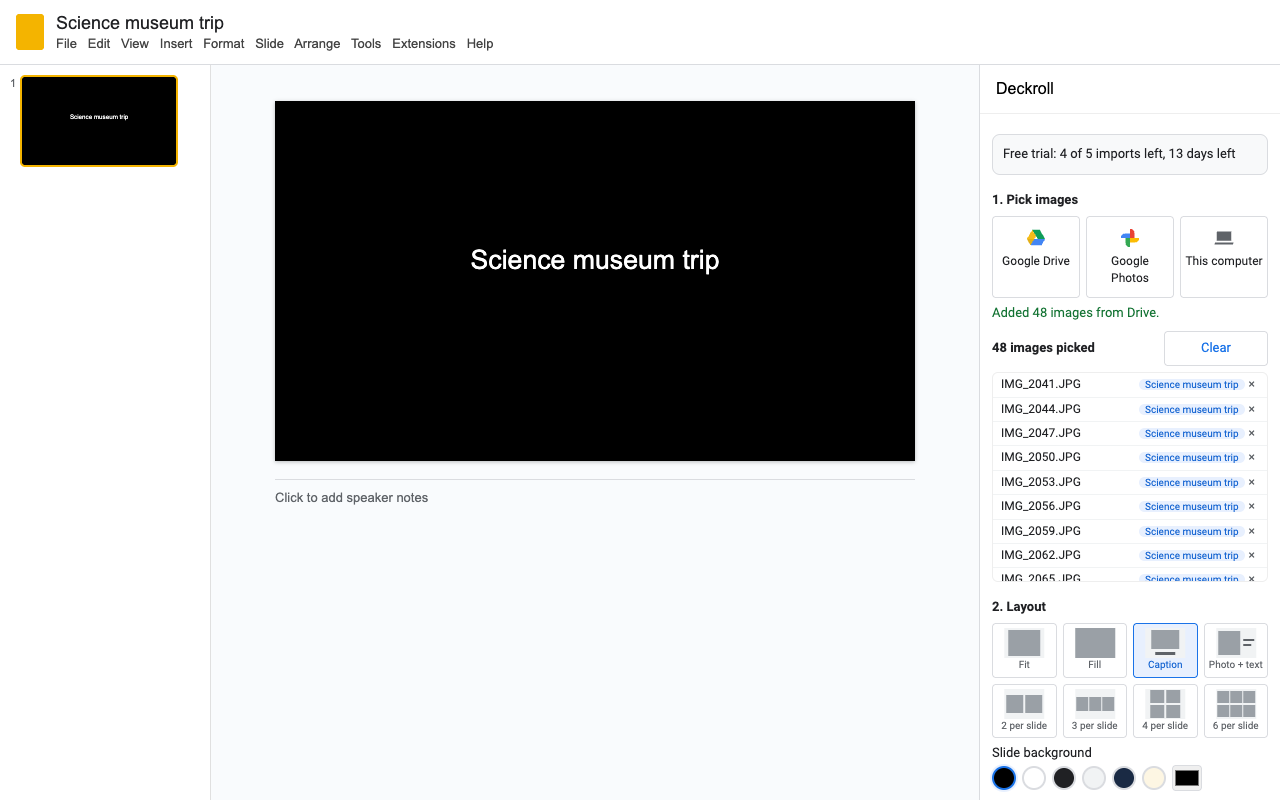
What it does
Pick images or whole folders in Google Drive (Shared drives too), photos in Google Photos, or files on your computer. Up to 2,000 per import.
Fit or fill the slide, a caption band under the photo, photo with text beside it, or 2, 3, 4 or 6 photos per slide.
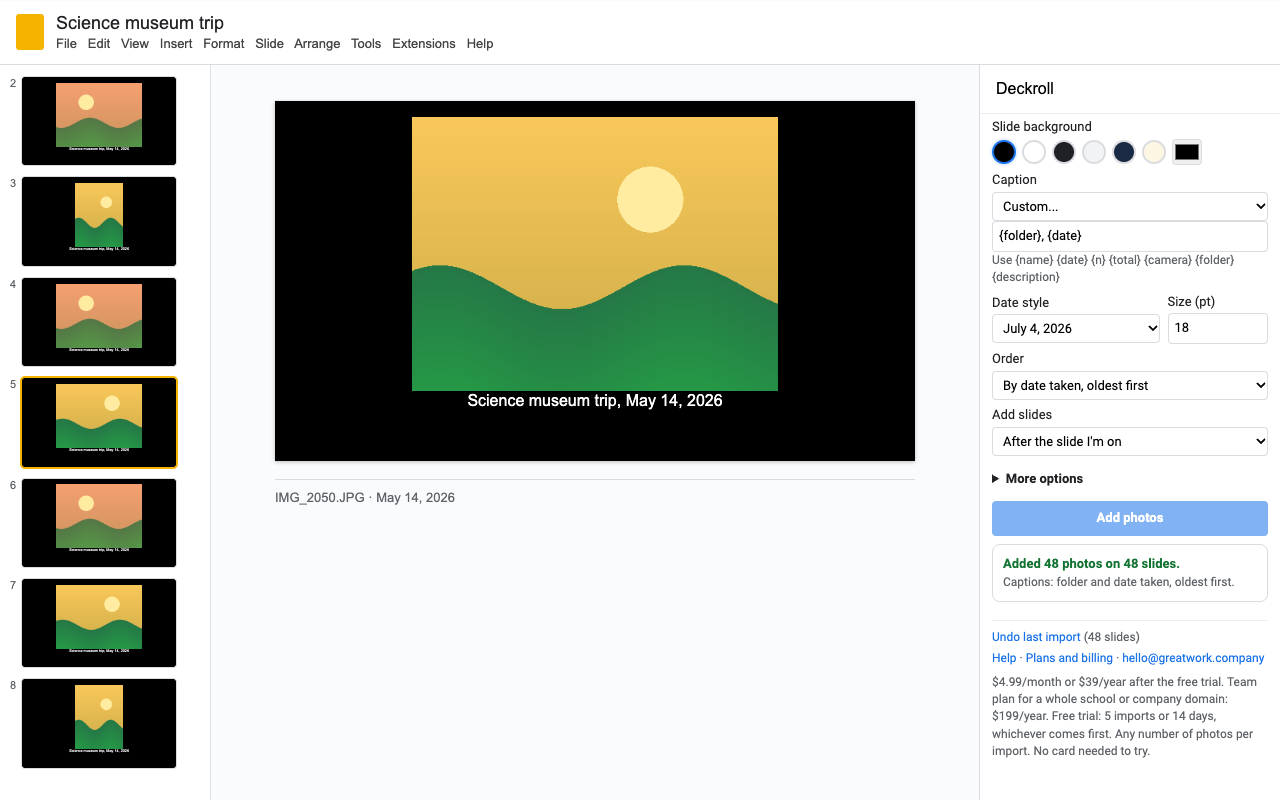
File name, date taken, both, or your own pattern like Day {n}: {date}. Dates come from the camera, not the upload time.
As picked, by file name (IMG_2 before IMG_10), or by date taken, oldest or newest first.
Run it on the same folder next week and photos already in the presentation are skipped. Undo the last import in one click.
Deckroll works in batches and shows progress. If one photo fails, the rest still go in and you see which one and why.
How to make a photo slideshow in Google Slides with Deckroll
- Install Deckroll, open a presentation and choose Extensions > Deckroll > Add photos.
- Click Google Drive and pick photos, or open a folder and press Ctrl+A (Cmd+A on a Mac) to take all of it. Or click Google Photos and pick photos there (open an album to pick from it). Or click This computer.
- Choose a layout, a background color and a caption.
- Click Add photos. The slides go in after the slide you're on, or at the end.
Pricing
About $3.25 a month. Every feature, one Google account.
Same features, billed monthly. Cancel when the project is done.
Team plan: everyone at your school's or company's Google Workspace domain.
5 imports or 14 days, whichever comes first, with every feature and no limit on photos per import. No card needed.
No surprise charges, no surprise limits. We never charge you unless you start a checkout yourself. Deckroll shows your trial status and these prices from the first minute. The trial does not shrink after you install it. When it ends, Deckroll shows the plans; nothing is charged and the slides you made stay yours.
Renewal. Monthly, annual and team plans renew automatically at the same price until you cancel. Cancel any time from Extensions > Deckroll > Plans and billing, in one step. You keep access until the end of the period you paid for.
Right to cancel (UK and EU). If you are a consumer in the UK or EU, you can cancel within 14 days of buying and get a full refund. Email hello@greatwork.company or cancel in Plans and billing and reply to the receipt.
Mistakes. Charged twice or by accident? Email us and we'll refund it.
Prices are in US dollars and exclude any sales tax or VAT that applies where you live. Payments are processed by Stripe; we never see your card number.
Why switch
| What people say about other photo-to-Slides add-ons | What Deckroll does |
|---|---|
| "The limit changed overnight" to 10 photos every 6 hours | A trial with every feature and no per-photo cap, stated up front, then one price that doesn't move. |
| "The documentation says you can import an album", but you can't | We say exactly what Google allows: you pick photos in the Google Photos picker, any album, up to 2,000 at a time. |
| Photos must be shared "Anyone with the link" | No sharing. Deckroll reads the files you pick with your own permission. |
| "Only moved 10 of my selected photos after multiple errors" | Batches with progress; failures are named, the rest go in, and failed ones stay in the list to retry. |
| "Sized the photos incorrectly" | Whole photo, right way up, never stretched. Fill only when you choose it. |
| "Won't work unless you give it all access" | Sees only the presentation you open, the files you pick and the photos you pick. |
Help
Can Deckroll import a whole Google Photos album by itself?
No app can since Google changed the Photos API in 2025. Deckroll opens the Google Photos picker; open the album there and select its photos (up to 2,000 per pick).
I picked a Drive folder and nothing came in.
Google gives add-ons access to exactly what you pick. If a folder pick doesn't include its photos, open the folder in the picker, press Ctrl+A (Cmd+A on a Mac) and click Select.
Some photos didn't go in.
Deckroll lists each one with the reason (deleted, a format Slides can't show, or too large). They stay in the list, so you can click Add photos again.
What counts as a trial import?
Each time you click Add photos and at least one photo goes in. Any number of photos. Picking, undo and failed imports don't count.
Can I undo?
Extensions > Deckroll > Undo last import removes the slides the last import added. Slides you made yourself are never touched.
Still stuck?
Email hello@greatwork.company. A person replies within one business day.
Privacy
- Google data it accesses: the presentation you open Deckroll in (to add slides and photos), the Google Drive files you pick, and the Google Photos you pick. Nothing else in your Drive or Photos.
- Photos: they go from Google straight into your presentation. They are never sent to or stored on Great Work servers. Photos from your computer go into the presentation only and are not saved to your Drive.
- Kept in the presentation: your layout settings, a short code for each photo already added (so re-runs skip them), and the slide ids of the last import (for Undo). Not the photos or their names.
- What reaches Great Work: your Google account email, the product id and a count of trial imports, for billing. See the full privacy policy.
- Sharing: we don't sell data, use it for ads, or use it to train AI models.
- Deckroll's use and transfer of information received from Google APIs adheres to the Google API Services User Data Policy, including the Limited Use requirements.