 Rowcatch
Export Gmail emails to Google Sheets, one row per email
Order numbers, totals, customer details, leads and invoice amounts pulled into columns by rules you can see and preview. Duplicates skipped. Kept up to date on a schedule.
Paid Chrome extension, sold by Great Work LLC (not Google). Free trial: your first 100 exported emails or 7 days, whichever comes first, with every feature. Then Starter $39/month, Pro $70/month or Business $99/month (yearly: $390, $699, $990). Terms of sale.
Add to Chrome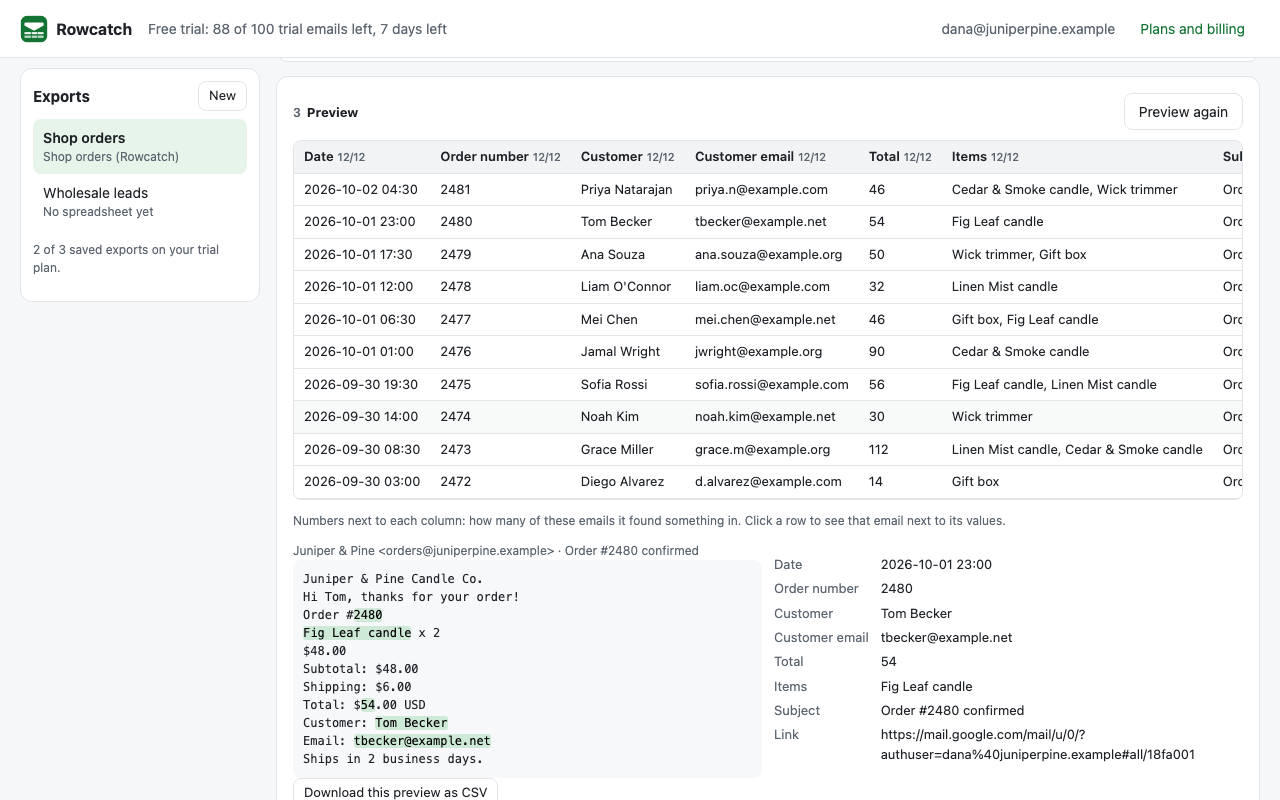
How it works
1. Pick the emails
Type a Gmail search, such as from:orders@yourshop.com newer_than:30d, or find emails and tick the ones you want.
2. Choose the columns
Start from a template (orders, leads, invoices, form notifications) and adjust each rule on a real email.
3. Preview, then export
See every value before anything is written. Rowcatch creates the spreadsheet and adds one row per email.
Rules you can read
- Text after a label: "Order number:", "Total", "Phone". Several spellings at once:
Order #|Order number. - Text between two markers, a line number, or a regular expression with groups when you need one.
- Formats: amounts as numbers ($1,234.56 and 1.234,56 EUR both work), dates as real dates, the first email address or phone number in a field.
- Combined columns:
{{From email}} / {{Order number}}. - Sender, recipients, subject, date, labels, attachment names and a link back to each email are one click away.
Built so nothing surprises you
- Before every export you see how many emails it will write and how many trial emails that uses. An export never runs and then asks for money.
- Duplicate checks by email, by conversation, or by a column you choose (one row per order number, even when a confirmation is sent twice).
- Scheduled sync every hour, every 6 hours or every day while Chrome is open. The toolbar button shows how many rows were added since you last looked.
- Your own columns and notes in the sheet are kept; new rows line up by column name.
- Text that looks like a formula is written as text, so an email can't put a formula in your sheet.
Your email stays yours
- Emails are read and parsed inside your browser and written only to the spreadsheet Rowcatch creates in your Google Drive.
- No email content ever reaches Great Work. Our licensing server only learns your Google account email and how many emails an export wrote.
- Read-only Gmail access. Drive access is limited to spreadsheets Rowcatch creates. No other website access at all.
- The use of information received from Google APIs will adhere to the Chrome Web Store User Data Policy, including the Limited Use requirements. Privacy policy.
Pricing
Starter
$39/month or $390/year
- 1 saved export
- 1,000 emails a month
- Every rule, template and schedule
Pro
$70/month or $699/year
- 10 saved exports
- 2,000 emails a month
- Every rule, template and schedule
Business
$99/month or $990/year
- Unlimited saved exports
- 4,000 emails a month
- Every rule, template and schedule
Buying here gets you a license key by email. Buying inside the app links the plan to your account. Change or cancel any time in Manage billing.
Free trial
Your first 100 exported emails or 7 days, whichever comes first, with every feature. Previews never use trial emails. No card needed to start.
Every plan includes every rule, template and schedule. Buying from this page gives you a license key by email; paste it in the extension's Plans and billing panel. Buying inside the extension links the plan to your Google account.
Terms of sale
- Seller: Great Work LLC, 651 N Broad St Suite 206, Middletown, DE 19709, USA, hello@greatwork.company. Google is not the seller and does not handle payments for Rowcatch.
- What you buy: a subscription to use Rowcatch with one Google account (or the license key you receive), at the price shown at checkout, billed monthly or yearly by Stripe until you cancel. Prices exclude any sales tax or VAT shown at checkout.
- Cancel any time in Plans and billing, Manage billing (or at addons.greatwork.company/billing). You keep access until the end of the period you paid for.
- Billing mistakes: if you're charged twice or by mistake, email hello@greatwork.company and we'll correct it.
- Right to cancel (UK and EU): consumers in the UK and EU can cancel within 14 days of purchase. Exporting emails during that period starts the service right away, at your request.
- The free trial is limited to 100 exported emails or 7 days per Google account, whichever comes first.
Support
Email hello@greatwork.company. A person replies within one business day.
Get started
Add Rowcatch to Chrome, click its toolbar button, sign in with Google, pick the Orders (or any) template, click Preview, then Create spreadsheet and Export.