
Speclark
Spec sheets and accessibility annotations for Figma
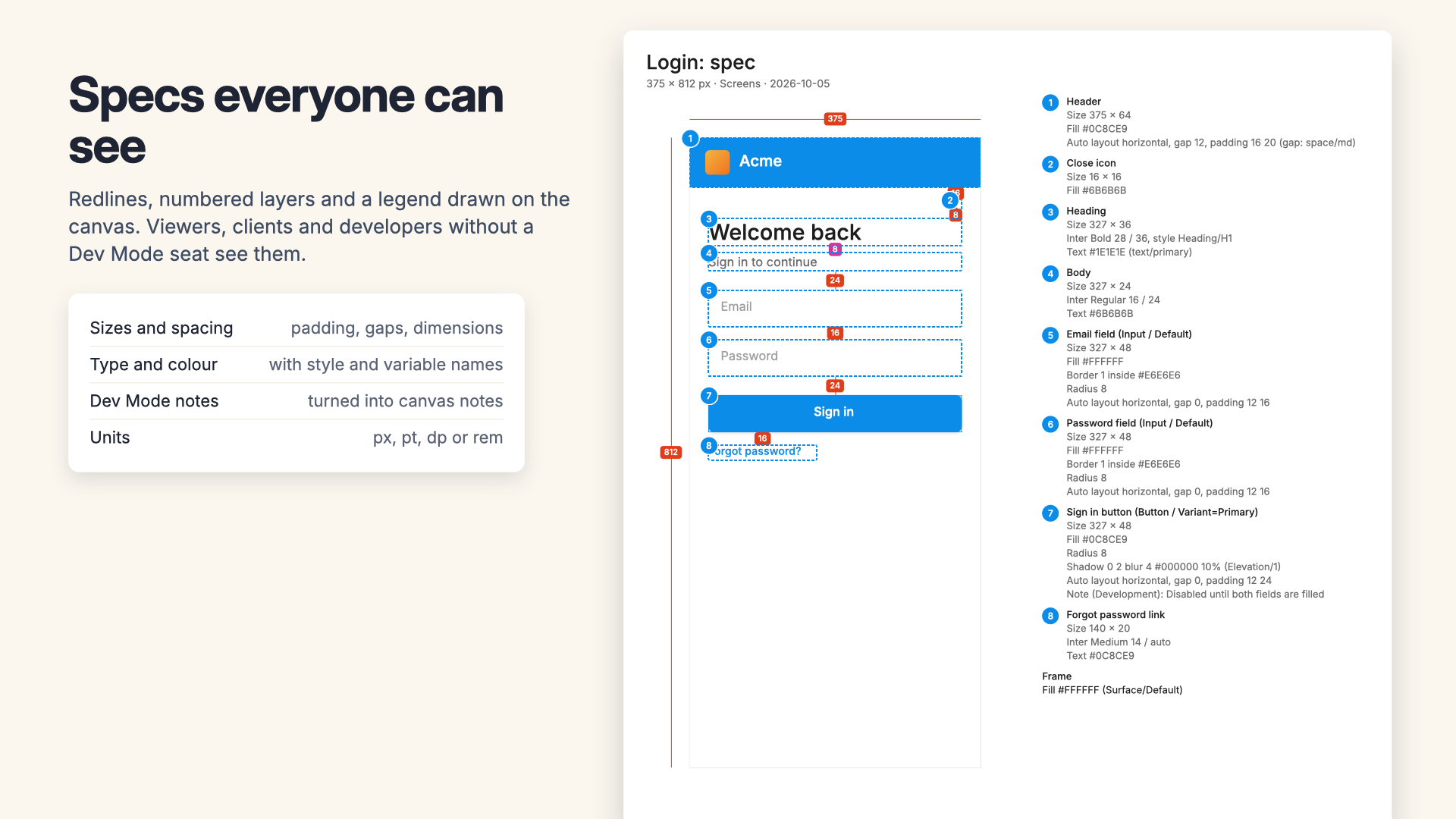
Select a frame and Speclark draws a spec sheet beside it: a picture of the design with numbered markers, padding and gap areas, dimension lines and a legend with every size, font, colour, border, radius, shadow and auto layout setting, using your style and variable names. Tag layers with roles, names, alt text, headings and focus order, and it draws an accessibility sheet too. Sheets are ordinary layers, so everyone who opens the file sees them, export them as one PDF, and redraw them in place when the design changes.
Email us to get SpeclarkBuy a license
What you get
- Spec sheets beside each selected frame, component or layer: numbered markers in reading order and a legend with size, font, size and line height, letter spacing, text style, fills and borders with style and variable names, radius, shadows, opacity and auto layout
- Padding and gap areas for auto layout, gaps between layers you placed by hand, and the frame's width and height
- Your Dev Mode annotations and measurements redrawn as canvas notes and dimension lines, with the pinned properties' current values
- Colour and text summaries per frame, in px, pt, dp or rem
- An accessibility kit: roles (controls, content and landmarks), accessible names, alt text or decorative, heading levels, focus order and reading order on each layer; suggestions from layer names and type sizes; focus numbered for you
- Checks against WCAG 2.2: images without alt text, controls without a name, targets under 24 by 24, heading levels that jump, duplicate or missing focus numbers
- Accessibility sheets with focus order joined in order, landmark outlines, heading and alt text tags and a legend in reading order
- Tags mirrored into Dev Mode annotations in the Accessibility category, if you want them there too
- Update: one click redraws a sheet in the same place after the design changes, and the Sheets tab shows which ones are out of date
- Export one PDF with a page per sheet, Figma's vector PDFs, PNGs, or the legends as Markdown or CSV for tickets
What Figma does on its own, and what it doesn't
Figma's annotations and measurements are good, and they stay live as the design changes. But only people with a Full or Dev seat can see them, on paid plans only, and they don't appear in PNG or PDF exports. View and Collab seats, clients, QA, outside developers and anyone on the Starter plan never see them. Figma also has no accessibility kit beyond an Accessibility category label, and no way to generate a full spec for a frame in one step. Speclark draws specs and accessibility notes as plain layers, so the person who opens the file or the PDF sees exactly what you see.
What Speclark doesn't do
A sheet is a picture of the design with notes on top, made when you click. It doesn't change by itself: click Update (or the Update spec sheet button on the sheet) after a change. Figma lets plugins add measurements only in Dev Mode, so Speclark draws its own lines instead of adding native ones. Checks cover what tags can tell; colour contrast is left to Figma's own Check designs.
Pricing
Buying here gets you a license key by email. Buying inside the app links the plan to your account. Change or cancel any time in Manage billing.
7-day free trial with 10 runs, starting with your first sheet or export: each click that makes or updates sheets (up to 3 at a time) or exports is one run. Tagging, suggestions, checks and the preview are always free. Then $19 a month or $199 a year per designer who makes sheets, billed by Great Work LLC through Stripe. Everyone who only views the file needs nothing. Buying for a team? Choose the number of seats at checkout; one license key covers them all. Subscriptions renew automatically until you cancel in Manage billing. Refunds and switching between monthly and annual: email us and a person handles it.
Privacy
Speclark reads and draws inside Figma, and makes exports on your computer. Nothing about your file is uploaded. The plugin only contacts addons.greatwork.company to check your license key. Privacy policy and terms.