 Collatewell
Merge, split and fix PDFs without leaving Google Drive
Select PDFs in Drive, right-click, Open with Collatewell. Drag the pages into order, split, rotate, number, watermark or compress, and save the result next to your files. No ads, no re-uploading, no paying to download what you already made.
Email us to get Collatewell Pricing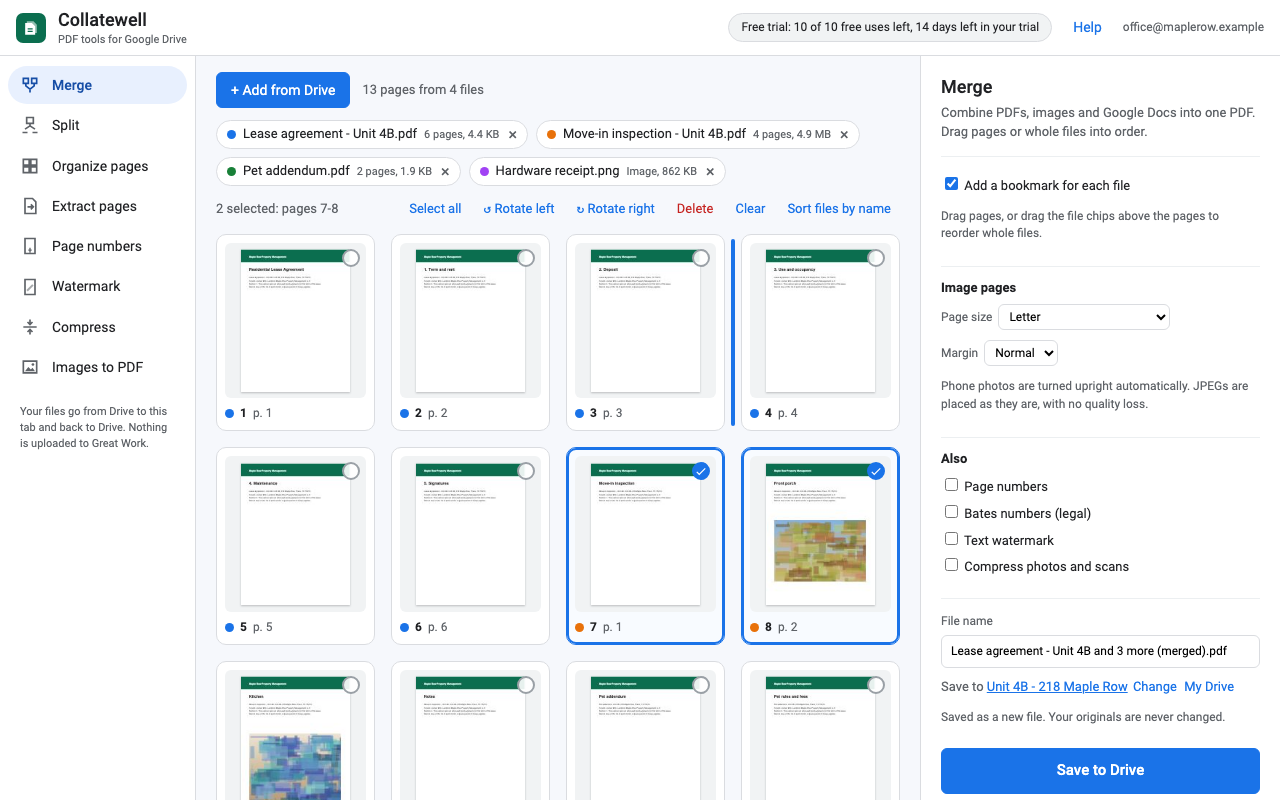
What it does
Merge
Combine PDFs, JPEG and PNG images and Google Docs, Sheets and Slides into one PDF. Drag single pages or whole files into order, and get a bookmark for each file.
Split
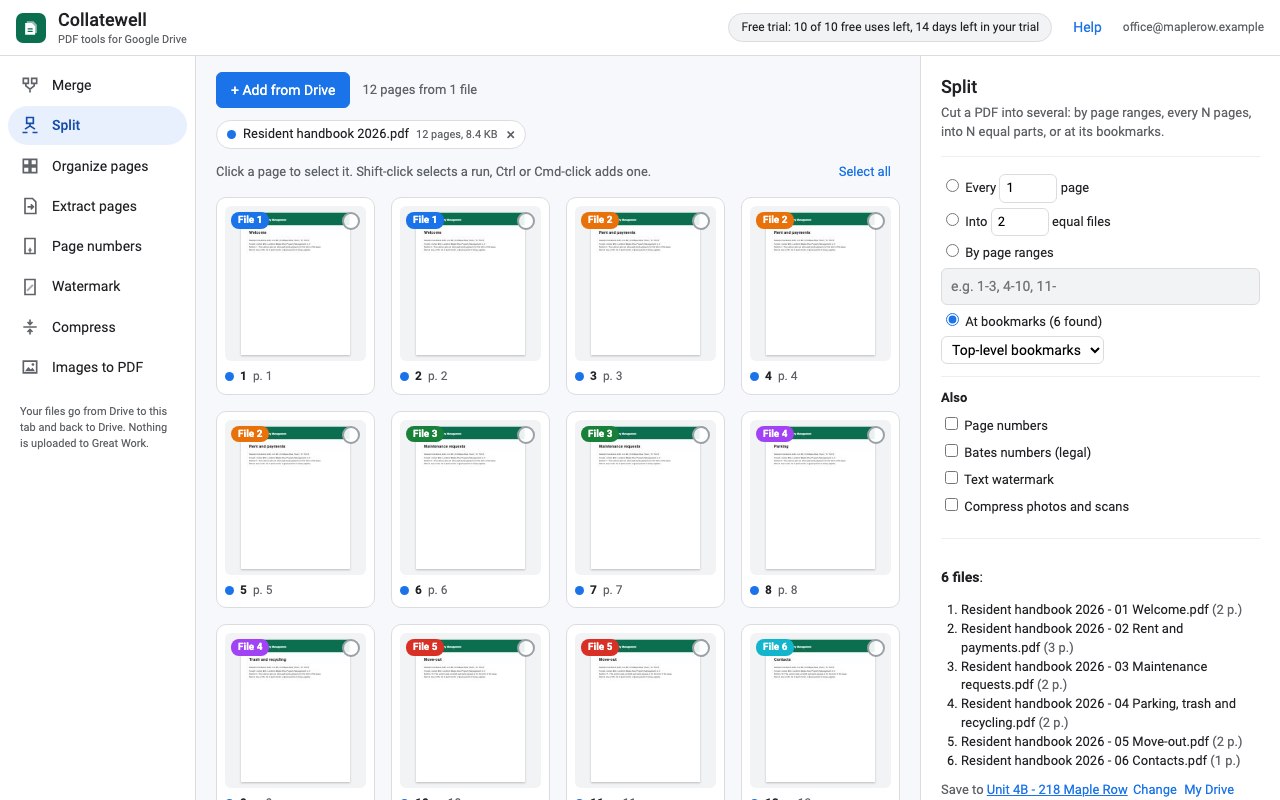
By page ranges (1-3, 4-10, 11-), every N pages, into N equal files, or at the PDF's own bookmarks, with each part named after its chapter.
Organize and extract
Reorder, rotate and delete pages with thumbnails. Select pages (or type 2-5, 9) and save just those.
Page and Bates numbers
Page 3 of 12, skip the cover, choose the corner. Bates numbers with your prefix for legal productions. Upright even on rotated pages.
Watermark
DRAFT, CONFIDENTIAL or any short text across every page or just the first, with color, opacity and angle.
Compress, honestly
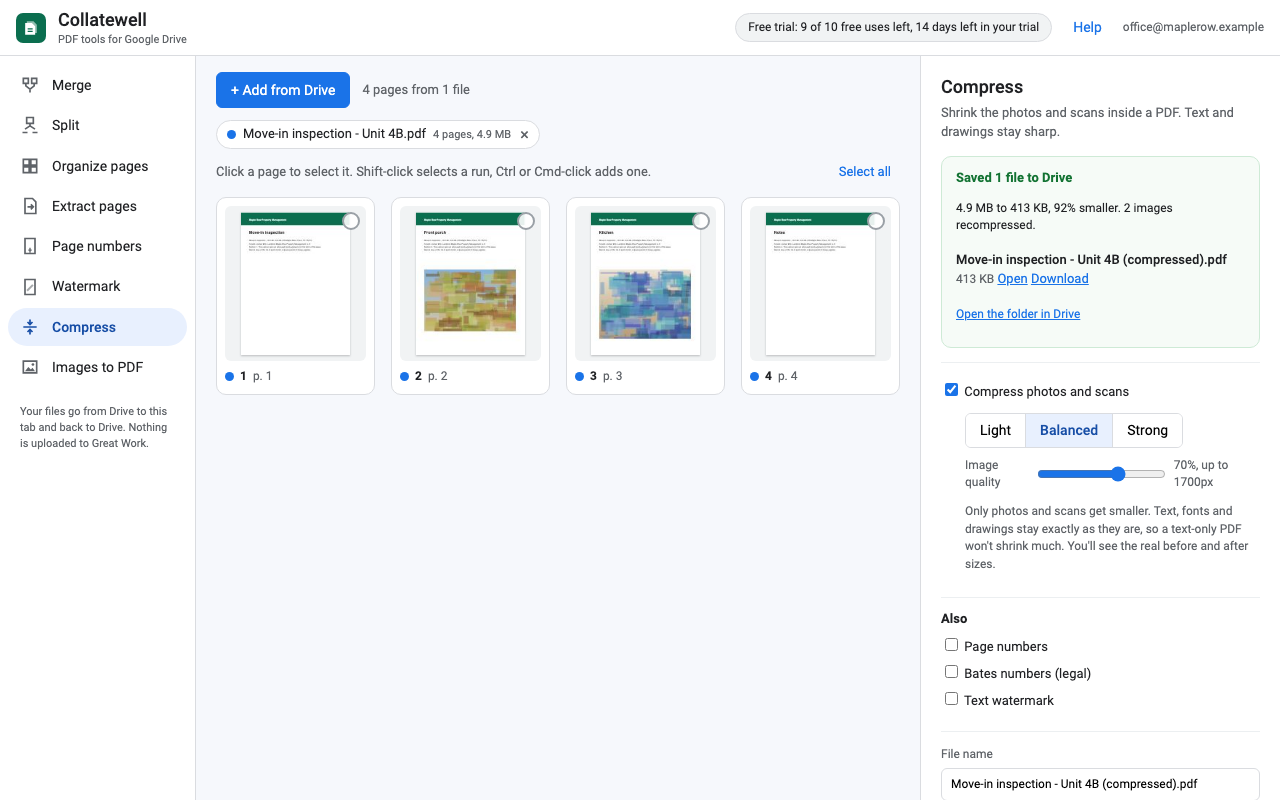
Recompresses the photos and scans inside a PDF with a quality slider, then shows the real before and after size. Text and drawings are never degraded.
Your files stay in your Drive
Most PDF add-ons send you to a website, ask you to upload the file again and keep a copy on their servers. Collatewell does the work inside your browser tab: files go from Google Drive to your browser and back to Google Drive with your own Google sign-in. They are never uploaded to Great Work or anyone else.
- Collatewell can only open files you choose (Google's per-file "drive.file" permission), never your whole Drive.
- Results are saved as new files next to the originals. Your originals are never changed unless you choose Replace and confirm, and even then Google Drive keeps the old version.
- If Drive refuses an upload (a full Drive, say), the finished PDF is still there to download, so the work is never lost.
- Our licensing server only sees your Google account email and how many saves you've made.
How it works
- Install Collatewell from the Google Workspace Marketplace.
- In Google Drive, select one or more PDFs (or images), right-click, then Open with > Collatewell. Or open Collatewell and click Add from Drive.
- Pick a tool on the left, arrange the pages, and click Save to Drive.
Pricing
Try it free for 10 saves or 14 days, whichever comes first. No card needed for the trial, and you are never charged unless you pick a plan. One save is one click of Save, however many files it writes: splitting a PDF into 20 files counts once. Adding files, arranging pages and failed saves are free. You always see whether you're on the trial before you start a job, never after.
One Google account. All tools, no page or file caps.
One Google account. Cancel any time.
Team plan: everyone with an email address at your company or school domain.
Renewal: plans renew automatically at the same price (monthly or yearly) until you cancel. Cancel any time from Manage billing in the app or the link in your receipt; you keep access until the end of the period you paid for.
Refunds and the right to cancel: if you're in the UK or the EU you can cancel within 14 days of buying and get a full refund. Anyone charged by mistake gets the charge refunded: email hello@greatwork.company.
Prices are in US dollars. Payment is handled by Stripe; we never see your card number.
Honest limits
- Password-protected or encrypted PDFs can't be edited. Remove the protection first (we never ask for PDF passwords).
- Compress only shrinks photos and scans. A PDF that is mostly text won't get much smaller, and the app tells you so.
- Watermark and page-number text uses the standard PDF fonts, which cover English and Western European letters.
- The work happens on your computer, so very large jobs (hundreds of MB) need a computer with enough memory. There are no page caps.
- Bookmarks, form fields and links inside a PDF aren't carried into merged or split results. Merges can add a bookmark for each file.
- Google exports Docs, Sheets and Slides as PDF up to 10 MB each.
- Collatewell organizes PDFs. It doesn't edit the text inside them, fill forms or collect signatures.
Install
Collatewell is listed on the Google Workspace Marketplace. Search for "Collatewell", or use the link on this page once the listing is live. It works in Google Drive on the web, in any current Chrome, Edge, Firefox or Safari.
Support
Email hello@greatwork.company. A person reads every message and answers within one business day.