Music notation in Google Docs and Google Slides
Clefwell puts sheet music, guitar tab and chord charts next to your document. Build a worksheet or a slide deck one snippet after another, then click any of them later to change it.
Email us to get Clefwell See pricing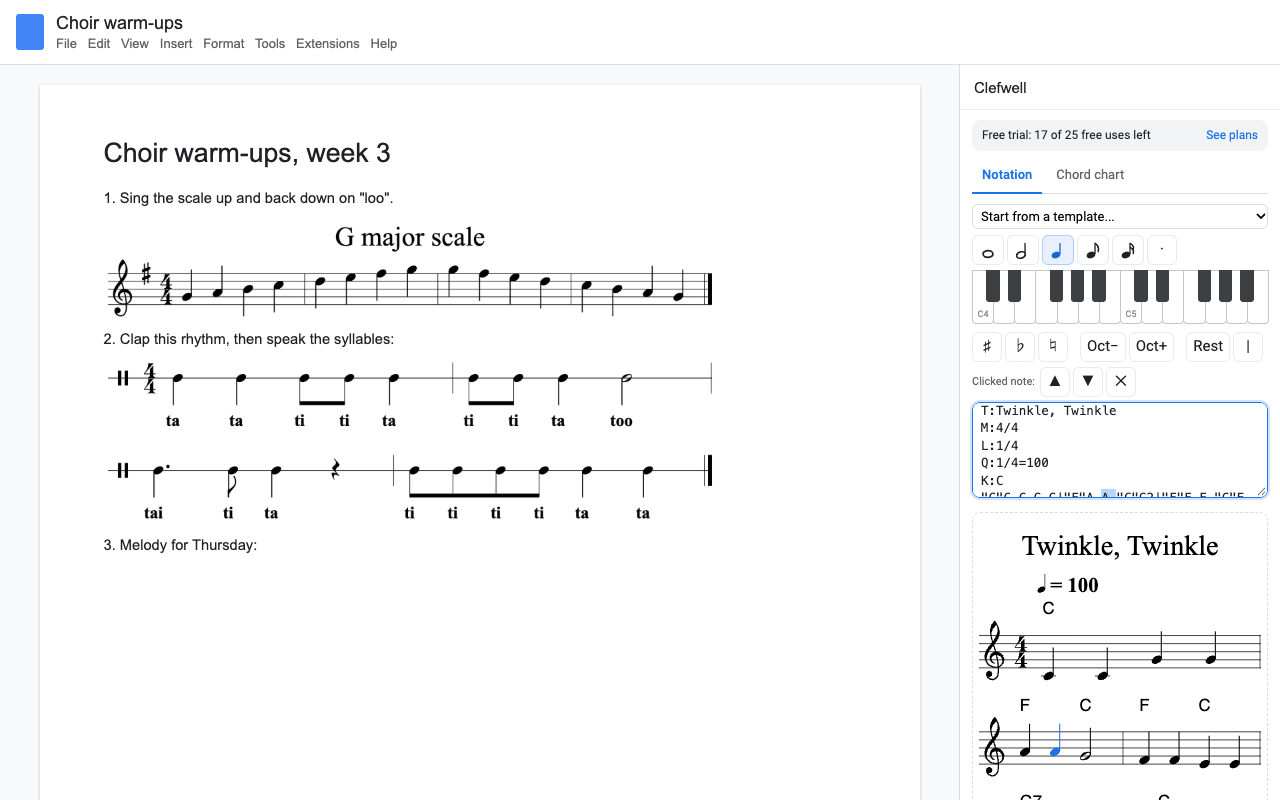
What it does
Start from a template, click note lengths and piano keys, or type ABC notation. The preview draws as you go.
Click a note in the preview to select it, then drag it up or down, or press sharp, flat or natural.
Click any snippet in your Doc or slide and it loads back into the editor. Change it, click Update, and it stays where it was. Edits are free.
Add a guitar, bass, ukulele, mandolin or banjo tab staff under the notes. Type C G Am F for fingering diagrams on guitar or ukulele.
Hear the snippet in the sidebar with each note lighting up, at the speed you pick. Move everything up or down a half step per click.
The sidebar stays open. Press Ctrl+Enter and the music goes in at your cursor, or stacks on the current slide.
How to add music notes to Google Docs
- Install Clefwell, open your Doc and click where the music should go.
- Choose Extensions > Clefwell > Open music editor.
- Pick a template, or click a note length and then the piano keys. Press Play to check it.
- Press Insert. To change it later, click the snippet once and edit it in the sidebar.
How to put sheet music on Google Slides
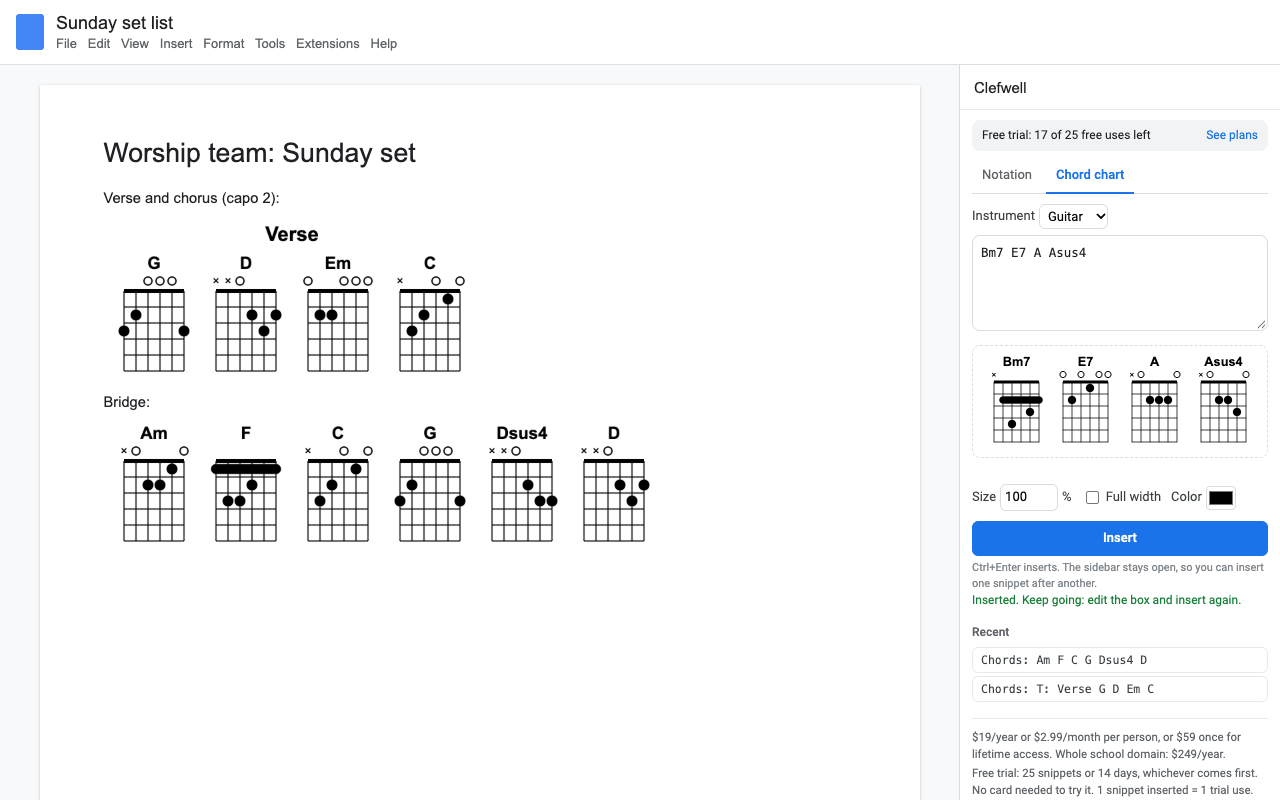
Open the deck, go to the slide and open the music editor the same way. New snippets land in the middle of the current slide and the next one stacks below it. Set Size to make the staff bigger for the back row, and pick white for a dark theme.
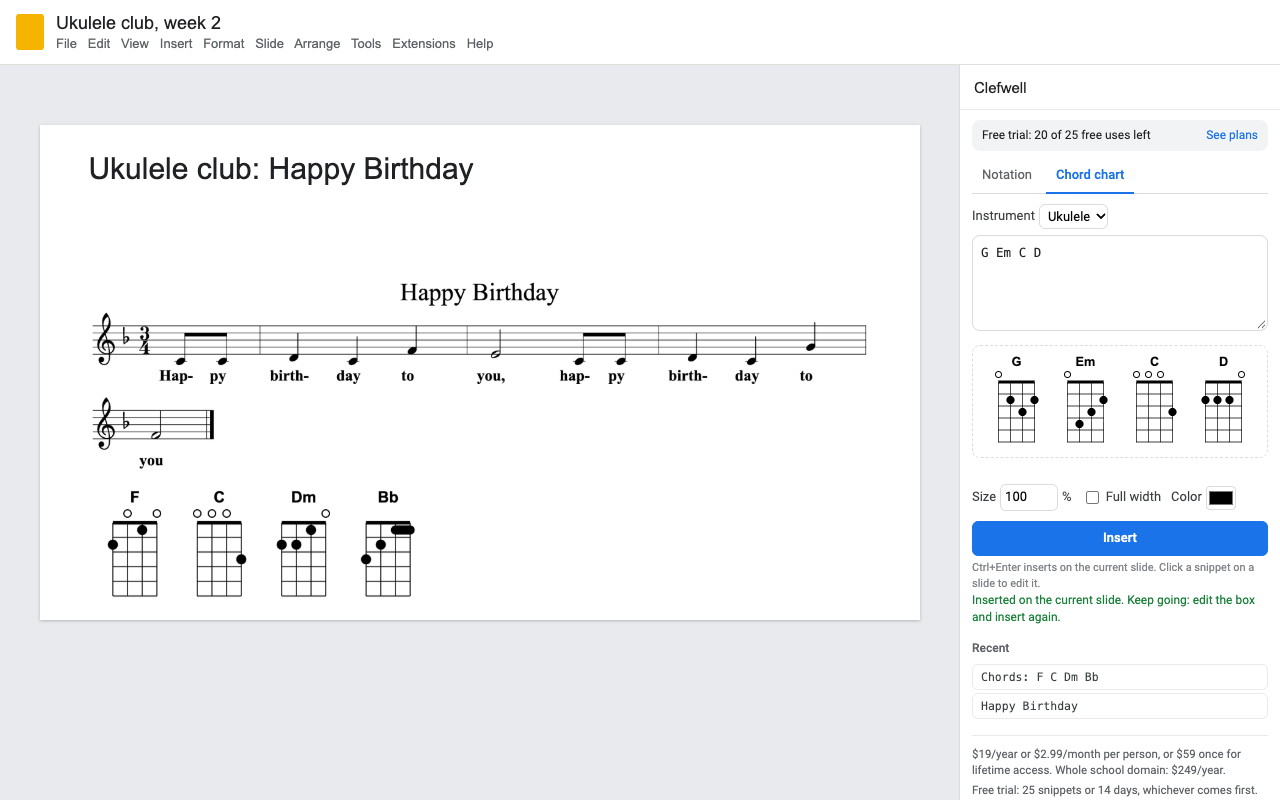
Guitar and ukulele chord diagrams
Open the Chord chart tab, choose guitar or ukulele and type the chord names in order, with or without bar lines: | Am | F | C | G |. Clefwell draws a diagram for each one, with barre chords where they belong. Add T: Chorus on the first line for a title, or your own fingering after a colon: Cadd9:x32030.
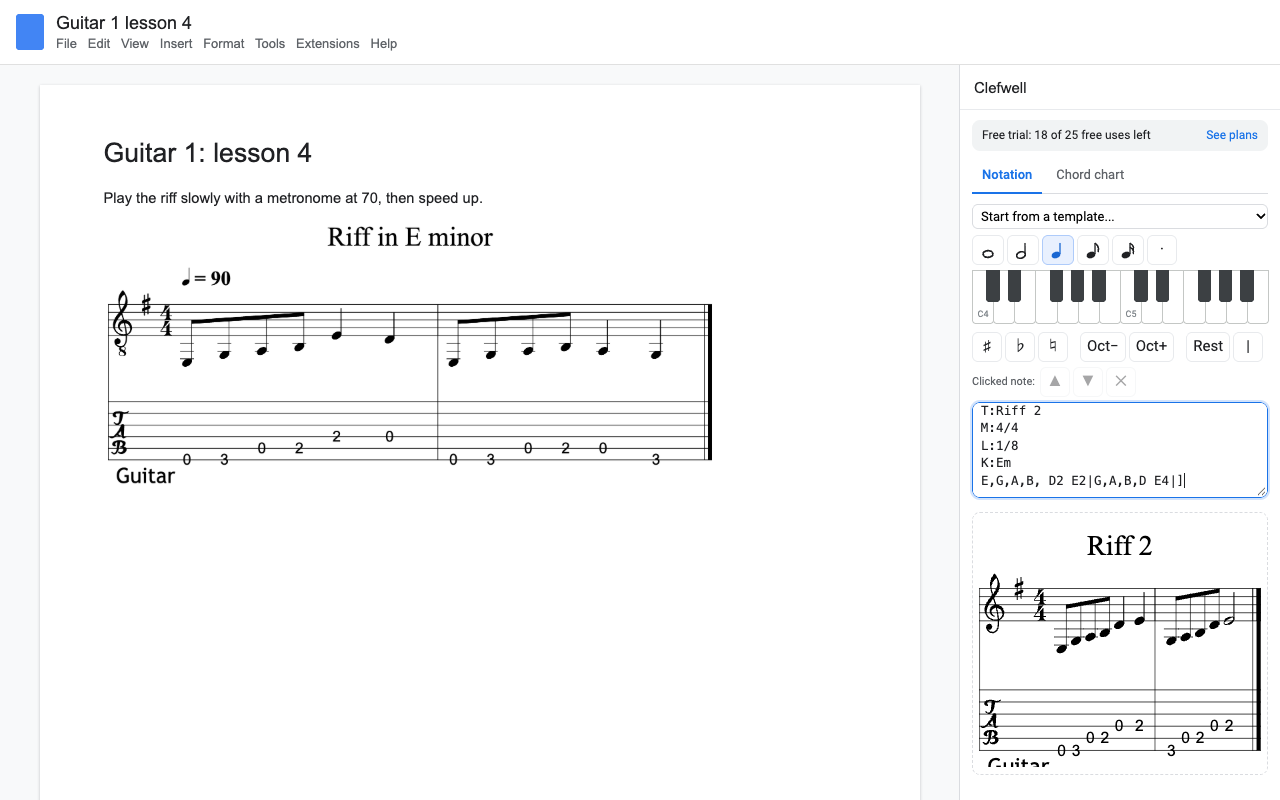
Guitar tab under the notes
Set Tab staff to Guitar (or bass, ukulele, mandolin, banjo) and the tab appears under the staff, with the fret for every note. Use the Guitar riff with tab template for music written at guitar pitch with the small 8 under the clef.
ABC notation in one minute
ABC is a plain-text way to write music. A few lines are enough:
X:1
T:Title
M:4/4
L:1/8
K:G
"G"GABc d2e2|"D7"d2B2 A4|]
w: lyr-ics go here
Letters are notes, a number makes a note longer, ^ is a sharp, _ a flat, z a rest, | a bar line and text in quotes a chord symbol. You don't have to learn it: the note buttons and piano keys write it for you, and you can paste ABC from any tune collection.
Pricing
Every feature, one Google account, Docs and Slides.
Same features, billed monthly. Handy for one term.
Lifetime access for one Google account. One payment, never renews.
School plan: everyone on your school's Google Workspace domain.
25 snippets or 14 days, whichever comes first. No card needed. Previews, playback, transposing and edits don't count.
No surprise charges. We never charge you unless you start a checkout yourself. Clefwell shows your trial status and these prices in the sidebar from the first minute. When the trial ends it shows the plans; nothing is charged and every snippet you inserted stays in your document.
Renewal. Monthly, yearly and school plans renew automatically at the same price until you cancel. Cancel any time from Extensions > Clefwell > Plans and billing, in one step. You keep access until the end of the period you paid for. Lifetime never renews.
Right to cancel (UK and EU). If you are a consumer in the UK or EU, you can cancel within 14 days of buying and get a full refund. Email hello@greatwork.company or cancel in Plans and billing and reply to the receipt.
Mistakes. Charged twice or by accident? Email us and we'll refund it. A person answers within one business day.
Prices are in US dollars and exclude any sales tax or VAT that applies where you live. Payments are processed by Stripe; we never see your card number.
Why switch
| What people say about other music add-ons | What Clefwell does |
|---|---|
| "Used to be free, now it asks for money" | The price and your trial count are in the sidebar before you insert anything. |
| "Unable to obtain refund" | A person answers billing email within one business day, and you can cancel in one step. |
| "All of a sudden I can't create a new snippet" | No outside account to sign in to: the music editor is built into the add-on. |
| Playback needs a separate paid account | Playback, transpose, tab and chord charts are all in the one price. |
| Asks for your name, profile picture and more | Asks only for the file you open it in and your account email. |
Help
Where is my snippet's music stored?
In the image's alt text (in Docs: right-click the image, Alt text). That's what lets you click it and edit it later.
What counts as a trial snippet?
Each snippet you insert. Previews, playback, transposing and edits to an existing snippet don't count.
Can collaborators edit my snippets?
Anyone with Clefwell installed and edit access to the file can click a snippet and update it.
Still stuck?
Email hello@greatwork.company. A person replies within one business day.
Privacy
- Google data it accesses: only the Doc or deck you open Clefwell in. It inserts snippets there, reads the alt text of a snippet you select, reads text you select and turn into a snippet, and reads the page width so music fits the line. No access to the rest of your Drive.
- Your music stays with you: it is drawn and played in your browser by code inside the add-on. It is never sent to Great Work or any rendering service.
- What reaches Great Work: your Google account email, the product id and a count of trial snippets, for billing. See the full privacy policy.
- Sharing: we don't sell data, use it for ads, or use it to train AI models.
- Clefwell's use and transfer of information received from Google APIs adheres to the Google API Services User Data Policy, including the Limited Use requirements.