LaTeX equations in Google Docs and Google Slides
Texwell gives you a LaTeX editor with a live preview right next to your document. Insert one equation after another, click any of them later to edit it, and turn math pasted from ChatGPT into real equations in one click.
Email us to get Texwell See pricing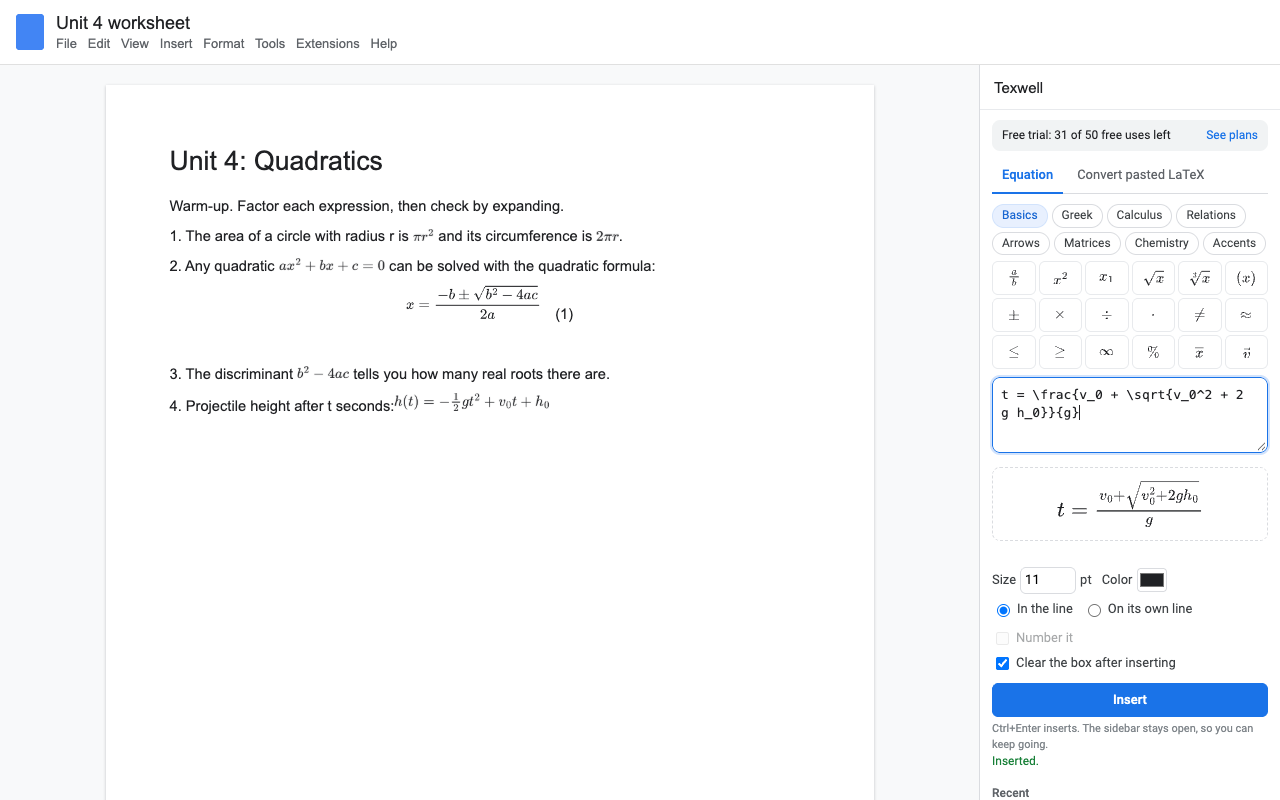
What it does
Type LaTeX or click the symbol buttons and watch the equation draw as you type. Mistakes get a plain message, like "Unknown command \fracc", before anything goes in the document.
The sidebar stays open. Press Ctrl+Enter and the equation goes in at your cursor; the next one lands right after it.
Click any equation in the document and its LaTeX loads back into the editor. Change it, click Update, and it stays where it was. Edits are free.
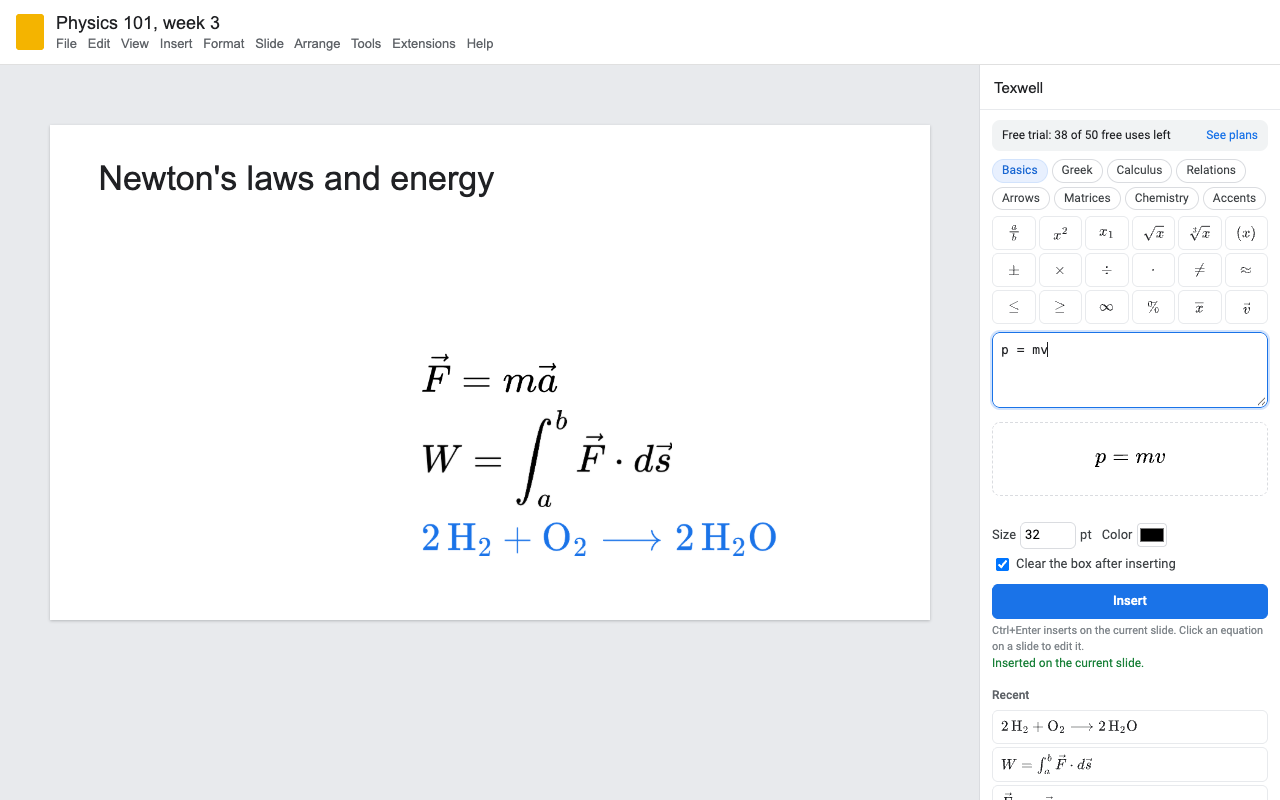
Convert LaTeX finds every $...$, $$...$$, \(...\) and \[...\] in the Doc and turns them into equations. Prices like $5 and $10 stay as text.
Equations match the size and color of the text around them, so they work on dark slides too. Display equations can be numbered (1), (2), (3).
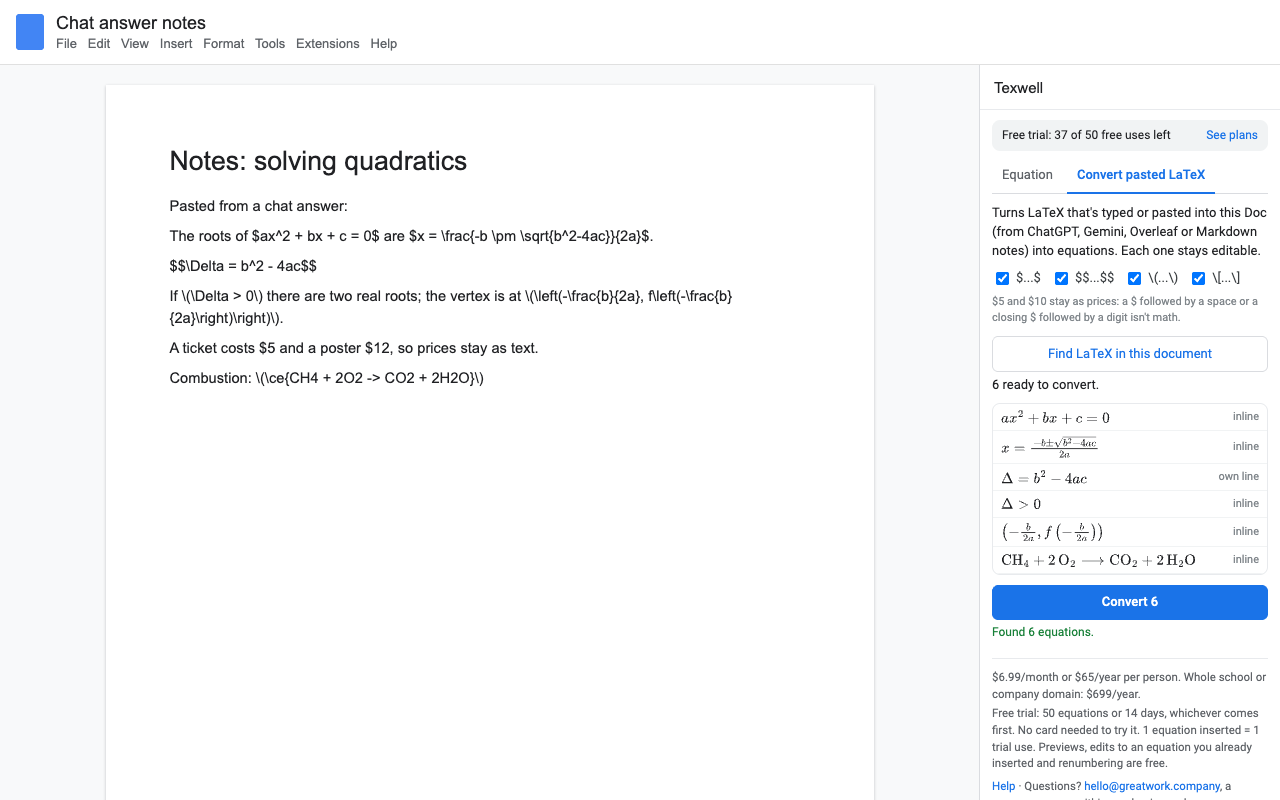
The same editor works in Google Slides; new equations stack neatly on the current slide.
How to insert an equation in Google Slides
- Install Texwell, open your deck and choose Extensions > Texwell > Open equation editor.
- Go to the slide, type the LaTeX (for example
E = mc^2) and set the size, 28 pt by default. - Press Insert. The equation appears on the slide; drag it where you want it. The next one goes below it.
- To change it later, click it once on the slide and edit it in the sidebar.
How to use LaTeX in Google Docs
Docs has a built-in equation tool (Insert > Symbols > Equation) that understands shortcuts like \alpha, but you can't type or paste a whole LaTeX expression into it, and it has no matrices, chemistry or colors. With Texwell, click where the equation goes, type any LaTeX, and press Insert. Choose On its own line for a centered equation and Number it for an equation number.
How to copy equations from ChatGPT to Google Docs
ChatGPT and Gemini write math as LaTeX between \( \), \[ \] or dollar signs, which Google Docs shows as raw text. Paste the answer into your Doc as it is, then choose Extensions > Texwell > Convert LaTeX and click Find LaTeX in this document. Check the list and click Convert. Each equation can still be edited afterwards.
What LaTeX it understands
Fractions, roots, powers and indices, sums, products, integrals, limits, matrices (pmatrix, bmatrix, vmatrix), cases, aligned, the AMS symbols, \text, \color, \cancel, \boxed, bra-ket notation, and chemistry with \ce{2H2 + O2 -> 2H2O}. Equations are drawn by MathJax, the same engine many math websites use.
Pricing
About $5.42 a month. Every feature, one Google account, Docs and Slides.
Same features, billed monthly. Handy for a single course or term.
Team plan: everyone at your school's or company's Google Workspace domain.
50 equations or 14 days, whichever comes first. No card needed. Previews, edits and renumbering don't count.
No surprise charges. We never charge you unless you start a checkout yourself. Texwell shows your trial status and these prices in the sidebar from the first minute. When the trial ends, it shows the plans; nothing is charged and every equation you inserted stays in your document.
Renewal. Monthly, annual and team plans renew automatically at the same price until you cancel. Cancel any time from Extensions > Texwell > Plans and billing, in one step. You keep access until the end of the period you paid for.
Right to cancel (UK and EU). If you are a consumer in the UK or EU, you can cancel within 14 days of buying and get a full refund. Email hello@greatwork.company or cancel in Plans and billing and reply to the receipt.
Mistakes. Charged twice or by accident? Email us and we'll refund it.
Prices are in US dollars and exclude any sales tax or VAT that applies where you live. Payments are processed by Stripe; we never see your card number.
Why switch
| What people say about other equation add-ons | What Texwell does |
|---|---|
| "I have to open MathType, create ONE equation, insert it, and then close it" | The sidebar stays open. Insert as many as you like, each right after the last. |
| "Inserted equations are not in line with text" | Equations go in at the cursor, inside the sentence, sized to the text around them. |
| "Cannot write LaTeX in this application" | LaTeX first, with buttons for when you don't remember a command. |
| "Can't change the colour of the rendered equation" | Any color; conversions pick up the color of your text. |
| "Bad rendering quality, no DPI option" | Drawn at three times the on-page size, so it stays sharp when you zoom or print. |
| "Requires signing up to make an account on their site" | No account. Your Google sign-in is enough. |
| Expired mid-session on renewal day | If our server can't be reached, Texwell keeps working on your last known plan for up to 3 days. |
Help
Where is my equation's LaTeX stored?
In the equation image's alt text (in Docs: right-click the equation, Alt text). That's what lets you click it and edit it later, and screen readers read it aloud.
Why does a fraction sit a little high in a sentence?
Google Docs lines up the bottom of an inline image with the text baseline, so tall equations with a part below the line sit slightly raised. For tall equations, use On its own line.
What counts as a trial equation?
Each equation you insert or convert. Previews, edits to an existing equation and renumbering don't count.
Can collaborators edit my equations?
Anyone with Texwell installed and edit access to the file can click an equation and update it.
Still stuck?
Email hello@greatwork.company. A person replies within one business day.
Privacy
- Google data it accesses: only the Doc or deck you open Texwell in. It inserts equations there, reads the alt text of an equation you select, and reads the Doc's text when you ask it to convert LaTeX. No access to the rest of your Drive.
- Equations stay with you: they are drawn in your browser by a copy of MathJax inside the add-on. They are never sent to Great Work or any rendering service.
- What reaches Great Work: your Google account email, the product id and a count of trial equations, for billing. See the full privacy policy.
- Sharing: we don't sell data, use it for ads, or use it to train AI models.
- Texwell's use and transfer of information received from Google APIs adheres to the Google API Services User Data Policy, including the Limited Use requirements.